ise smart connect KNX Sonos
Commissioning
Product Manual Page 52 (76)
7 Commissioning
7.1 Operation
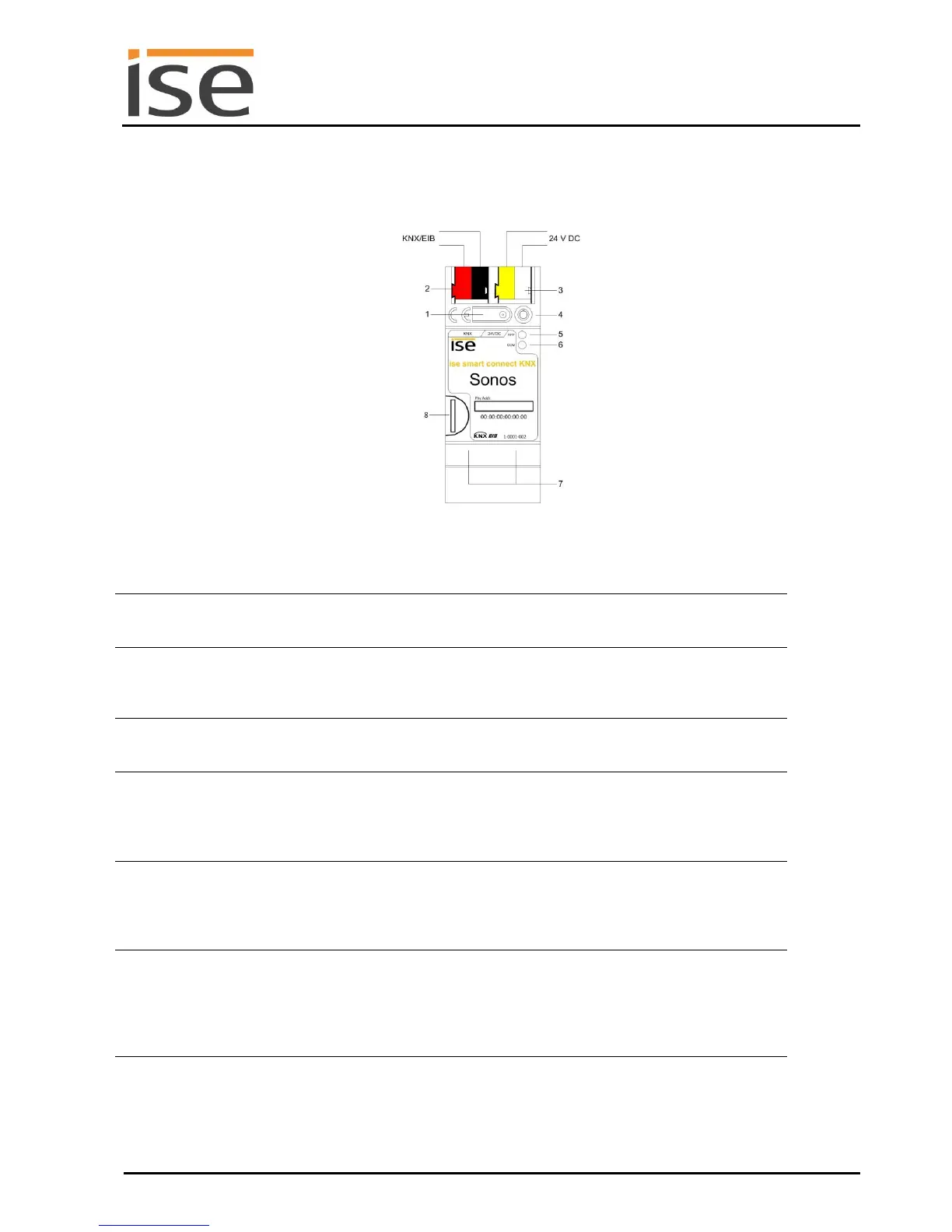
Figure 6: ise smart connect KNX Sonos.
Programming button
for KNX
Switches the device to the ETS programming mode or vice ver-
sa.
KNX connection (twist-
ed pair)
On left: (+ / red)
On right: (– / black)
Connection for
power supply
DC 24–30 V, 2 W (at 24 V)
On left: (+ / yellow)
On right: (– / white)
KNX programming
LED (red)
Red: Device is in ETS programming mode
Yellow: For start or diagnosis code, see 7.2.1 / 7.2.2
Green: Normal operation
Off/
Flashing: For start or diagnosis code, see 7.2.1 / 7.2.2
Yellow: Normal operation (brief dark phases indicate KNX tel-
egram traffic)
Off/
Flashing: For start or diagnosis codes, see 7.2.1 / 7.2.2
LED 10/100 speed
(green)
On: 100 Mbit/s
Off: 10 Mbit/s
LED link/ACT (orange)
On: Connection to IP network
Off: No connection
Flashing: Data reception on IP
As optional network authorisation (network drive) for audio files
for playback by Sonos components
Media size: Up to 32 GB microSDHC
Formatting: FAT32



 To Next Page