7.7 Configuration of playlists using the website
With the ise smart connect KNX Sonos, you can save some default settings for each master-slave
group. This enables direct selection of potential playback sources (playlists or radio stations) without
always having to search through the entire list of all available Sonos sources.
The selection is made using the website of the device. Calling up the website is described in Section
7.6.2 – Using the website of the device.
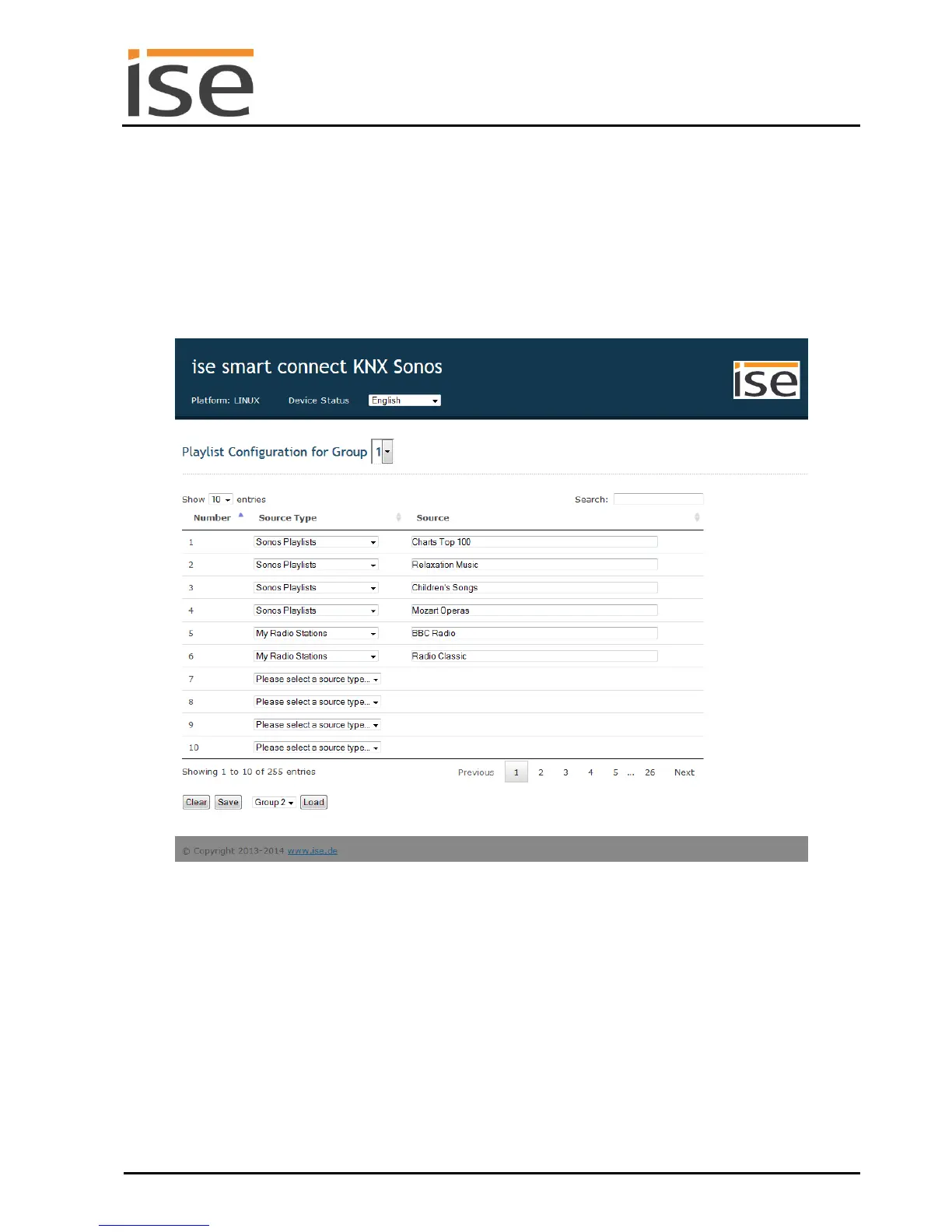
The start page of the device always shows the configuration of the playlist for the first group.
Figure 8: Device website for configuration of the playlist.
Initial display with the available Sonos sources (see 7.7.1).
The start page is divided into two sections. The header with a blue background contains the device
name and menu bar. The device name is linked to the start page on each website. The menu bar con-
tains a link to the status page (Device Status), which serves only for diagnostic purposes and language
selection for the configuration page.
The next section of the page begins with the header line, which contains the configuration for the first
group as the starting value. Another group can be selected at the end of the header line via the selec-
tion list. The current configuration of the music sources for the selected group is made for the selected
group in the form of a table. The operating elements for deleting, saving and loading a configuration
complete the page.



 To Next Page