Digital Network Public Address & Voice Alarm System
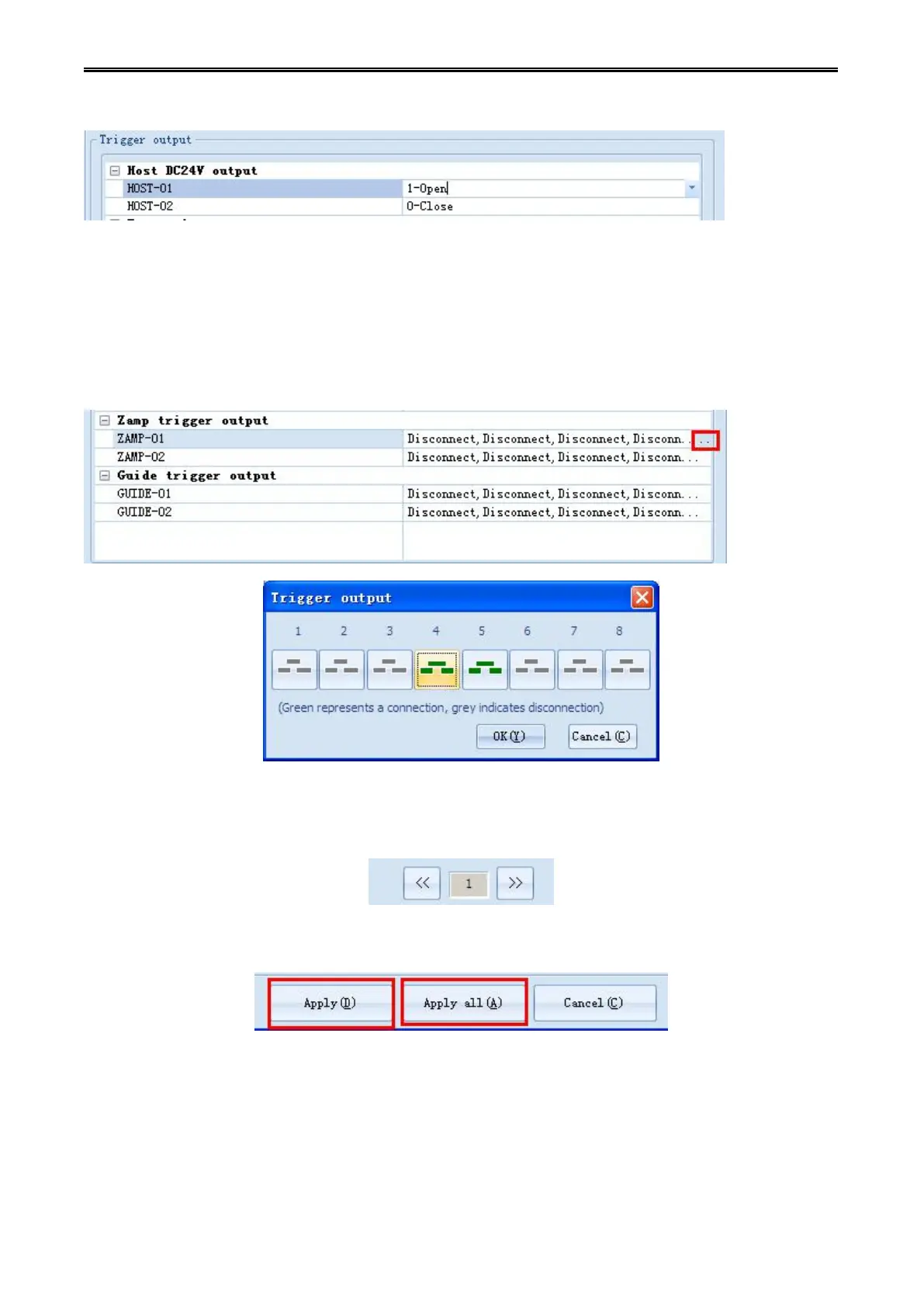
host is opening or closing. (it can be a single or multiple hosts linkage).
Step 10: Setting the configuration state of the output contact when linkage to other equipment. Click the
sub menu button [...] which on the right of partition amplifier contact output, (the configuration of
changeover machine contact output is the same), it will pop-up the state of setup dialog box of "contact
output", click the eight buttons on the configure box, you can enable or disable any contact output. (you
can set a single or multiple contact linkage).
Button turns to green means to enable the output, grey means to disables the output.
Click [<<] [>>] button, which is on the bottom page of "partition amplifier & pour machine contact
configuration", it will switch eight contacts of the host, The current digital, represents related online
interface behind the "partition power amplifier & changeover machine".
Click the "application" button, then the current configuration information will be written to the host, click
[all application] button then all configuration information will be written to the host.

 To Next Page
 Loading...