Digital Network Public Address & Voice Alarm System
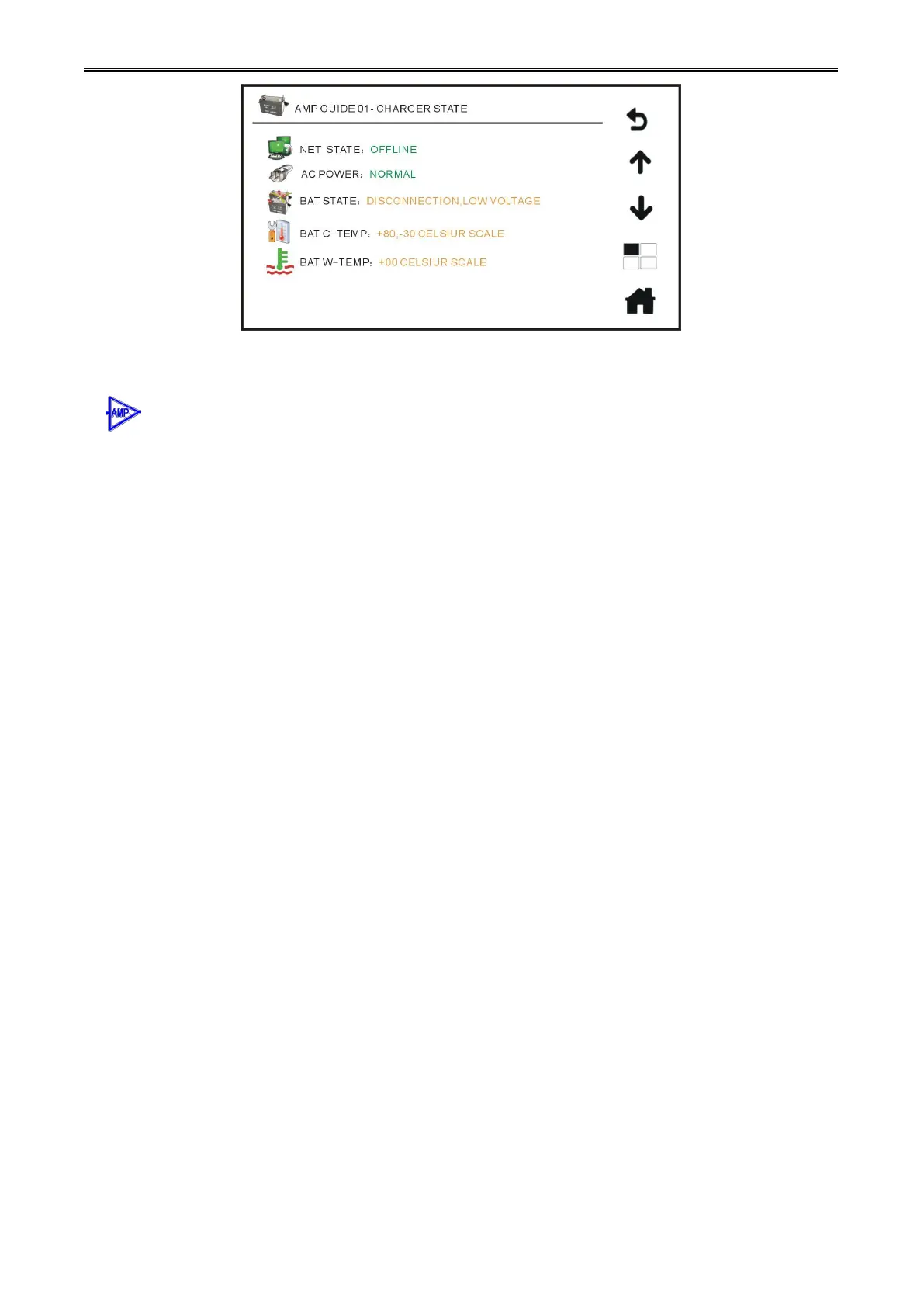
Amplifier Changeover Charger Menu Page on Host Touch Screen
6. Amplifier Status & Zone Status: Normal/Fault…. Press to check current statuses of zone and
amplifier, and refer to “Amplifier & Zone Status” menu.
If system is equipped with amplifier changeover, you can press this icon and enter the submenu shown
below:
Amplifier Changeover 01-Amplifier & Zone Status.
Configuration Status: 01 spare->-8 main (quantity of main & spare amplifier can be set in PC software
and it depends on actual demand). For example: 01 spare—there is one piece spare amplifier.
08 main—there are eight main amplifier.
Channel: 01 02 03 04 05 06 07 08 (it means that system is equipped with eight main
amplifiers. If system is just equipped with four main amplifiers, it will show: 01 02 03 04)
Main Amplifier: Normal/Fault/Sleep. It shows working status of main amplifier: it shows as Normal when
main amplifier works well; it shows Fault when amplifier output AMP loop is short-circuited or faulty. If
sleep function is on and more than 3 minutes without input signal, it will switch to sleep-mode to save
power (configure in software).
Spare Amplifier: Normal/Fault/Sleep. It shows working status of spare amplifier: it shows as Normal
when spare amplifier works well; it shows Fault when amplifier output AMP loop is short-circuited or faulty.
If sleep function is on and more than 3 minutes without input signal, it will switch to sleep-mode to save
power (configure in software).
Physical Zone: Normal/Open/Short/Ground. It shows channels working status of current main amplifier:
it shows as Normal when connection is good; it shows as Open when loop between H and C is
open-circuit; is shows as Short when loop between H and C is short-circuit; it shows as Ground when H
and C of output terminal is grounded.
Switch Instruction: How does amplifier changeover switch main amplifier to spare amplifier automatically?
For example: If first channel main amplifier breaks down, first spare amplifier will be switched to main
channel 01 output; if third channel main amplifier breaks down, first spare amplifier will be switched to
main channel 03 output; if several main amplifiers break down at the same time, system will switch in
following order: CH1>CH2>CH3>CH4>CH5>CH6>CH7>CH8.

 To Next Page
 Loading...