DP350 User's Manual
- 6 -
Note: Before connecting the parallel interface or the serial interface, please make sure the
power of the printer is shut down. Only after tighten the cable, could turn on the printer,
or it would damage the printer.
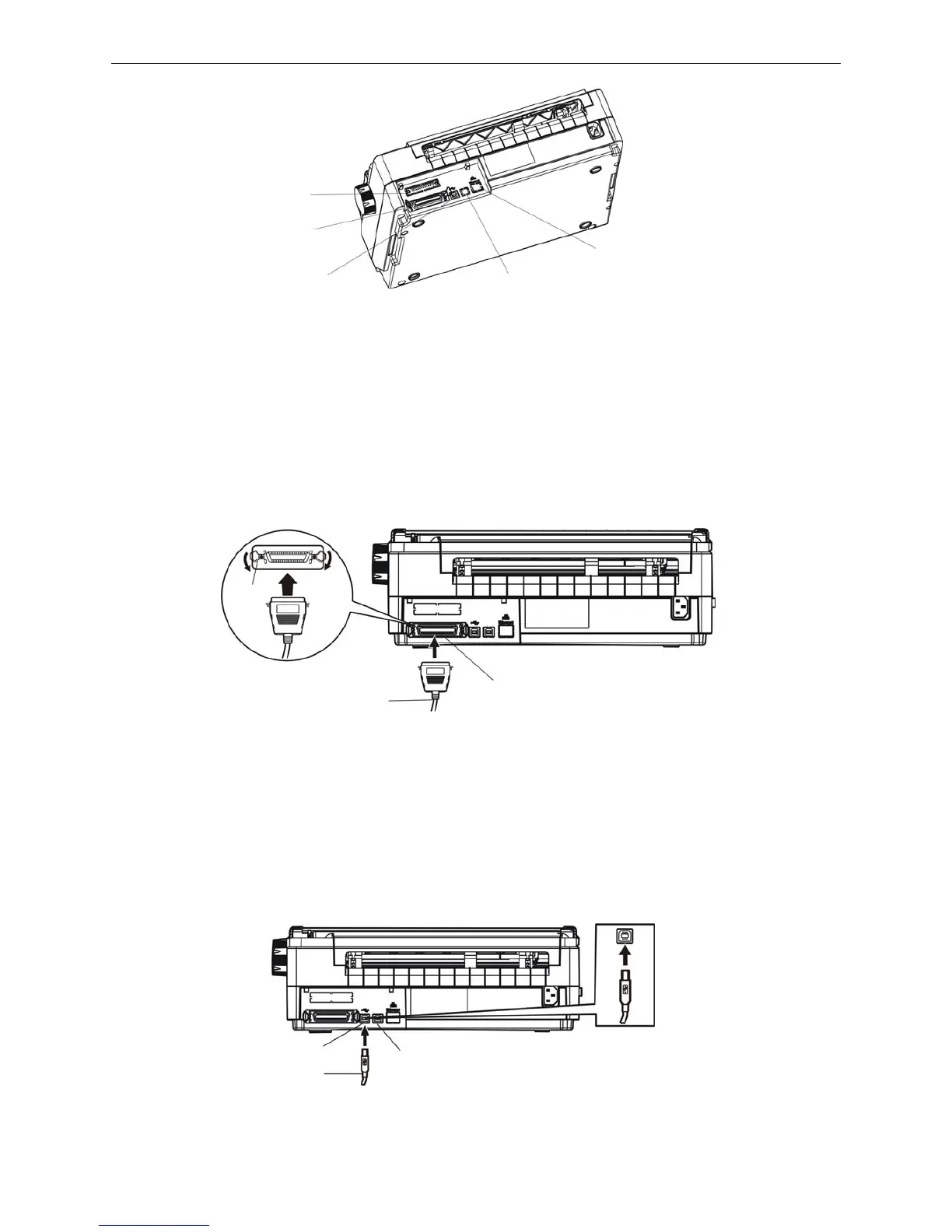
1.8.1 Connecting to the Parallel Interface
1. Turn off both the computer and the printer. Plug the parallel cable connector securely into the
printer’s parallel interface. Squeeze the wire clips together until they lock in place on either side of
the connector. (Shown as figure 1-13)
2. Plug the other end of the cable into the computer's parallel interface, and make sure it is connected
fast.
1.8.2 Connecting to the USB Interface
1. Plug the USB cable A end (flat shape) into the computer's USB interface.
2. Plug the USB cable B end (square shape) into the printer's USB interface (As shown in figure 1-14).
Note: Don't impact the plug after connecting to the USB cable.
Figure 1-12 Lay the back of the printer upwards
Figure 1-13 Connect to the parallel interface
Figure 1-14 Connect to USB cable
Serial interface
USB interface
Parallel interface
USB interface
Ethernet interface
USB interface
USB cable
USB interface
Parallel interface
Parallel cable
Wire clip



 To Next Page