DP350 User's Manual
- 23 -
Chapter 3 How to Use the Printer
Here are the steps of using printer:
1. Install the printer as the chapter 1, connect the printer to your computer and install the driver
correctly.
2. Load the correct type of paper.
3. Set the printer if necessary.
4. Send the print command to the printer to print.
3.1 Loading the Paper
In addition to printing on cut sheets and tractor papers, your printer can also print on a wide variety of
paper types, including multi-ply papers, labels and envelopes.
Caution: When printing on multi-ply paper, as it is thicker than general paper, it needs the bigger
print force, so printing past or at the edge of these papers can damage the print head.
Please make sure the printing contents are all within the printable area while printing. The correlative
printable area, see the Appendix.A for reference.
3.1.1 Loading Cut Sheets
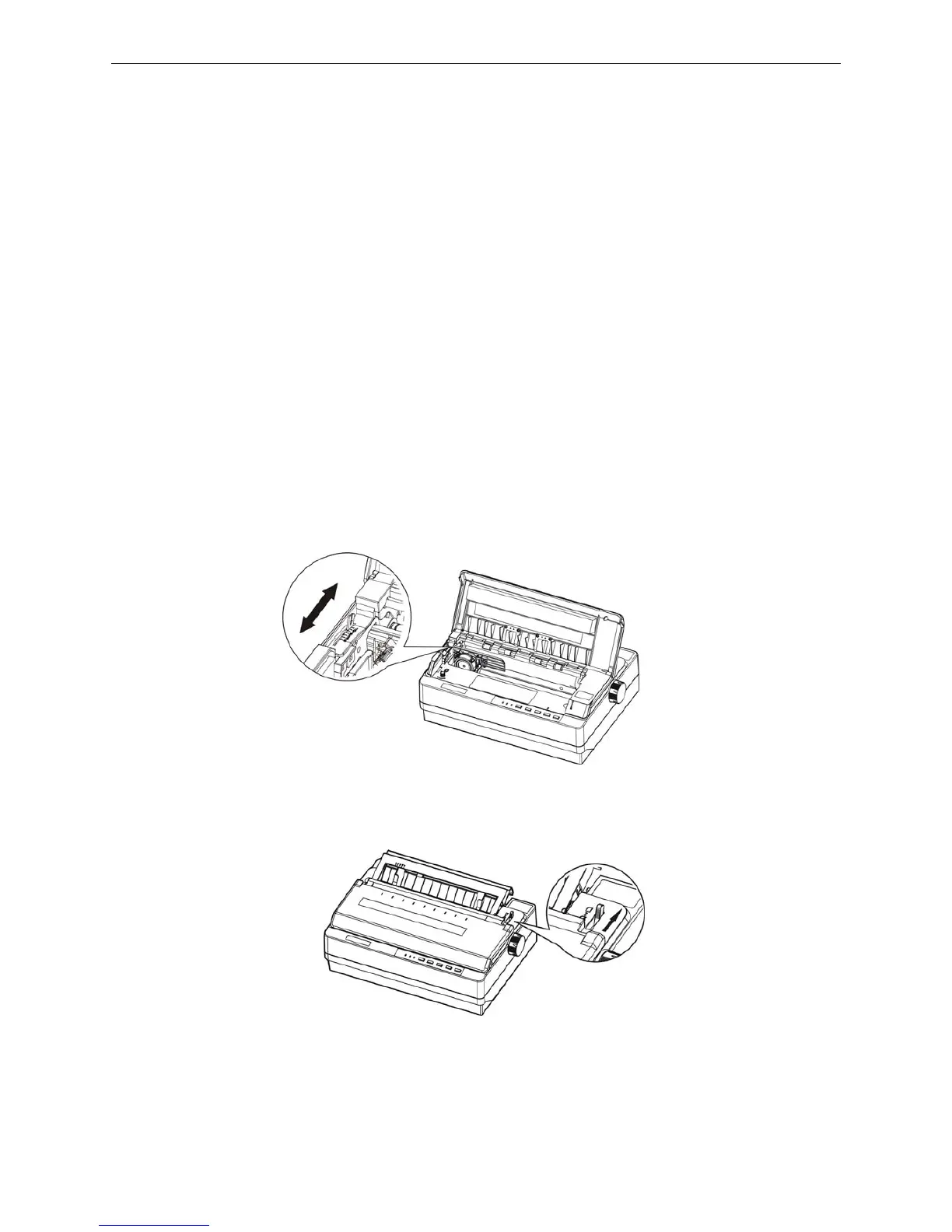
1. Make sure the printer is powered off, and open the window of the printer, refers to chapter 2.7 of this
manual, pull the gad adjust lever to cut sheet position according to the paper type.
2. Close the window, and pull paper select lever toward the cut sheet position.
3. Raise the printer back cover to the proper position (shown as figure 3-3), then turn on the printer.
Figure 3-1 Adjust the gap adjust lever
Figure 3-2 Adjust the paper select lever



 To Next Page