DP350 User's Manual
- 19 -
Chapter 2 Control Panel
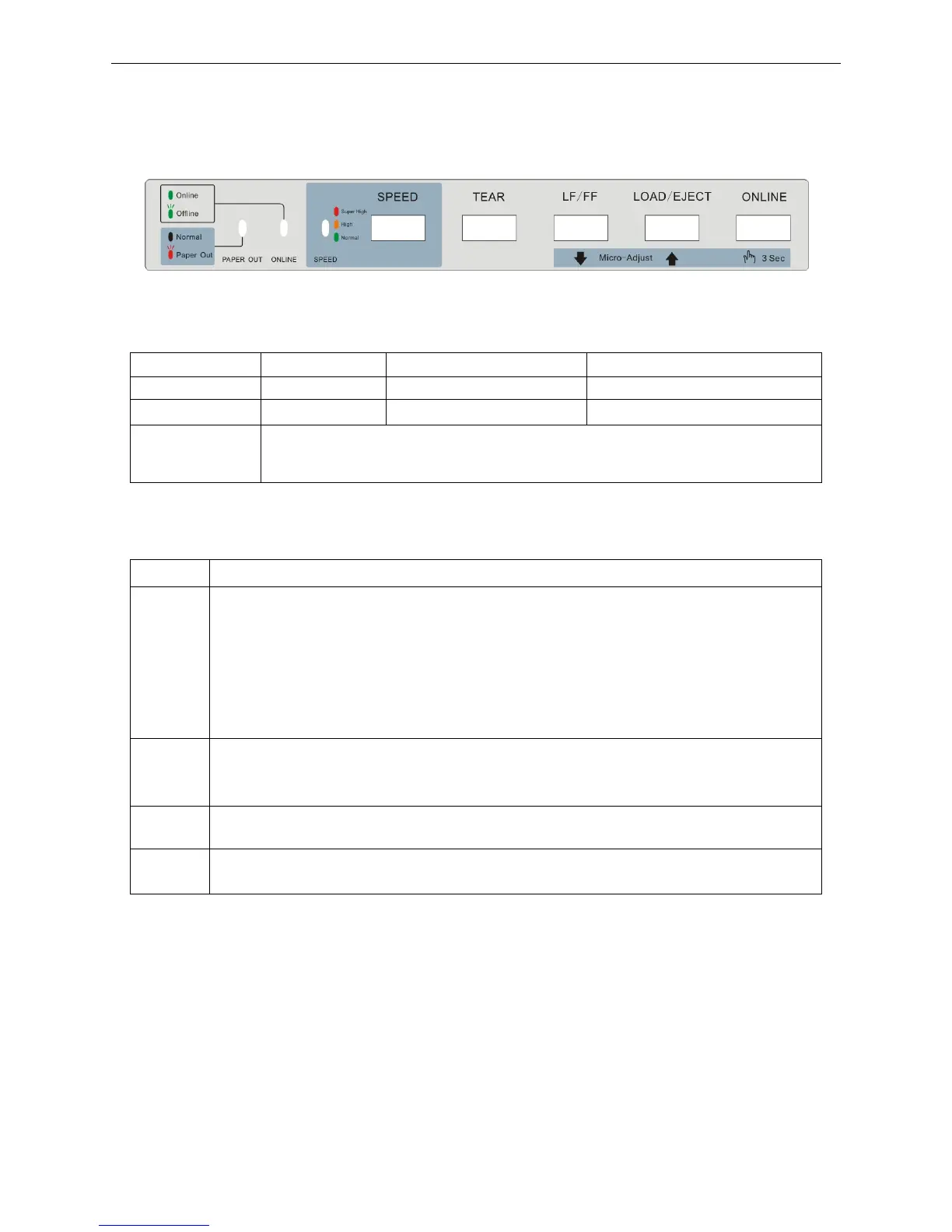
2.1 Control Panel
Include 5 keys and 3 LEDs (shown as figure2-1).
2.2 LED Description
2.3 Control Panel Basic Function Description
ONLINE Press ONLINE key to switch between online mode and offline mode.
LOAD/
EJECT
At the state of paper out, press LOAD/EJECT key once, the paper would be fed into the
printing home position automatically when the paper is at the ready position. In the
tractor paper mode and press LOAD/EJECT key once, the paper would eject one page
of tractor paper when it is at the tear position or just feed paper. When it is at other
positions, press LOAD/EJECT key once, the tractor paper would eject one line,
Alternatively, hold the LOAD/EJECT key down, the printer would eject one page of
tractor paper. If in the cut sheet mode, press the LOAD/EJECT key, the paper would be
entirely ejected from the printer.
LF/FF
If the paper is at the print position, press the LF/FF key once in sleep or offline mode, the
printer would feed the paper one line. Alternatively, hold the LF/FF key down, the printer
would feed one page of tractor paper or eject the cut sheet.
TEAR
In the tractor paper mode, in sleep or offline mode, press TEAR key to switch between
the tear position and the printing home position.
SPEED
In the offline mode, pressing SPEED key can switch among normal speed mode (or
letter speed mode), the high speed mode and the super high speed mode.
Note: Print speed is divided into Normal print mode (letter mode or normal speed mode), the
high speed mode and the super high speed mode.
If Letter mode is set through online aptitude parameter setting or menu setup mode,
press SPEED key on the control panel when offline, printer print speed will switch
among letter mode, high speed mode and super high speed mode.
If any other modes (not including letter mode) is set through online aptitude parameter
setting or menu setup mode, press SPEED key on the control panel when offline, printer
print speed will switch among normal speed mode, high speed mode and super high
speed mode.
Note: When using tractor paper, if paper is out, please press LOAD/EJECT key or LF/FF key to
feed paper after loading paper again.
LED OFF ON BLINK
PAPER OUT Normal
——
Paper out or malfunction
ONLINE
——
Online Offline
SPEED
The green LED denotes normal speed mode (or letter speed mode), the yellow
LED denotes the high speed mode and the red LED denotes the super high
speed mode.
Figure 2-1 Control panel



 To Next Page