8
1.2.
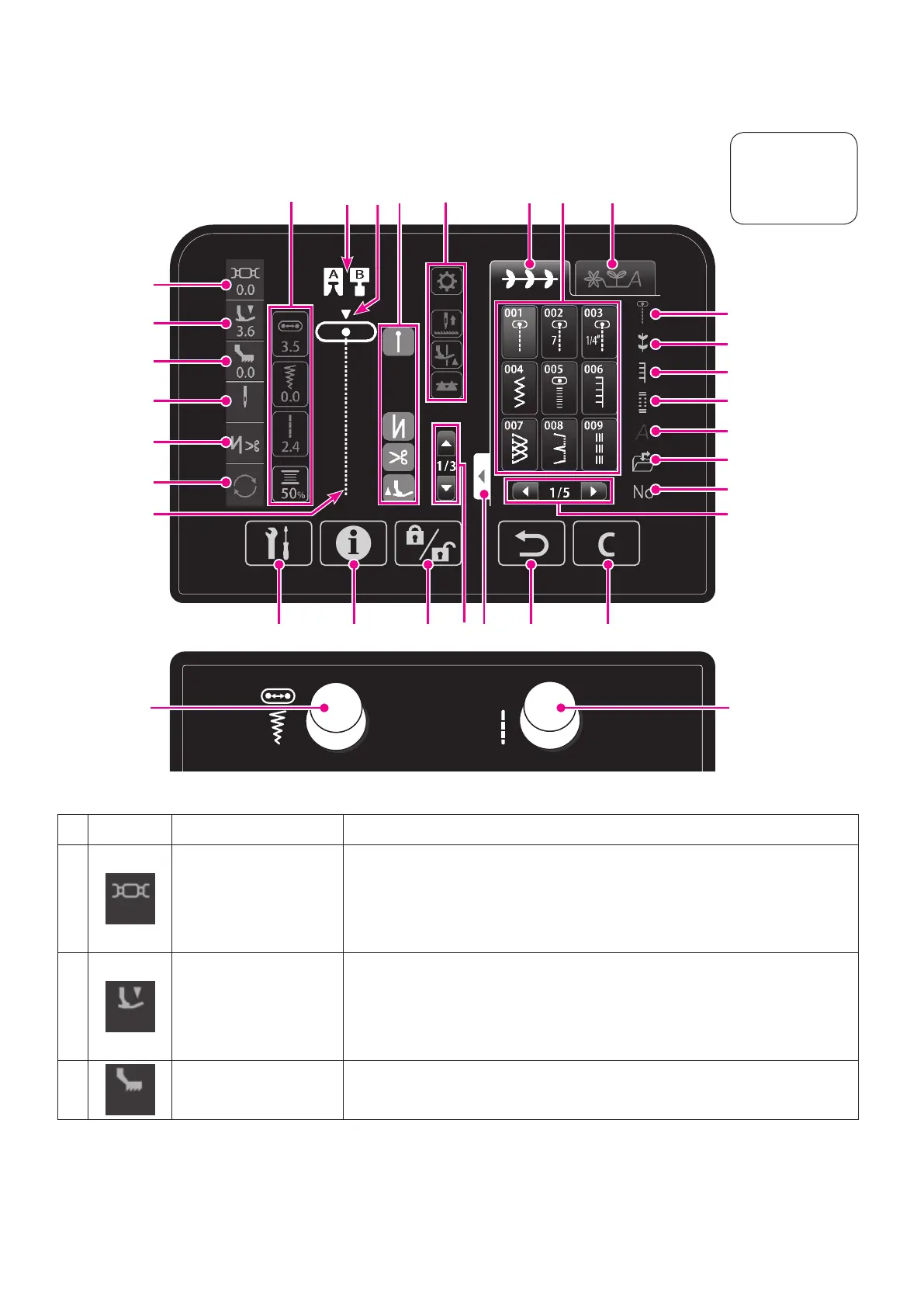
Names and functions of the operation icons and operational keys
Name Function
❶
Thread tension icon
Detailed setting of the thread tension is displayed.
Press the thread tension icon when you want to change the thread ten-
sion.
The thread tension set value will be returned to the initial value by select-
ing a different pattern.
❷
Presser foot pres-
sure icon
Presser foot pressure is displayed.
Press the presser foot pressure icon when you want to change the pres-
sure foot pressure.
The presser foot pressure will be returned to the initial value by re-turning
the power ON.
❸
“JUKI Smart Feed”
adjustment icon
This icon is displayed by placing “JUKI Smart Feed” in position.
Adjustment value of “JUKI Smart Feed” can be set.
Touch the icon
with ngers or
a stylus pen.
F G
A B C D E
❶
❷
❸
❹
❺
❻
Ⓐ
Ⓑ
Ⓒ
❼
❽
❾
Ⓓ


 To Next Page
 Loading...