– 30 –
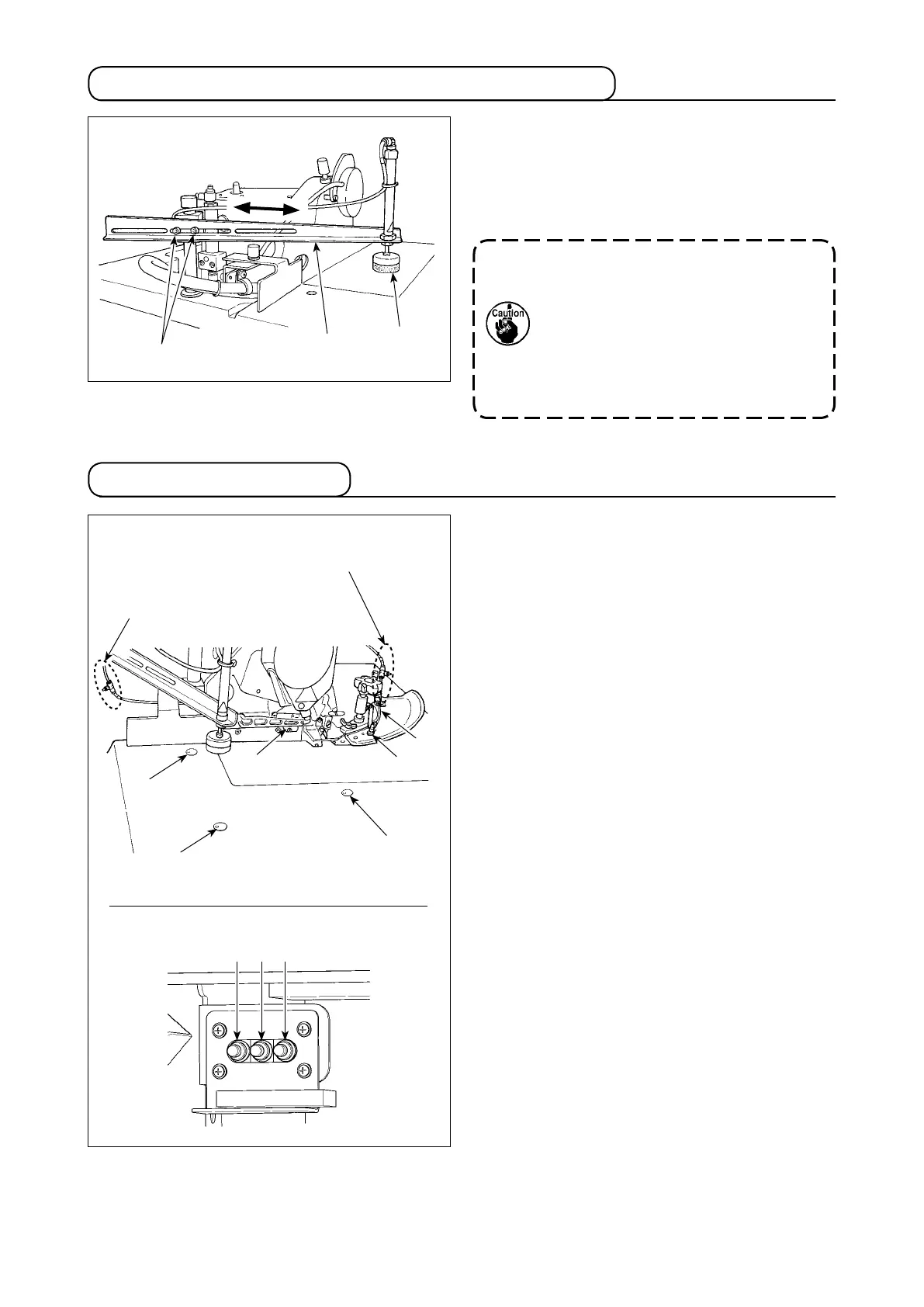
Loosen screws
❷
(at two locations) which x cylin-
der mounting arm
❶
to adjust the arm to the right or
left. Adjust the thread trimmer presser to the position
at which it clamps the material to be sewn at the
center of its width.
6-2.Adjustingthepositionofthethreadtrimmerpresser
6-3.Adjustingtheairblow
1) The amount of the following air blow should be
adjusted by means of the speed controller ac-
cording to the type of material and pattern to be
sewn.
❶
Cloth feeding air blow
❷
Cloth feeding air blow
❸
Cloth feeding air blow
❹
Side cover air blow
❺
Start sensor air blow
❻
Curve sensor air blow (optional)
2)
The air blowing amount is reduced by turning the
adjusting knob clockwise.
3)
The air blowing direction of the cloth feeding blow
can be changed by loosing the M4 nut mounted
underside of the table.
After changing the air blowing direction, be sure
to tighten the nut to x it. In addition, check to be
sure that the air hoses are fully tightened with a
clip band.
Whenadjusting,xthethreadtrimmer
pressersothatpressersponge
❸
is
alignedwiththetopfaceofthetablewith
thethreadtrimmingcylinderbroughttoits
lower position. If the cylinder is inclined,
the thread trimmer presser may fail to
properly clamp the material or a cylinder
failure can occur.
Forthestartsensorairblow
and curve sensor air blow
Formaterialfeeding
Forthesidecoverairblow
❷
❶
❸
❶
❷
❸
❹
❺
❻
❶ ❷ ❸


 To Next Page