– 28 –
(1)Settingoftheautolifterfunction(optional)
When the optional auto-lifter device (AK) is attached,
the auto-lifter function is brought into action.
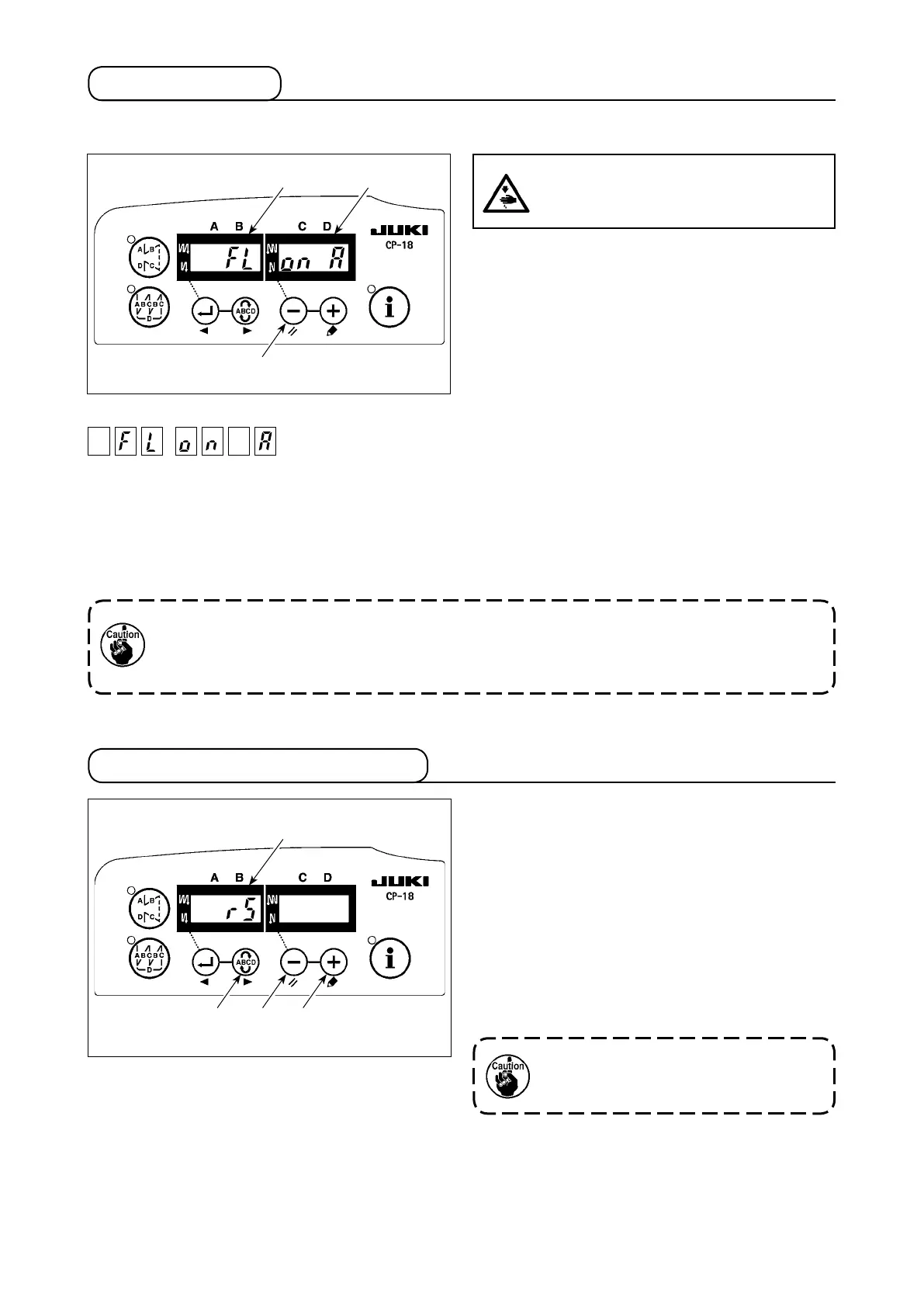
1) Turn ON the power switch while pressing switch
❶
on the operation panel.
2) LED display is turned to
Ⓐ
,
Ⓑ
(FL ON) with
“beep”, and the function of auto-lifter becomes
effective.
3) Turn OFF the power switch, and turn ON the
power switch again to return to the normal
mode.
4) Repeat the operation 1) to 3), and LED display
is turned to (FL OFF). Then, the function of au-
to-lifter does not work.
FL ON : Auto-lifter device becomes effective.
FL OFF : Auto-lifter function does not work.
5-6.Othersettings
Airdrivedisplay(+24V)
1. Toperformre-turningONofthepower,besuretoperformafterthetimeofonesecondormore
has passed.
(IfON/OFFoperationofthepowerisperformedquickly,settingmaybenotchangedoverwell.)
2. Auto-lifterisnotactuatedunlessthisfunctionisproperlyselected.
All contents of function setting of the control box can
be returned to the standard set values.
1) Pressing all switches
❶
,
❷
and
❸
, turn ON
the power switch.
2) LED displays indication
Ⓐ
with the sound “peep”,
and initialization starts.
3) The buzzer sounds after approximately one
second (single sound three times, “peep”, “peep”,
and “peep”), and the setting data returns to the
standard setting value.
5-7.Initializationofthesettingdata
4) Turn OFF the power switch, and turn ON the
power switch again to return to the normal
mode.
DonotturnOFFthepoweronthewayof
initializingoperation.Programofthemain
unitmaybebroken.
CAUTION :
Whentheauto-lifterfunctionisused,donot
placeyourngersunderthepresserfoot.
❶
ⒷⒶ
❸❷❶
Ⓐ


 To Next Page