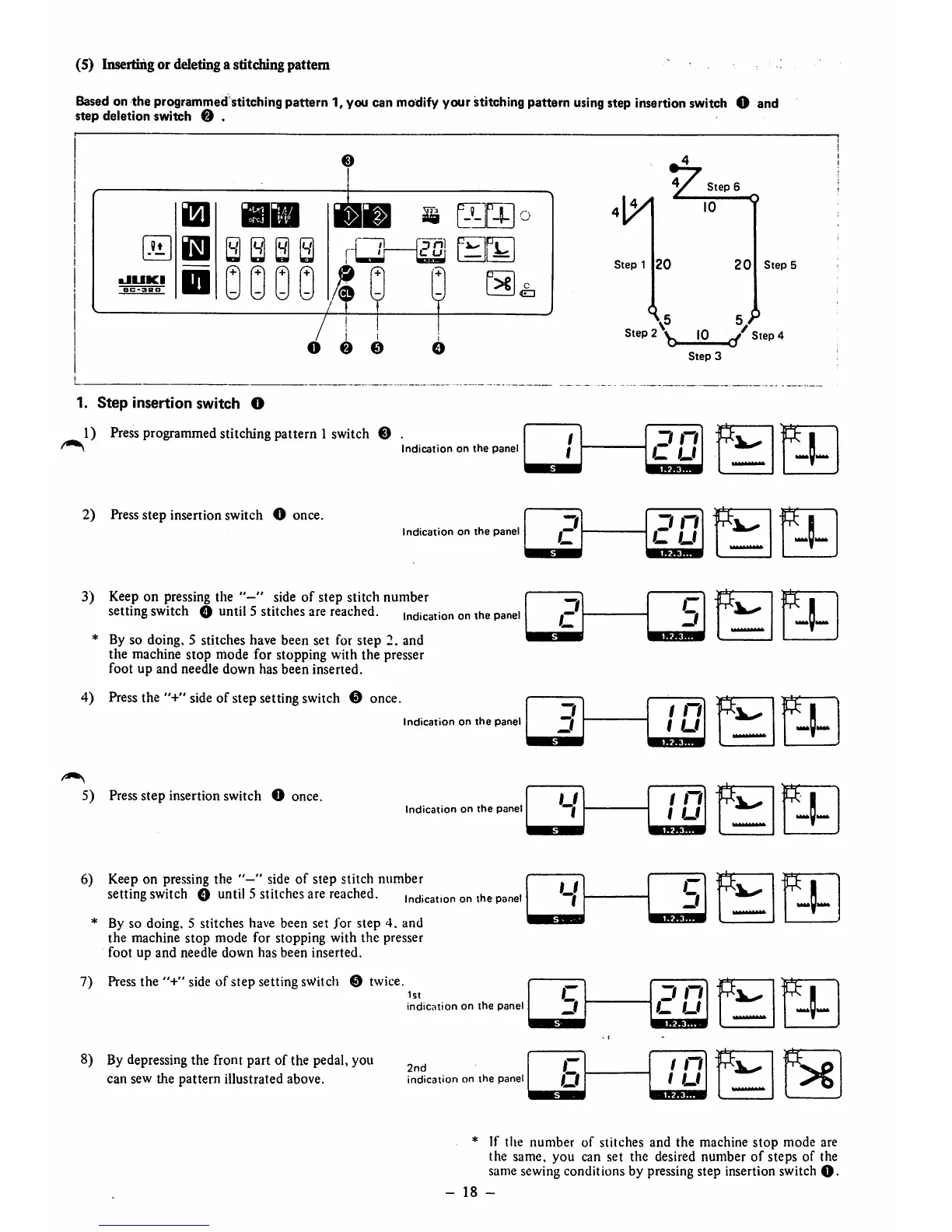
(5) Inserting or deleting a stitching pattern
Based on the programmed stitching pattern 1, you can modify
your
stitching pattern using step insertion switch O and
step deletion switch O .
e
1
1
.'1
aJUKI
8C-3aO
ISl
l!l
s s a a
0000
m
So
/ ! 1
Step
6
^ Q
10 T
Step
1
20
20
\ 5 5 ^
Step
2^^
10
Step
4
Step
3
0 0 0
1.
Step
insertion
switch
O
1) Pressprogrammed stitching pattern 1 switch © .
Indication
on
the
panel
2)
Press
step insertion switch O once.
Indication
on
the
panel
3) Keep on pressing the " side
of
step stitch number
settingswitch O until 5 stitches are reached.
indication
on
the
panel
* By so doing, 5 stitches have been set for
step
2. and
the machine stop mode for stopping with the presser
foot up and needle down has been inserted.
4)
Press
the "+"
side
of step setting
switch
© once.
Indication
on
the
panel
5)
Press
step insertion switch O once.
1
1
J n
L u
o
J n
u
o
u
c
3
3
j
1 n
u
u
1
/ n
1 u
u
1
c
3
c
3
3 n
u
c
O
/ n
1 u
Indication
on
the
panel
6) Keep on pressing the " side
of
step stitch number
setting
switch
O
until
5
stitches
are
reached.
indication
on
the
panel
* By so doing. 5 stitches have been set for step 4. and
the
machine stop mode for stopping with the presser
foot up and needle down has been inserted.
7)
Press
the
"+"
side of step setting switch © twice.
1st
indication
on
the
panel
8) By depressingthe front part of the pedal, you
can sew the pattern illustrated above.
2nd
indication
on
the
panel
ff;
Step
5
ff"
* If the number of stitches and the machine
stop
mode are
the same,
you
can set the desired
number
of
steps
of the
same sewing conditions by pressing step insertion switch
O-
-
18
-



 To Next Page
 Loading...


