•
Step
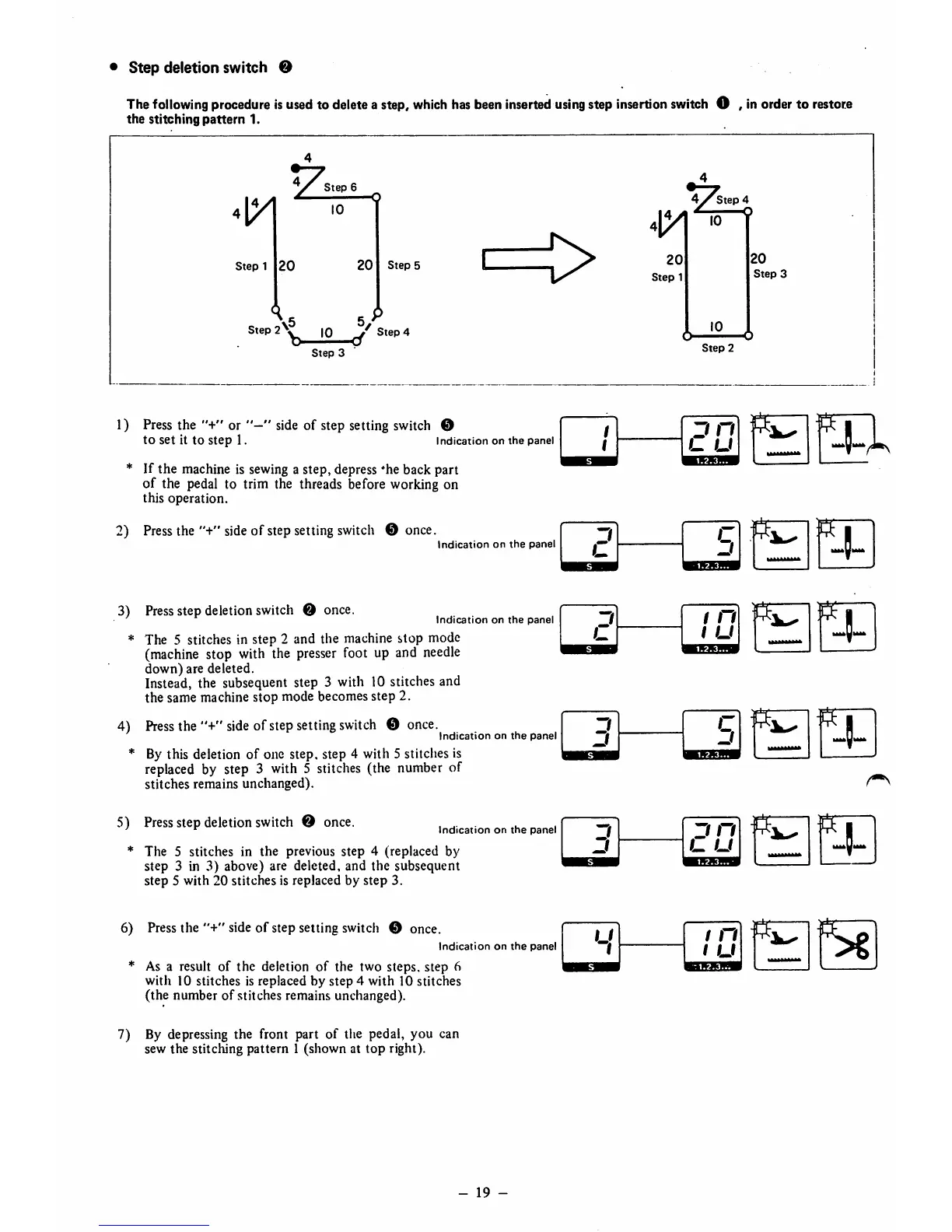
deletion switch O
The
following
procedure
isusedto deletea step,
which
has
been
inserted
using
step
insertion
switch
O , inorderto
restore
the
stitching
pattern
1.
_ 4
Steps
' Q
10
Step
1
20
20
Step
5
c>
\5
5
Step 10 Step 4
Step
3
1) Press the "+" or " side of step setting switch ©
to
set
it to
step
1. indication on the panel
* If the machine is sewing a step, depress *heback part
of the pedal to trim the threads before working on
this operation.
2)
Press
the "+"
side
of stepsetting
switch
©
once.
Indication
on
the
panel
3)
Press
Stepdeletion switch © once.
Indication
on
the
panel
* The 5 stitches in step 2 and the machine stop mode
(machine
stop
with
the
presser
foot up and
needle
down)
are deleted.
Instead, the subsequent step 3 with 10 stitches and
the same machine stop mode becomes step 2.
4)
Press
the"+"
side
ofstep
setting
switch
©
once.
Indication
on
the
panel
* By this deletion
of
one step, step 4 with 5 stitches is
replaced by step 3 with 5 stitches (the number of
stitches remains unchanged).
5)
Press
step deletion
switch
©
once.
Indication
on
the
panel
* The 5 stitches in the previous step 4 (replaced by
step 3 in 3) above) are deleted, and the subsequent
step 5 with 20 stitches is replaced by
step
3.
6) Pressthe side of step setting switch © once.
Indication
on
the
panel
* As a result of
the
deletion
of
the two steps, step 6
with 10 stitches is replaced by step 4 with 10 stitches
(the number
of
stitches remains unchanged).
7) By depressing the front part of the pedal, you can
sew the stitching
pattern
1 (shown at
top
right).
-
19
-
Step
2
3 n
L.
U
Zi
u
c
3
3
1 n
1 u
3
j
c
3
3
3
n
u
u
f
/ n
1 u
Step
3
1^
Iff



 To Next Page