- 11 -
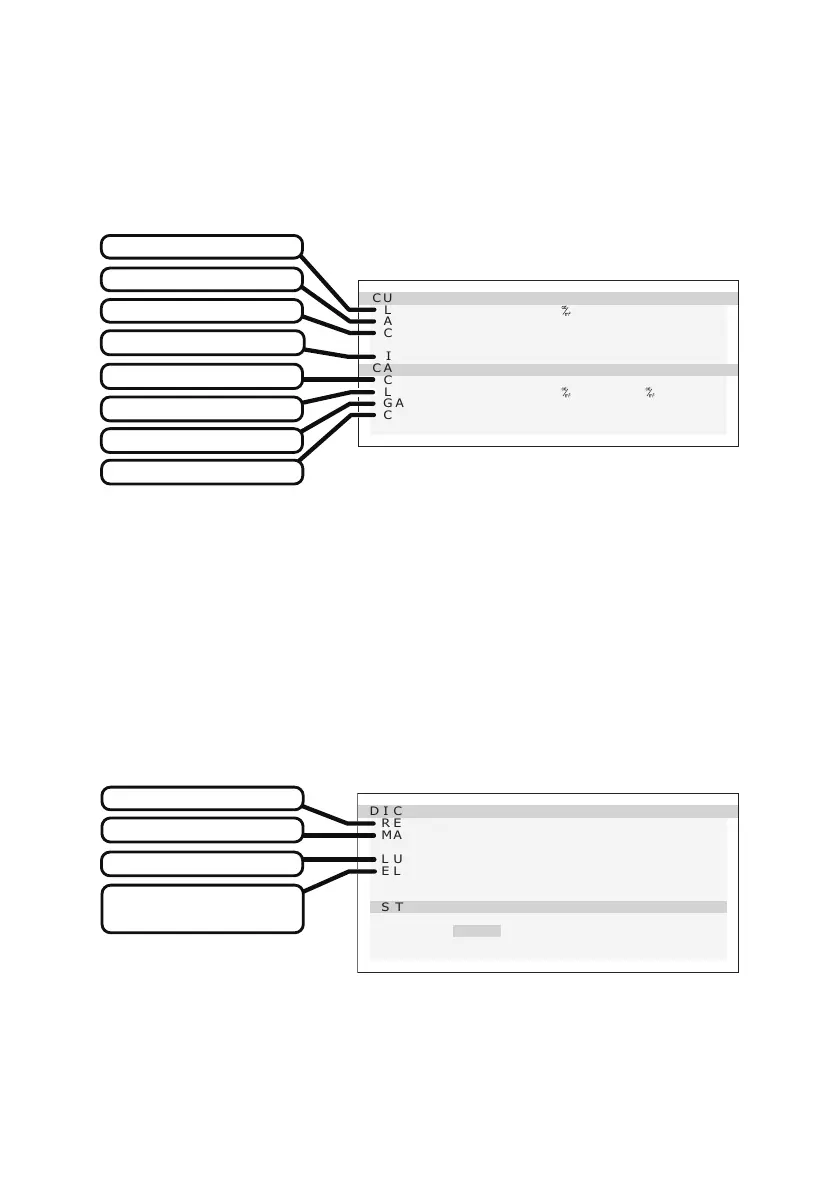
3. Current ate
1) Display the “Operation Button Guide ①” by pressing any one of operation buttons
(A–C).
2) Press the “MENU” button.
3) Select “CURRENT STATE” from MENU 1/2 using the “▼” or “▲” button and press the
“OK” button. The following “CURRENT STATE” OSD appears as below.
CURRENT STA T E
LUMINA N C E : 409
AMB LI G H T : 1 0 0.0
lx
COLO R : 7 500 K
( x=0.300 y=0. 315)
INPU T : D VI
CALI BRAT I ON S E T T I N G
CONF IG : 1
L U MINANCE : 410 / 0. 6
G A MMA : D I C O M GSD F
COLO R : 7 500 K
( x=0.299 y=0. 315)
CURRENT STATE
Current luminance
Current input source
Current color
Conguration number
Current ambient Light
Gamma setting
Color setting
Luminance setting
4. DICOM conformance te
1) Display the “Operation Button Guide ①” by pressing any one of operation buttons
(A–C).
2) Press the “MENU” button.
3) Select “DICOM CONFORMANCE TEST” from MENU 1/2 using the “▼” or “▲” button
and press the “OK” button. The following “DICOM CONFORMANCE TEST” OSD
appears as below.
DICOM CONF ORMA NCETEST
RESULT :Pa ssed
MA X DE VIATION : 4. 5
LUMI NANCE :Stable
EL APSED TIME :123 m in
STA RT TE S TI N G
Y e s
>N o
%
DICOM CONFORMANCE TEST
Continuous lighting time
of the backlight
Maximum deviation
Test result
Luminance status


 To Next Page
 Loading...