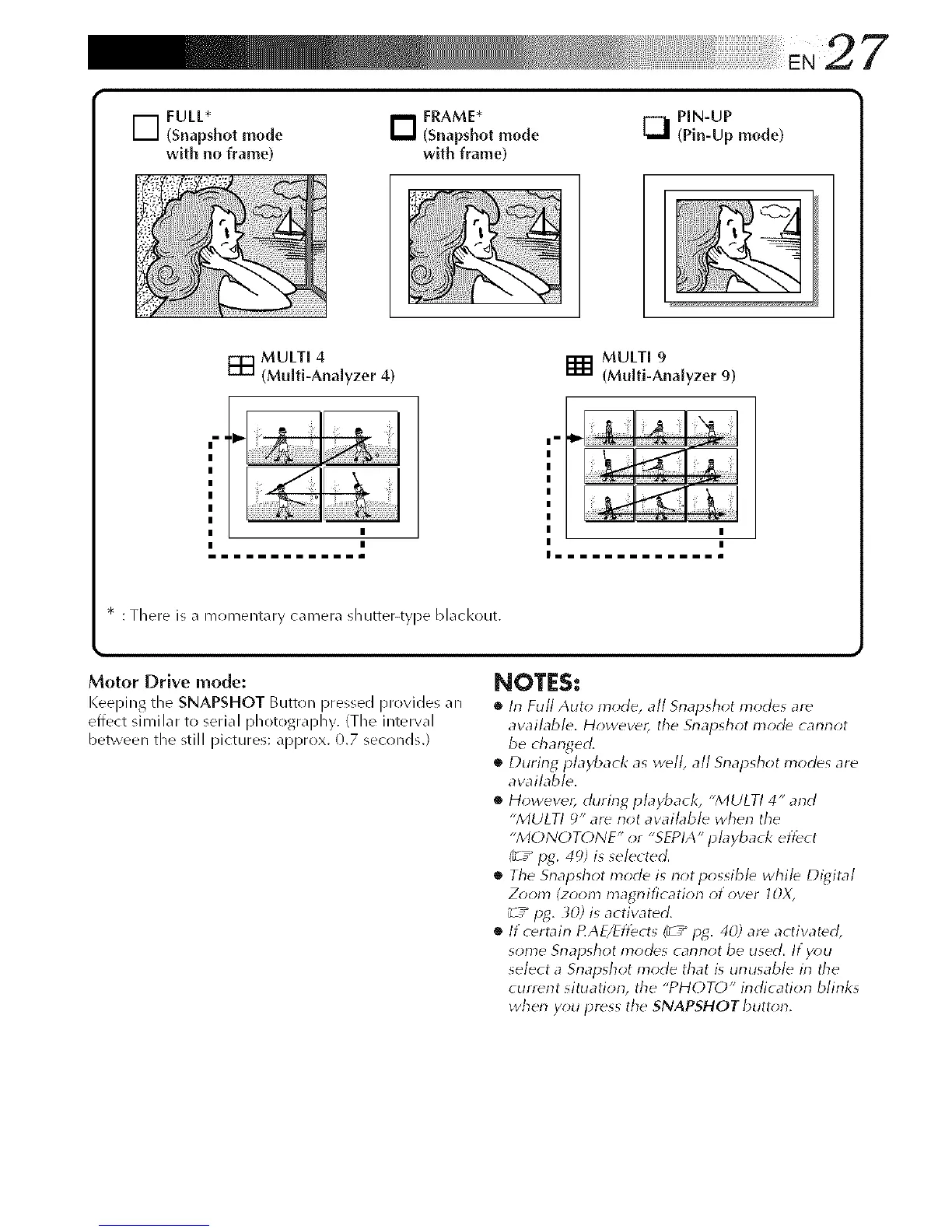
D FULL*
(Snapshot mode
with no frame)
D FRAME*
(Snapshot mode
with frame)
[_ PIN-UP
(Pin-Up mode)
MULTI 4
[] (Multi-Analyzer 4)
MULTI 9
[] (Multi-Analyzer 9)
|-
{
m...mmm...mmm
* : There is a i_1omei4tarycamera shutter-tyl)e hlacl<out.
Motor Drive mode:
Keeping the SNAPSHOT Button pressed provides an
effect similar to serial photography. (The interval
between the still pictures: approx. 0.7 seconds.)
NOTES:
• In Full Auto mode, all Snapshot modes ar_
aw_ilable. Howewr, the Snapshot Inocb cannot
be changed.
• During playback as well, all Snapshot modes are
available.
• However, during playback, "MULTI 4" and
"MULTI 9" ar_ not available when the
"MONOT()NE" or "SEPIA" playback effect
(_ / pg. 49) is selected.
• The Snapshot mode is not possible while Digital
Z_)om (zoom magnificatiorl of over IOX,
_7_ lag. _0.) is activated.
• If certain tqAE/Eflbcts (¢ / lag. 40) are activated,
some Snapshot modes cannot be used. If y_)u
select a Snapshot mode that is unusable in the
cunent situatiorl, the "PHOTO" indication blinks
when you press the SNAPSHOT button.



 To Next Page