Menus
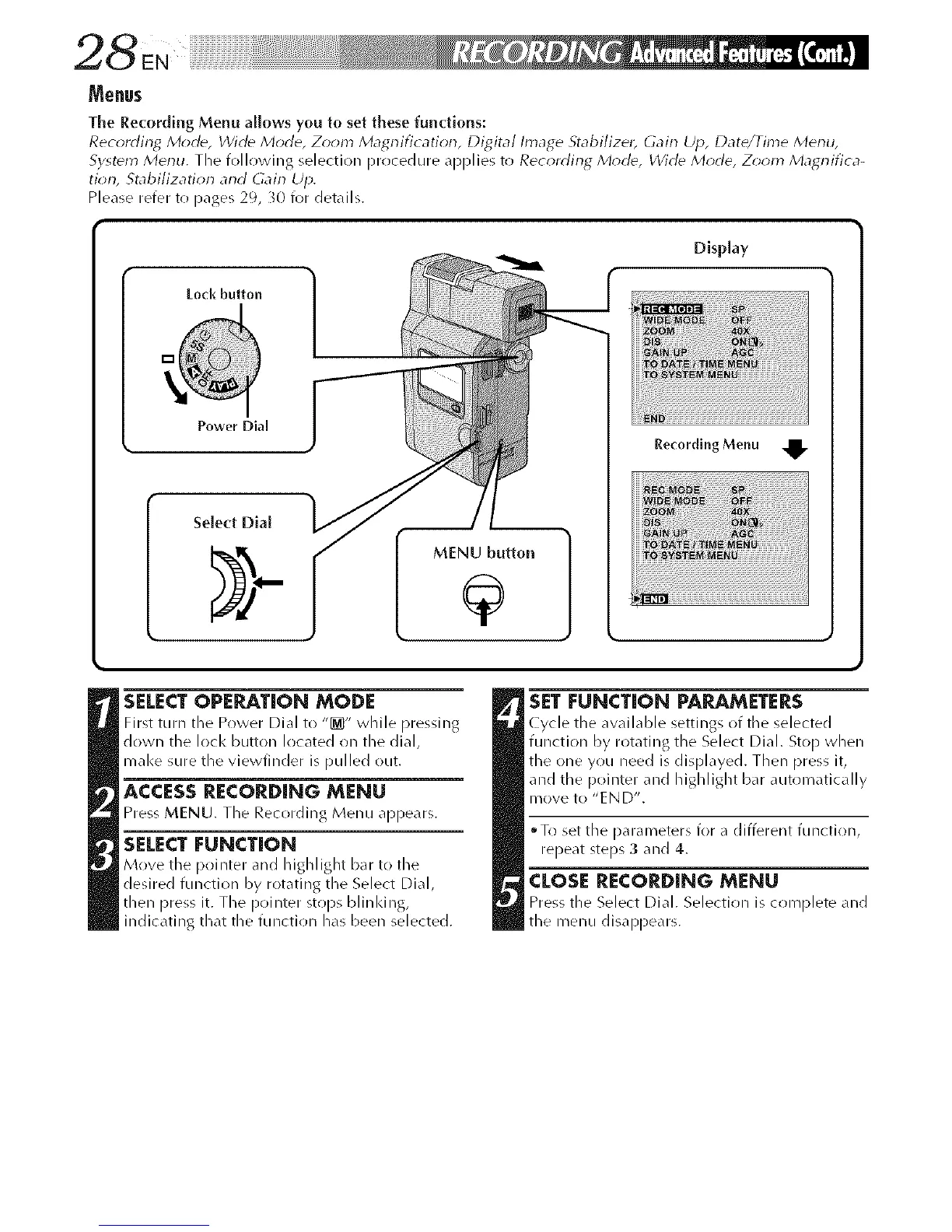
Tile Recording Menu allows you to set these functions:
Recording Mode, Wide Mode, Z_m Magrlification, Digital Image Stabilizet, Gain Up, Date/Time Merlll,
System Menu. The following selection procedure applies to Recording, Morld, Wirle Mode, Z;oln Magr-lifica-
tion, Stabi/izatior_ and Gain Up.
Please refer to pages 29, 30 for details.
Lock button
Power Dial
MENU button
DispLay
RecordlngMenu ,_
SELECTOPERATION MODE
First turn the P_wer DJ_II to "[_" while pressing
down the lock button located _n the dial,
m_l<e sure the vJewfJl/der is pulled out.
ACCESS RECORDING MENU
Press MENU. The Recording Menu appears.
SELECT FUNCTION
Move the p_)inter and highlight bar t(> the
desired function by rotating the Select Dial,
then press it. The pointer stops blinl<ing,
indicating that the function has been selected.
SETFUNCTION PARAMETERS
Cycle the aw_ilable settings of the selected
function by r(>t_ting the Select Dial. St(>[) when
the one you need is displayed. Then press it,
and the [)(>inter and highlight bar automatically
m()ve t() "E N D".
T_)set the parameters for a different function,
repeat steps 3 and 4.
CLOSE RECORDING MENU
Press the Select Dial. Selection is c_)mplete and
the menu disappears.



 To Next Page