FADE/WIPEEffects
IMPORTANT:
It certain P.AE/Efl_ct_ (2 / iJ_. 40) ar_ actiw_ted, some Fade/Wipe Effects cannot be used. lt you select a Fad_/
Wipe Effect that is unusable in the current situation, the indication blinks.
Use these to spice up tile transition frorn one scene to tile next. You car/also vary transitions frorn scene to
scene. Refer to pages 3} }8 for Fade/Wipe effects and techniques.
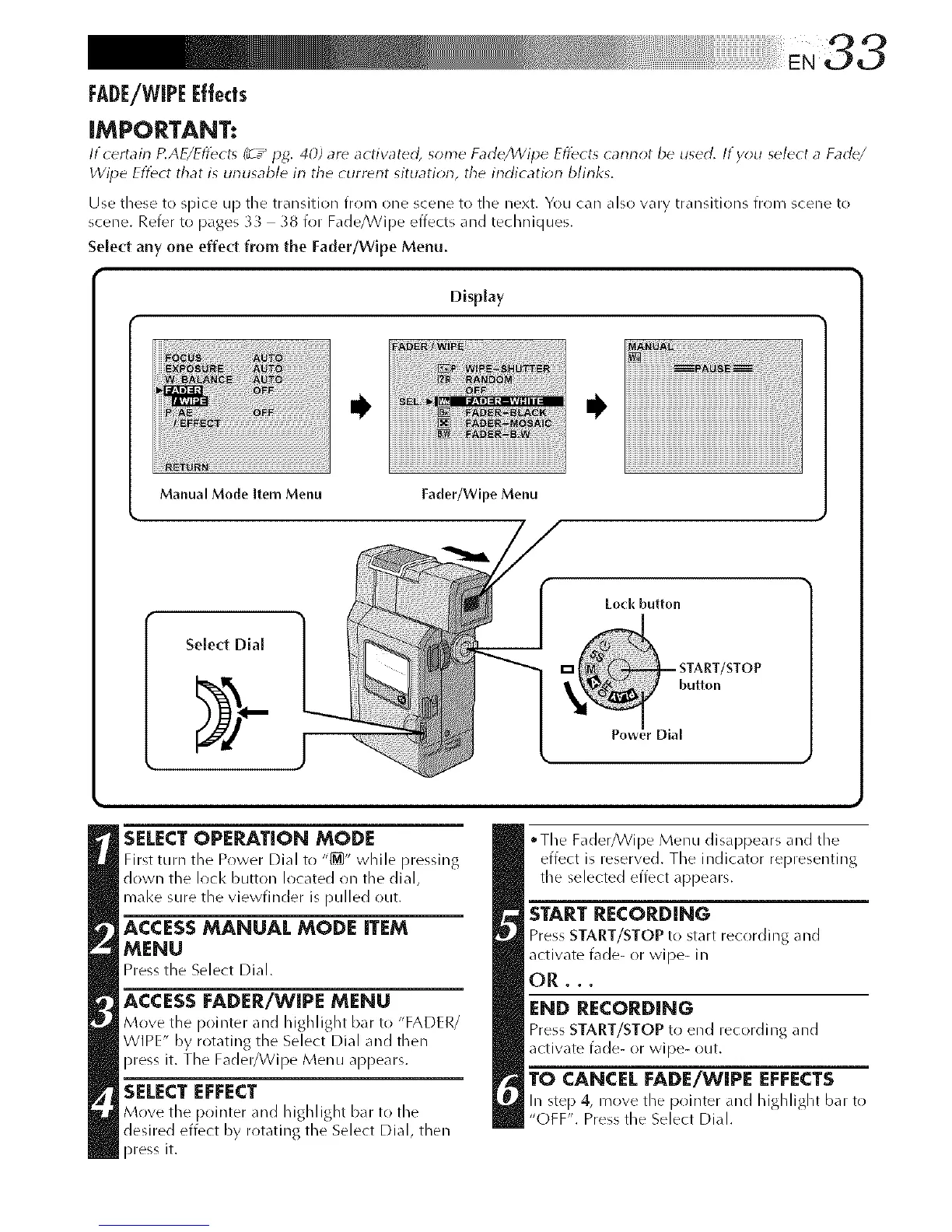
Select any one effect from the Fader/Wipe Menu.
Display
Manual Mode item Menu
Fader/Wipe Menu
Select Dial
Lock button
SELECTOPERATION MODE
First tlll'n the Power Dial to "_" while pressing
down the lock button located on tile dial,
mal<e sure the viewfinder is pulled out.
ACCESS MANUAL MODE ITEM
MENU
Press the Select Dial.
ACCESS FADER/WIPE MENU
Move the pointer and highlight bar to "FADER/
WIPE" by rotating the Select Dial and then
press it. The Fader/Wipe Menu appears.
=
SELECT EFFECT
Move the pointer and highlight bar to the
desired effect by i'otatillg the Select Dial, then
press it.
"Tile Fader/Wipe MenLi disappears and tile
effect is reserved. The indicator representing
tile selected effect appears.
START RECORDING
Press START/STOP to start recording and
activate fade- or wipe- in
OR,,,
END RECORDING
Press START/STOP tr! end recordillg and
actiw_te fade- or wipe- out.
TO CANCEL FADE/WIPE EFFECTS
In step 4, move the pointer and highlight bar to
"OFF". Press the Select Dial.



 To Next Page