FadesandWipes
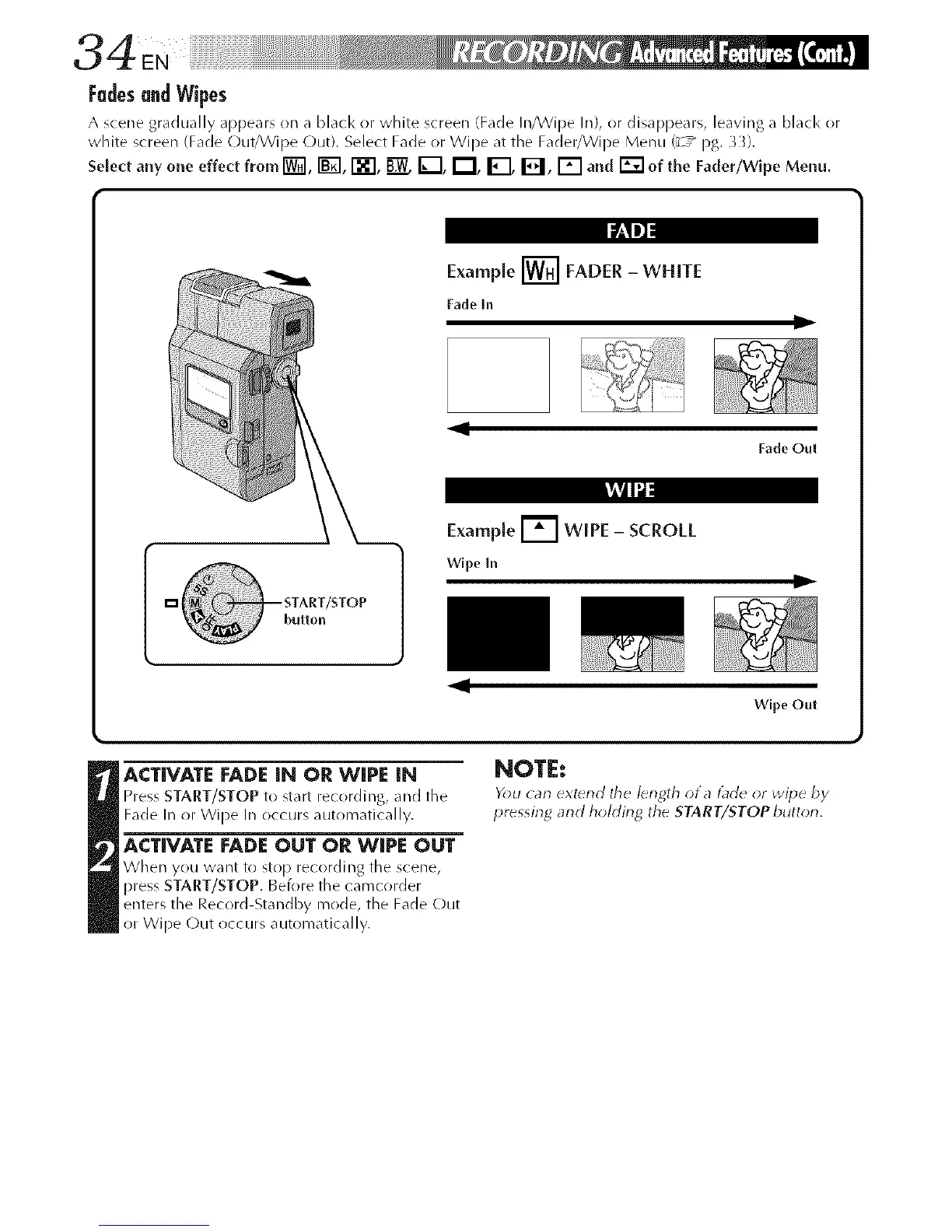
A scene gradually appears on a black or white screen (Fade In/VVJpe In), or dJsapl_eal% leaving a black or
white screen (Fade Out/VVipe C)uO. Select Fade or Wipe at tile Fader/Wipe Menu (_T_ pg. _).
Select any one effect from [W_I, i-_1, i-'_"[, _ I_--[, I_1, _, El, [] and _ of the Fader/Wipe Menu.
Example [] FADER - WHITE
Fade In
lit
11
Fade Out
k_Vdlli:
Example [] WIPE - SCROLL
Wlpe In
ql
ID
Wipe Out
ACTIVATE FADE IN OR WIPE IN
Press START/STOP to start recording, and tile
Fade In or Wipe In occurs automatically.
ACTIVATE FADEOUT OR WIPE OUT
Wl/en you want to stop recording tile scene,
press START/STOP. Before the camcorder
enters the Record-Standby mode, the Fade Out
or Wipe C)ut occurs automatically.
NOTE:
You can extend the lerlgth of a t_de or wipe by
pressing and hohfing the START/STOP button,



 To Next Page