P.AE/Effeds
IMPORTANT:
If certairl Fades or Wipes (_ / pg. 37, 389 are activated, some F_AE/Efl_cts carlrlot be used. Ifyou select a
RAE/Efl_ct that is unusable irl the current situatiorl, the effect% symbol begins flashing.
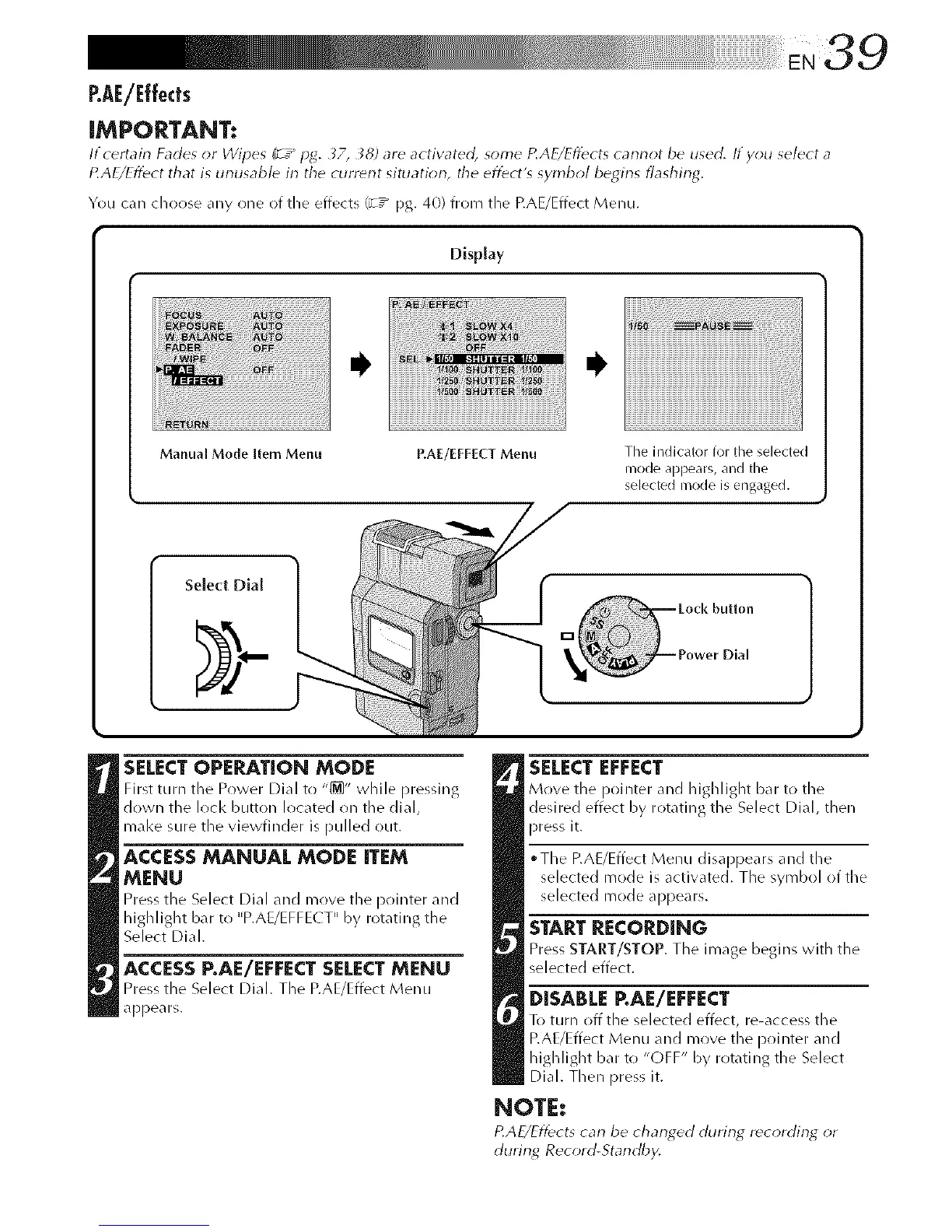
You can choose any one of the effects _-T_ pg. 40) from the RAE/Effect Menu.
Display
Manual Mode Item Menu P,AE/EFFECT Menu
Tile indicator for the selected
nlode appears, and tile
selected nlode is engaged.
Select Dial
SELECTOPERATION MODE
Nrst turn the Power Dial tr! "_" while pressing
down the loci< button located on the died,
mal<e sure the viewfinder is pulled out.
ACCESSMANUAL MODE ITEM
MENU
Press the Select Dial and mrlve the prfinter and
highlight bar to "P.AE/EFFE( T" by rotating the
Select Dial.
ACCESS P.AE/EFFECT SELECT MENU
Press the Select Dial. The P.AUEffect Menu
appears.
SELECT EFFECT
Move the pointer and highlight bar to the
desired effect by rotating the Select Dial, then
press it.
The RAE/Effect Menu disappears and the
selected mode is activated. The symbol of the
selected mode appears.
START RECORDING
Press START/STOP. The image begins with the
selected effect.
DISABLE RAE/EFFECT
To turn off the selected effect, re-access the
RAE/Effect Menu and move the pointer and
highlight bar to "OFF" by rotating the Select
Dial. Then press it.
NOTE:
P.AE/Eff_cts carl be changed during r_cording _r
durirlg Record-Standby,



 To Next Page