70 N
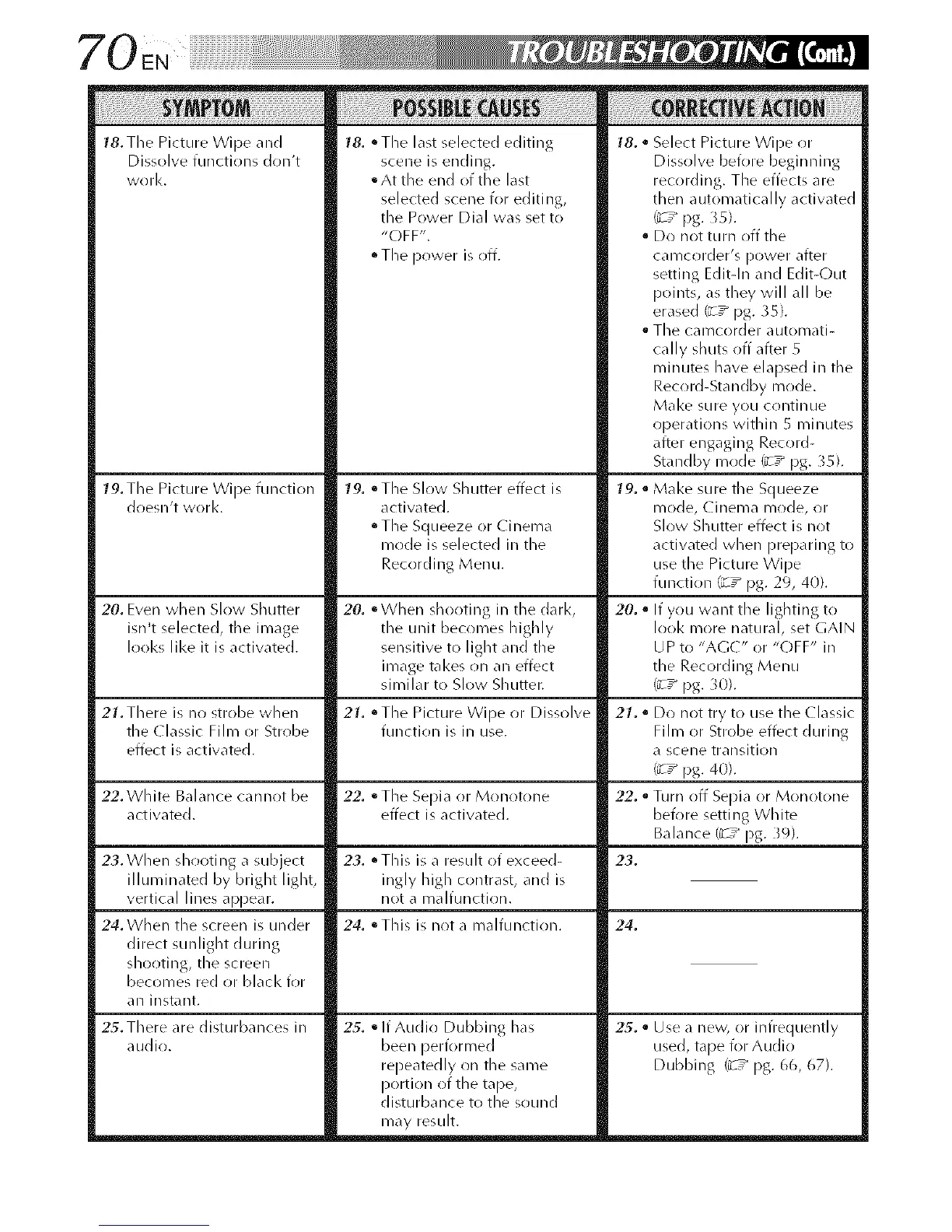
18. The Picture Wipe and
Dissolve functions don't
work,
79. Tile Picture Wipe function
doesn't work.
20. Even when Slow Shutter
isn't selected, the image
looks like it is activated.
21. There is no strobe when
the ( lassic Film or Strobe
effect is activated.
22. White Balance cannot be
activated.
23. When shooting a subject
illuminated by bright light,
vertical lines appear.
24. When the screen is under
direct sunlight during
shooting, the screen
becomes red or black for
an instant.
18. °The last selected editing
scene is ending.
• At the end of the last
selected scene for editing,
the Power Dial was set to
"OFF".
• The power is off.
79. °The Slow Shutter effect is
activated.
• The Squeeze or Cinema
mode is selected in the
Recording Menu.
20. °When shooting in the darl<,
the unit becomes highly
sensitive to light and the
image takes on an effect
similar to Slow Shutter.
21, °The Picture Wipe or Dissolve
function is in use.
22, • The Sepia or Monotone
effect is activated.
23. °This is a result of exceed-
ingly high contrast, and is
not a malfunction.
24. °This is not a malfunction.
18. • Select Picture Wipe or
Dissolve before beginning
recording. The effects are
then automatically activated
t_ ,_ pg. 35).
• Do not turn off the
camcorder's power after
setting Edit-In and Edit-Out
points, as they will all be
erase(] ('_ ,_pg. 35).
The camcorder automati-
cally shuts off afteR 5
minutes have elapsed in the
Record-Standby mode.
Make sure you continue
operations within 5 minutes
after engaging Record-
Standby mode {_-7 pg. 35).
79. • Make sure the Squeeze
mode, Cinema mode, or
Slow Shutter effect is not
activated when preparing to
use the Picture Wipe
function _-7 pg. 29, 40).
20.. If you want the lightingto
look more natural, set GAIN
U P to "AGC" or "C)FF" in
the Recording Menu
t_,_pg. 30).
21. " Do not try to use the ( lassic
Film or Strobe effect during
a scene transition
(¢ ,_ pg. 40).
22. • Turn off Sepia or Monotone
before setting White
Balance (_-7 pg. }9).
23.
24.
25. There are disturbances in
audio.
25. olf Audio Dubbing has
been performed
repeatedly on the same
portion of the tape,
disturbance to the sound
may result.
25. • Use a new, or infrequently
used, tape for Audio
Dubbing ('_ ,_pg. 66, 67).



 To Next Page