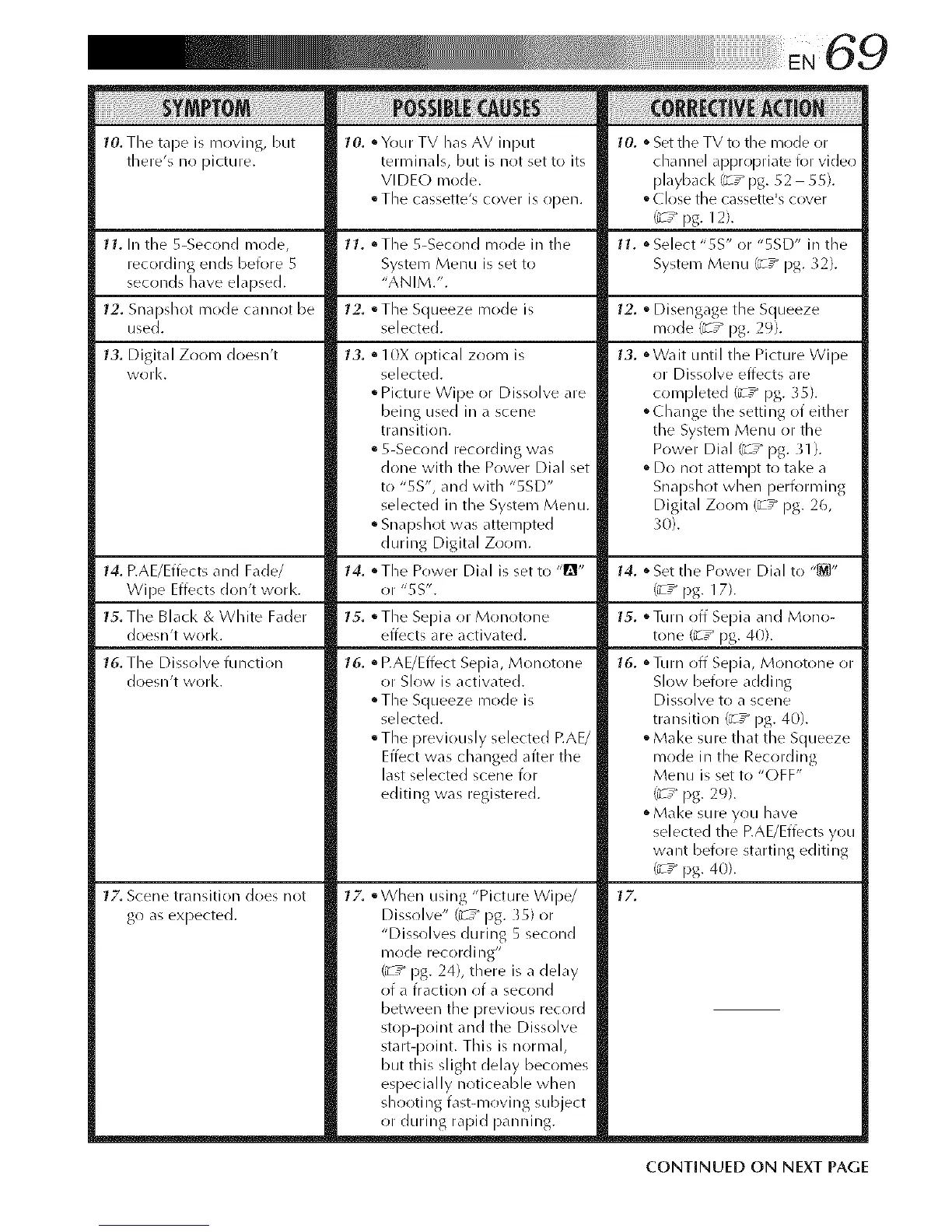
10. Tile tape is moving, but
there's no picture.
11. In the 5-Second mode,
recording ends before 5
seconds have elapsed.
12. Snapshot mode cannot be
used.
13. Digital Zoom doesn't
work.
14. RAE/Effects and Fade/
WiDe Effects don't work.
15. The Black & White Fader
doesn't work.
16. The Dissolve function
doesn't work.
17. Scene transition does not
go as expected.
10.
°Your TV has AV input
terFninals, but is not set to its
VI DE(_) mode.
• The cassette's cover is open.
11. °The 5-Second mode in tile
System Menu is set to
"ANIM.'.
12. °The Squeeze mode is
selected.
13. Q10X optical zoom is
selected.
• Picture Wipe or Dissolve are
being used in a scene
trailsition.
• 5-Second recording was
done with the Power Dial set
to "5S', and with "SSD"
selected in the System Menu.
• Snapshot was attempted
during Digital Zoom.
14. • The Power Dial is set to "_"
or "55".
15. • The Sepia or Monotone
effects are activated.
16.
• RAE/Effect Sepia, Monotone
or Slow is activated.
• The Squeeze mode is
selected.
• The previously selected RAE/
Effect was changed afteR the
last selected scene for
editing was registered.
17" °When using "Picture Wipe/
Dissolve" (_-7_ pg. }5) or
"Dissolves during 5 second
mode recording"
(_ ,_ I)g. 24), there is a delay
of a fraction of a second
between tile previous record
stop-point and the Dissolve
start-point. This is normal,
but this slight delay becomes
especially noticeable when
shooting fast-moving subject
or during rapid panning.
10. • Set the TV to the mode or
channel appropriate for video
playback C_,_pg. 52 55).
• (]:lose the cassette's cover
_ ,_ pg. 12).
11. • Select "5S" or "5SD" in the
System Menu /_ ,_ pg. 32).
12. • Disengage the Squeeze
mode (_-T_ pg. 2%.
13. °Wait until the Picture Wipe
or Dissolve effects are
completed (_-T_ pg. }5).
• Change the setting of either
the System Menu or the
Power Dial C_,_ pg. 31 ).
• Do not attempt to take a
Snapshot when perfl)rl_/ing
Digital Zoom (_z _ pg. 26,
30).
14.
15.
16.
17"
• Set tile Power Dial to "_"
C_,_ pg. 17).
• Turn off Sepia and Mono-
tone (_-T_ pg. 40).
• TLIIR oil Sepia, Monotone or
Slow before adding
Dissolve to a scene
transition (_z_ pg. 40).
oMake sure that the Squeeze
mode in the Recording
Menu is set to "OFF"
C_,_ pg. 29).
oMake sure you have
selected the RAE/Effects you
wa nt before starting editi ng
(¢ ,_ pg. 40).
CONTINUED ON NEXT PAGE



 To Next Page