10 DDX6021BT/DDX6051BT/DDX4021BT/DDX4051BT/DDX3021/DDX3051
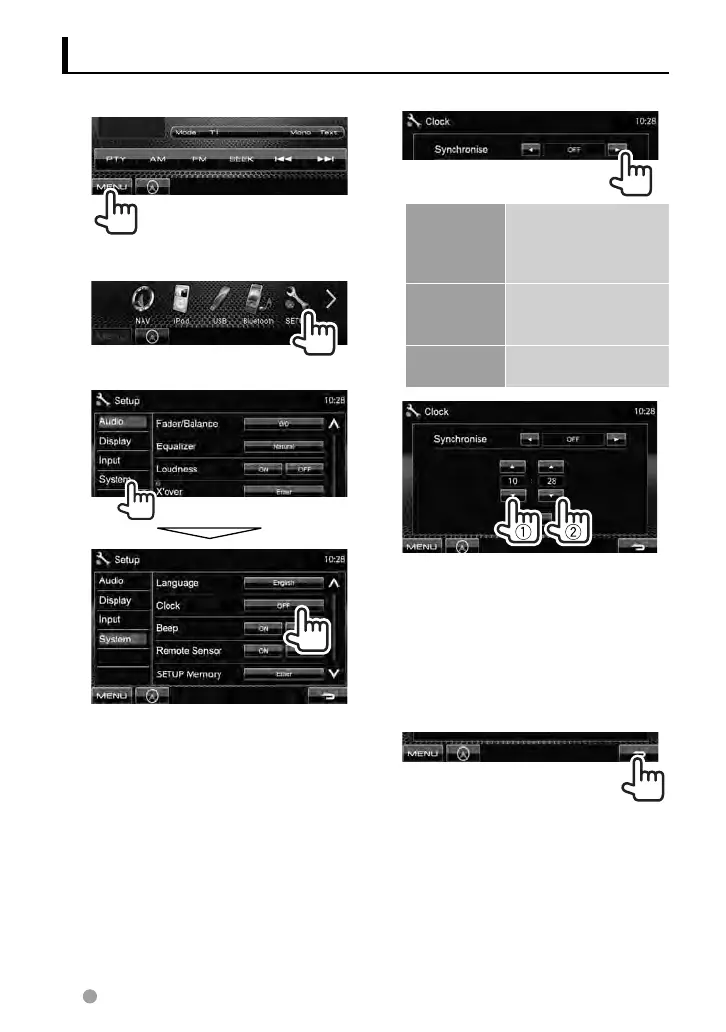
Setting the clock
1 Display <Top Menu> screen.
2 Display <Setup> screen.
3
4 Set the clock time.
<NAV> *
Synchronizes the
clock time with the
connected navigation
unit.
<Radio Data
System>
Synchronizes the clock
time with FM Radio
Data System .
<OFF> Sets the clock manually.
(☞ below)
1
Adjust the hour
2
Adjust the minute
[Reset]: Sets the minute to “00.”
Example:
3:00 – 3:29 = 3:00
3:30 – 3:59 = 4:00
5 Finish the procedure.
* Appears only when the navigation unit is
connected.
EN_LVT2269-001A_EQ.indb 10EN_LVT2269-001A_EQ.indb 10 11/11/28 10:0811/11/28 10:08



 To Next Page