English 47
3
4
Cancel
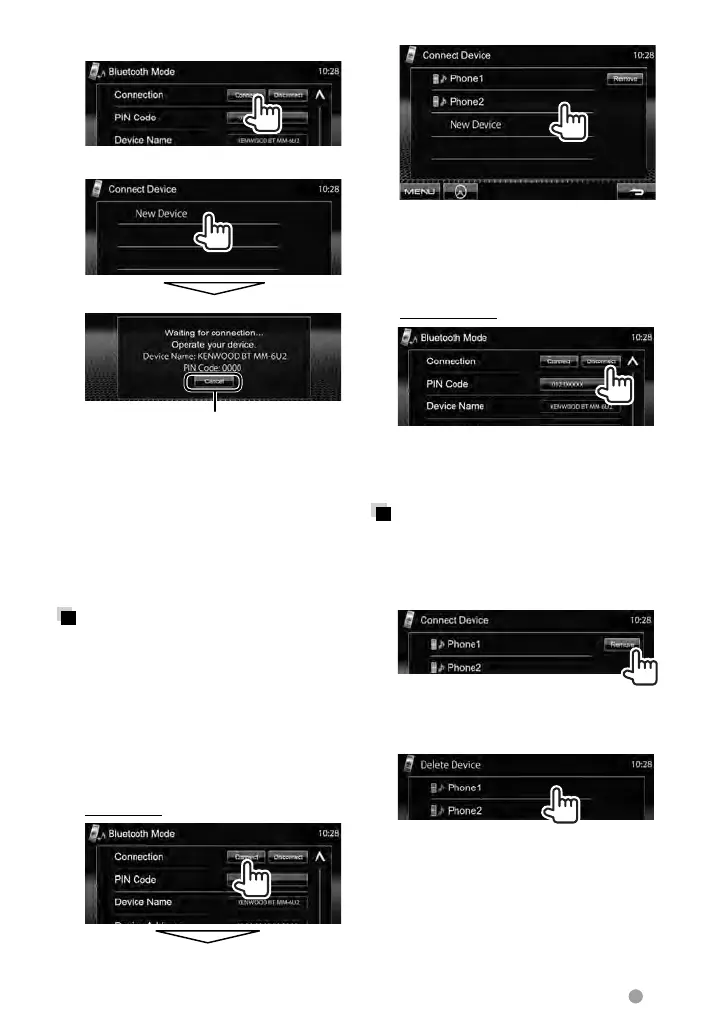
5 Operate the Bluetooth device
to connect.
“Connected” appears. Press [OK] to
confirm the operation.
Now connection is established and you
can use the Bluetooth device through
the unit.
Connecting/disconnecting a
registered Bluetooth device
1 Display the Bluetooth setting
screen. (☞ page 46)
• For Bluetooth mobile phone:
<Handsfree Mode>
• For Bluetooth audio player:
<Bluetooth Mode>
2 To connect
Select the device you want to connect.
• All registered devices (mobile phone
and audio player) are listed on
<Connect Device>.
– Selectable items depend on the
device you are operating.
To disconnect
A confirmation message appears. Press
[Ye s ].
Deleting a registered
Bluetooth device
1 On <Connect Device> (☞ Step 2 on
the left column):
2 Select a device to delete the
registration.
Confirmation message appears. Press
[Ye s ].
EN_LVT2269-001A_EQ.indb 47EN_LVT2269-001A_EQ.indb 47 11/11/28 10:0811/11/28 10:08



 To Next Page