English 11
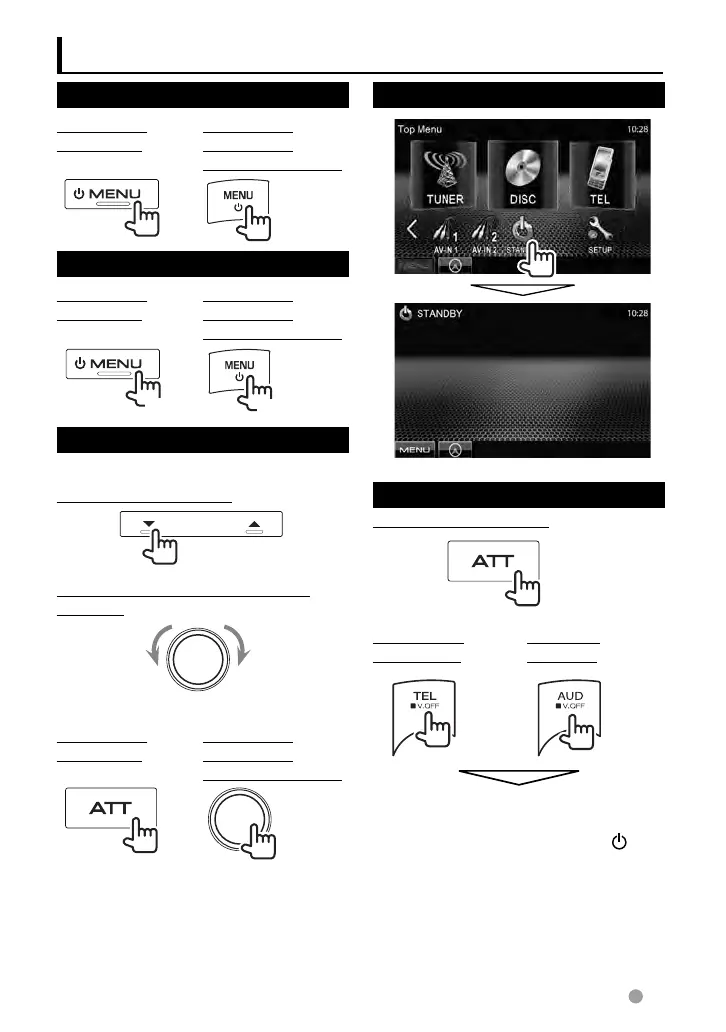
Turning on the power
DDX6021BT/
DDX6051BT
DDX4021BT/
DDX4051BT/
DDX3021/DDX3051
Turning off the power
DDX6021BT/
DDX6051BT
DDX4021BT/
DDX4051BT/
DDX3021/DDX3051
(Hold)
(Hold)
Adjusting the volume
To adjust the volume (00 to 35)
DDX6021BT/DDX6051BT
IncreaseDecrease
DDX4021BT/DDX4051BT/DDX3021/
DDX3051
IncreaseDecrease
To attenuate the sound
DDX6021BT/
DDX6051BT
DDX4021BT/
DDX4051BT/
DDX3021/DDX3051
The ATT indicator lights up.
To cancel the attenuation, press the ATT
button ( DDX6021BT/DDX6051BT ) or VOL/ATT
knob ( DDX4021BT/DDX4051BT/DDX3021/
DDX3051 ) again.
Common operations
Putting the unit in standby
Turning off the screen
DDX6021BT/DDX6051BT
(Hold)
DDX4021BT/
DDX4051BT
DDX3021/
DDX3051
(Hold) (Hold)
The screen is turned off.
To turn on the screen, press MENU/
.
EN_LVT2269-001A_EQ.indb 11EN_LVT2269-001A_EQ.indb 11 11/11/28 10:0811/11/28 10:08



 To Next Page