6 DDX6021BT/DDX6051BT/DDX4021BT/DDX4051BT/DDX3021/DDX3051
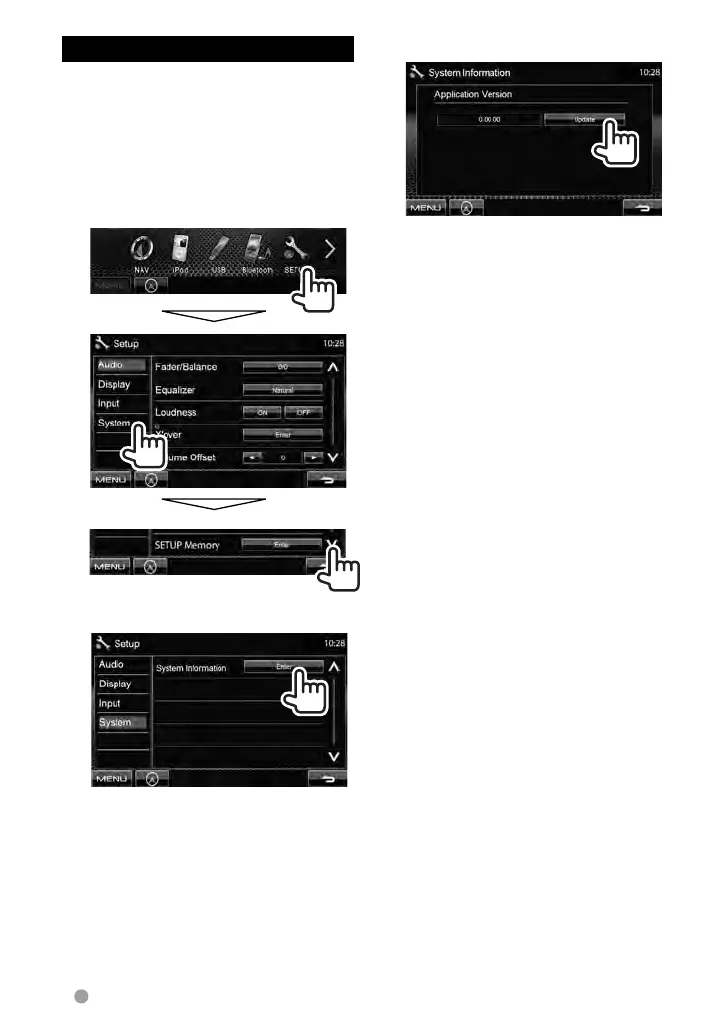
Updating the system
You can update the system by connecting a
USB device containing the update file.
1 Create an update file, copy it
to a USB device, and connect
it to the unit.
To connect a USB device, ☞ page 70 .
2 On <Top Menu>:
3
4
It may take a while.
If the update has been complete
successfully, “Update Completed”
appears. Reset the unit.
* If the update has failed, turn the power off
and then on, and retry the update.
* Even if you have turned off the power
during update, you can restart the update
after the power is turned on. The update
will be performed from the beginning.
EN_LVT2269-001A_EQ.indb 6EN_LVT2269-001A_EQ.indb 6 11/11/28 10:0811/11/28 10:08



 To Next Page