English 13
*
1
*
2
NAV
*
3
(☞ page 32)
Displays the navigation screen when a navigation unit is
connected.
DISC
(☞ page 14)
Plays a disc.
TEL
*
4
(☞ page 49)
Displays the Bluetooth mobile phone setting screen.
USB
(☞ page 21)
Plays files on a USB device.
iPod
*
5
(☞ page 23)
Plays an iPod/iPhone.
TUNER
(☞ page 26)
Switches to the radio broadcast.
AV-IN 1/AV-IN 2
*
5
(☞ page 31)
Switches to an external component connected to AV-IN
input terminal.
Bluetooth
*
4
(☞ page 53)
Plays a Bluetooth audio player.
*
1
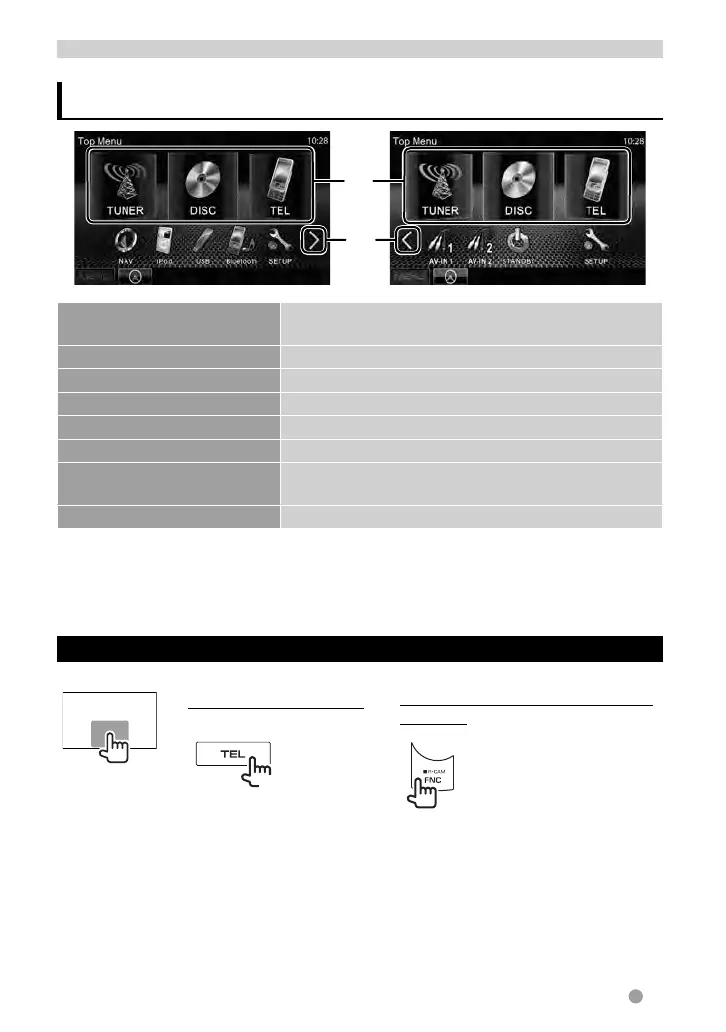
You can select 3 items to be displayed in this area. (☞ page 41)
*
2
Switches between the previous and next pages.
*
3
When no navigation unit is connected, “No Navigation” appears.
*
4
Only for DDX6021BT/DDX6051BT/DDX4021BT/DDX4051BT .
*
5
Select an appropriate input setting on <AV Input>. (☞ page 42)
Displaying the source control screen
On each playback screen, perform the following:
or
DDX6021BT/DDX6051BT
DDX4021BT/DDX4051BT/DDX3021/
DDX3051
(Hold)
• For DDX6021BT/DDX6051BT , pressing and holding TEL hides the operation buttons. For
DDX4021BT/DDX4051BT/DDX3021/DDX3051 , pressing FNC/R-CAM hides the operation
buttons.
• The operation buttons disappear by touching the screen or when no operation is done for
about 5 seconds.
AV SOURCE OPERATIONS
Selecting the playback source
EN_LVT2269-001A_EQ.indb 13EN_LVT2269-001A_EQ.indb 13 11/11/28 10:0811/11/28 10:08



 To Next Page