English 35
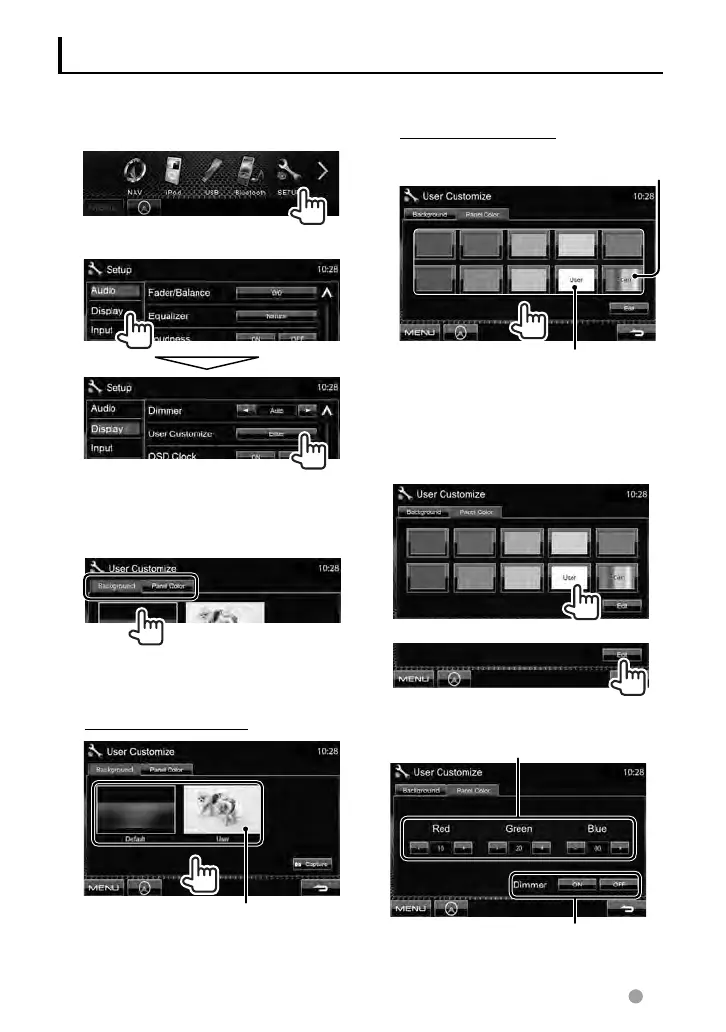
To select a panel color
For making your own color
adjustment,
☞ below
Variable color illumination
• Illumination color changes gradually.
Making your own color adjustment
• You can make your own color adjustment
only when <User> is selected.
1
2
3
User color adjuster: You can make your
own color adjustment stored in <
User>
Dimmer setting: You can make the color
adjustment for each dimmer setting
1 On <Top Menu>:
2
3 Select an item to change
(<Background> or <Panel
Color>).
4 Select a background/panel
color.
To select a background
For setting your favorite scene as
the background,
☞ page 36
Changing the display design
You can change the background and panel color.
EN_LVT2269-001A_EQ.indb 35EN_LVT2269-001A_EQ.indb 35 11/11/28 10:0811/11/28 10:08



 To Next Page