English 53
• To register a new device, ☞ page 46.
• To connect/disconnect a device, ☞ page 47.
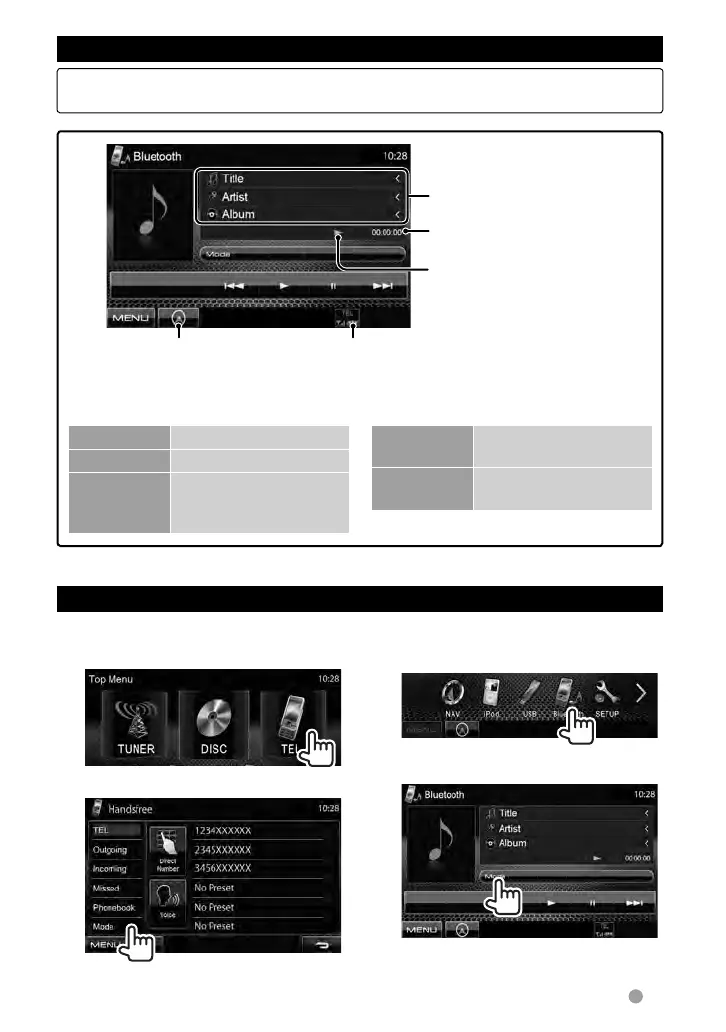
Using the Bluetooth audio player
For Bluetooth mobile phone:
1 On <Top Menu>:
2
For Bluetooth audio player:
1 On <Top Menu>:
2
Tag data (current track title/
artist name/album title) *
• Pressing [<] scrolls the text if
not all of the text is shown.
Battery reminder (only when the information
comes from the device)
Playback status *
(3: play / 8: pause)
Playing time *
☞ page 32
• The operation buttons, indications and information displayed on the screen differ
depending on the connected device.
[3] Starts playback.
[8] Pauses.
[4][¢] • Selects track. (Press)
• Reverse/forward
search* (Hold)
[Mode] Displays the Bluetooth
setting screen. (☞ below)
[MENU] Displays <Top Menu>
screen.
* Available only for the devices compatible with AVRCP 1.3.
Bluetooth device settings
EN_LVT2269-001A_EQ.indb 53EN_LVT2269-001A_EQ.indb 53 11/11/28 10:0811/11/28 10:08



 To Next Page