English 33
Sound adjustment
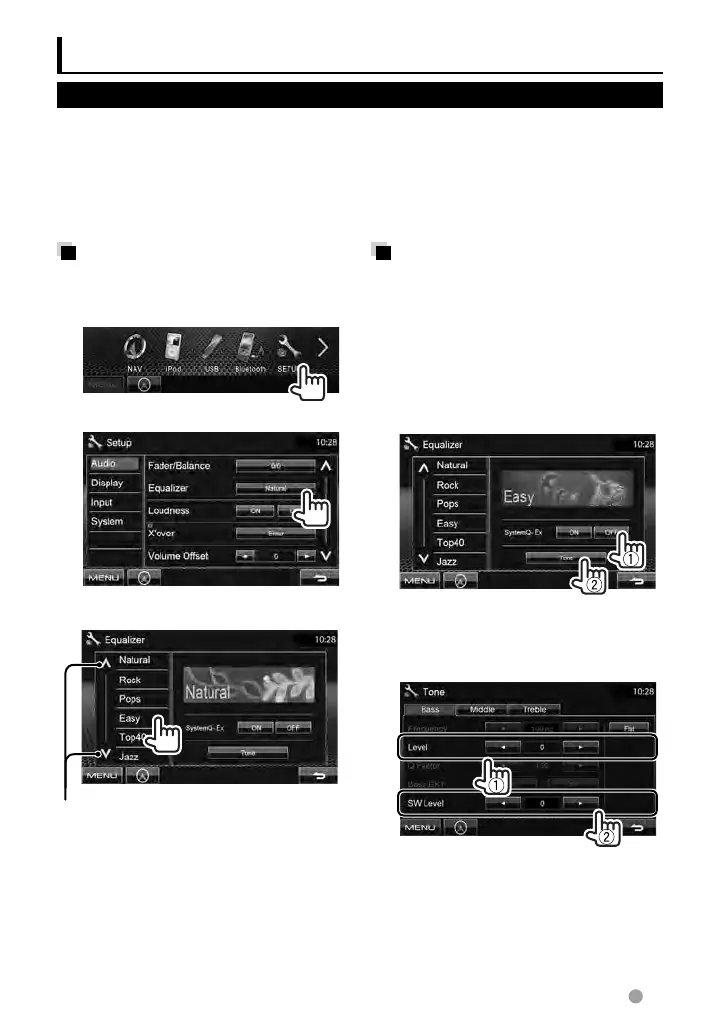
Selecting a preset sound
mode
1 On <Top Menu>:
2
3 Select a sound mode.
Changes the page
Storing your own
adjustment
Customizing preset sound mode
1 Select a sound mode. (☞
“Selecting a preset sound mode”)
2 Set <SystemQ- Ex> to <OFF>
(1), then press [Tone] (2).
3 Adjust the level of each band
(1), then select the subwoofer
level * (2).
The adjustments are stored and <User>
is activated.
*
Adjustable only when the subwoofer is activated.
(
☞ page 40)
Using the sound equalization
• The adjustment is memorized for each source until you adjust the sound again. If the source
is a disc, the adjustment is stored for each of the following categories.
– DVD/DVD-VR
– VCD/CD
– DivX/MPEG1/MPEG2/MP3/WMA/WAV/AAC
• You cannot adjust the sound when the unit is in standby.
EN_LVT2269-001A_EQ.indb 33EN_LVT2269-001A_EQ.indb 33 11/11/28 10:0811/11/28 10:08



 To Next Page