72 DDX6021BT/DDX6051BT/DDX4021BT/DDX4051BT/DDX3021/DDX3051
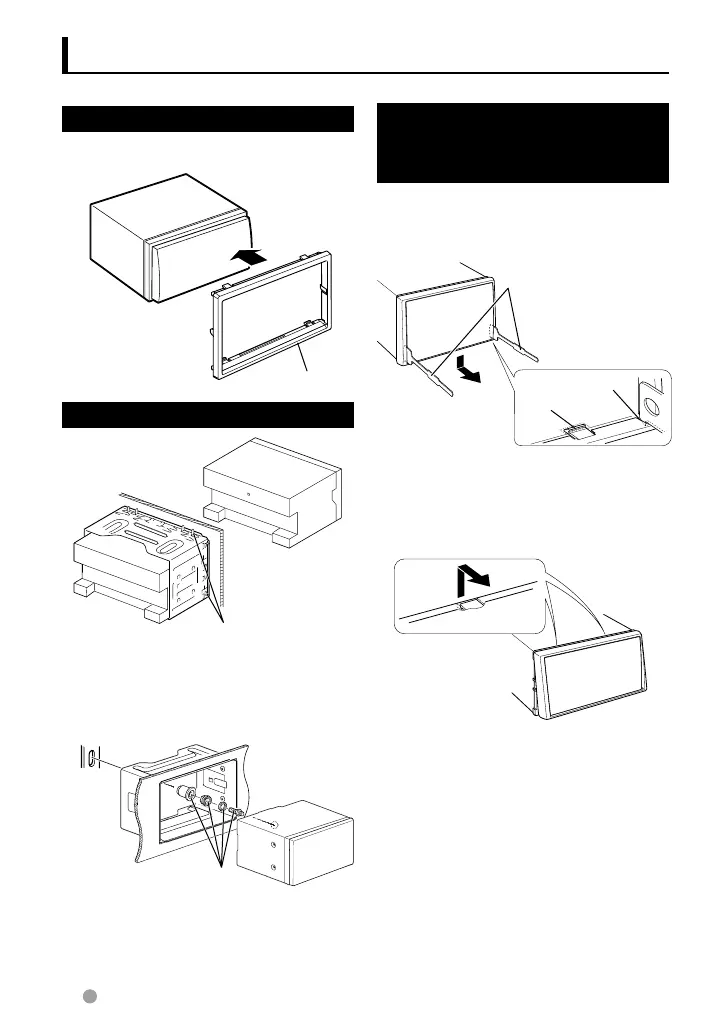
Installing the Escutcheon
1 Attach accessory 3 to the unit.
A
ccessory
3
Installing the Unit
B
end the tabs of the mounting sleeve
with a screwdriver or similar utensil and
attach it in place.
For more stable attachment the unit (DDX6051BT/
DDX6021BT only)
B
racket
A
ccessory
6
⁄
• Make sure that the unit is installed securely in
place. If the unit is unstable, it may malfunction
(eg, the sound may skip).
Removing the Escutcheon
(DDX4021BT/DDX4051BT/
DDX3021/DDX3051 only)
1 Engage the catch pins on the removal tool
4 and remove the two locks on the lower
level. Lower the frame and pull it forward as
shown in the figure.
A
ccessory
4
L
ock
C
atch
⁄
• The frame can be removed from the top side in
the same manner.
2 When the lower level is removed, remove
the upper two locations.
Installing/Removing the Unit
EN_LVT2269-001A_EQ.indb 72EN_LVT2269-001A_EQ.indb 72 11/11/28 10:0811/11/28 10:08



 To Next Page