English 49
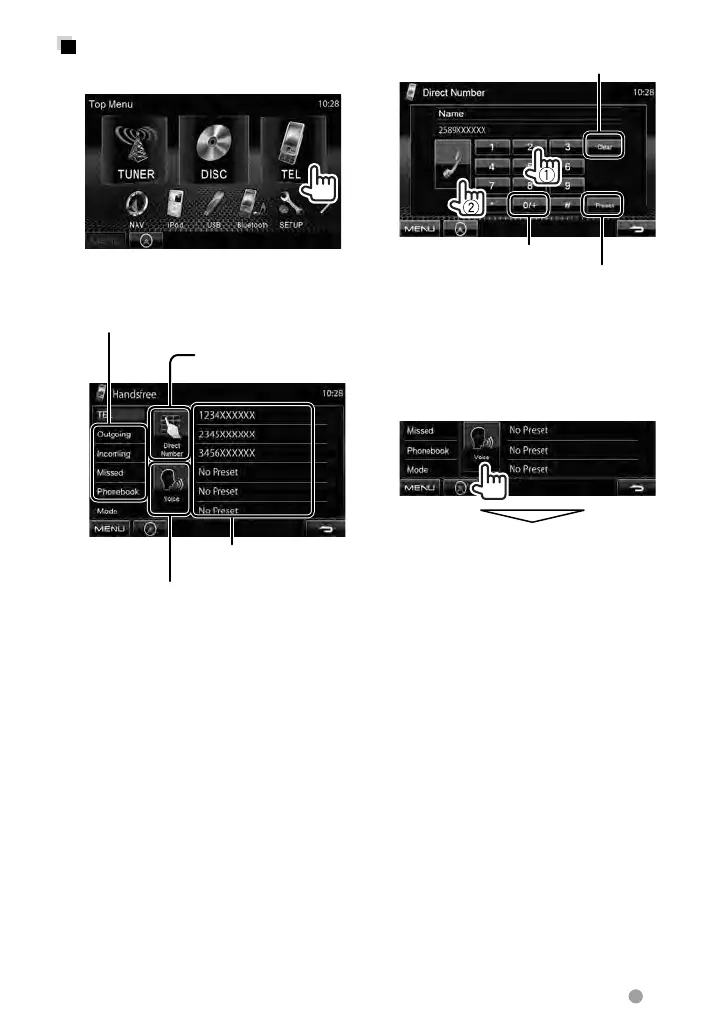
Direct number entry
Hold: Adds “+”
Deletes last character
Presets the entered phone number on the
preset list (
☞ page 51)
• You can enter up to 32 numbers.
Voice Dialing
• Available only when the connected mobile
phone has the voice recognition system.
Speak the name you want to call.
To cancel, press [Cancel].
Making a call
1 On <Top Menu>:
2 Select a method to make a
call.
Preset list (For presetting,
☞ page 51)
Direct number entry
(
☞the right column)
Voice dialing (☞ the right column)
Phonebook/Call lists (
☞ page 50)
EN_LVT2269-001A_EQ.indb 49EN_LVT2269-001A_EQ.indb 49 11/11/28 10:0811/11/28 10:08



 To Next Page