English 23
Preparation
• Connect iPod/iPhone. (
☞
page 70 )
• Use the following cables:
–
To watch the video and to listen to the
music (analog): USB Audio and Video
cable for iPod/iPhone—KCA-iP22F/
KCA-
iP202
(optional accessory)
– To listen to the music (digital): USB
Audio cable for iPod/iPhone—KCA-iP102
(optional accessory)
• Do not use extension cables.
iPod/iPhone that can be connected to this
unit:
Made for
– iPod with video
– iPod classic
– iPod nano (6th Generation)
– iPod nano (5th Generation)
– iPod nano (4th Generation)
– iPod nano (3rd Generation)
– iPod nano (2nd Generation)
– iPod nano (1st Generation)
– iPod touch (4th Generation)
– iPod touch (3rd Generation)
– iPod touch (2nd Generation)
– iPod touch (1st Generation)
– iPhone 4
– iPhone 3GS
– iPhone 3G
– iPhone
Listening to the iPod/iPhone device
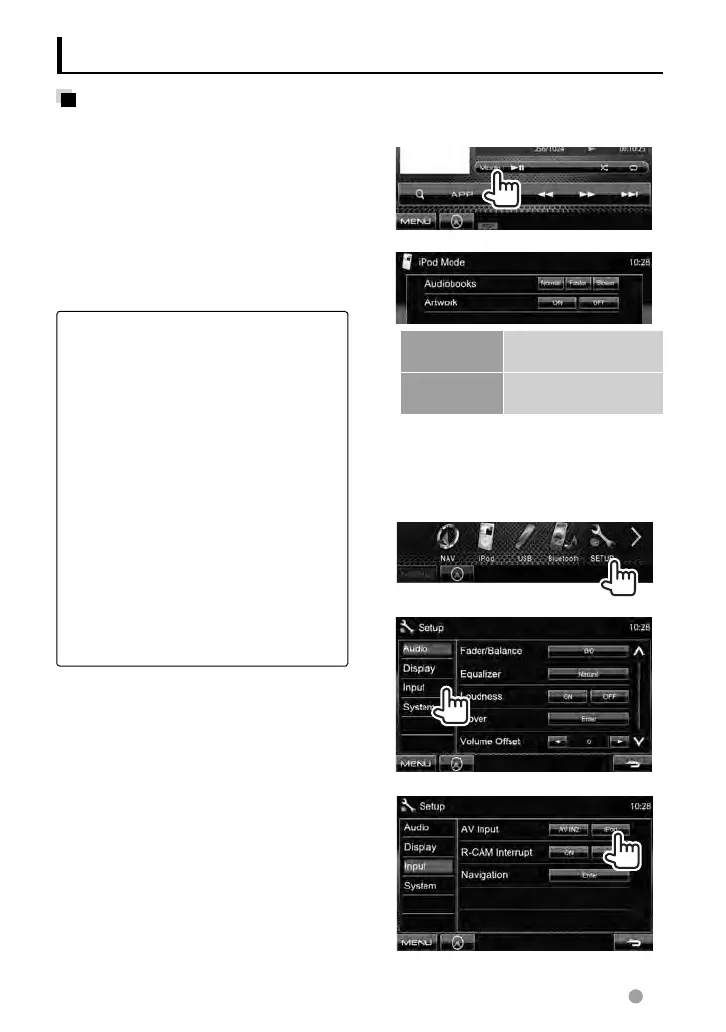
Settings for iPod playback
When the source is “
iPod
”...
1
2
Audiobooks Selects the speed of
audio books.
Artwork Shows/hides the iPod
artwork.
Setting <AV Input>
You can change the setting only when the
unit is in standby.
1 On <Top Menu>:
2
3
EN_LVT2269-001A_EQ.indb 23EN_LVT2269-001A_EQ.indb 23 11/11/28 10:0811/11/28 10:08



 To Next Page