English 71
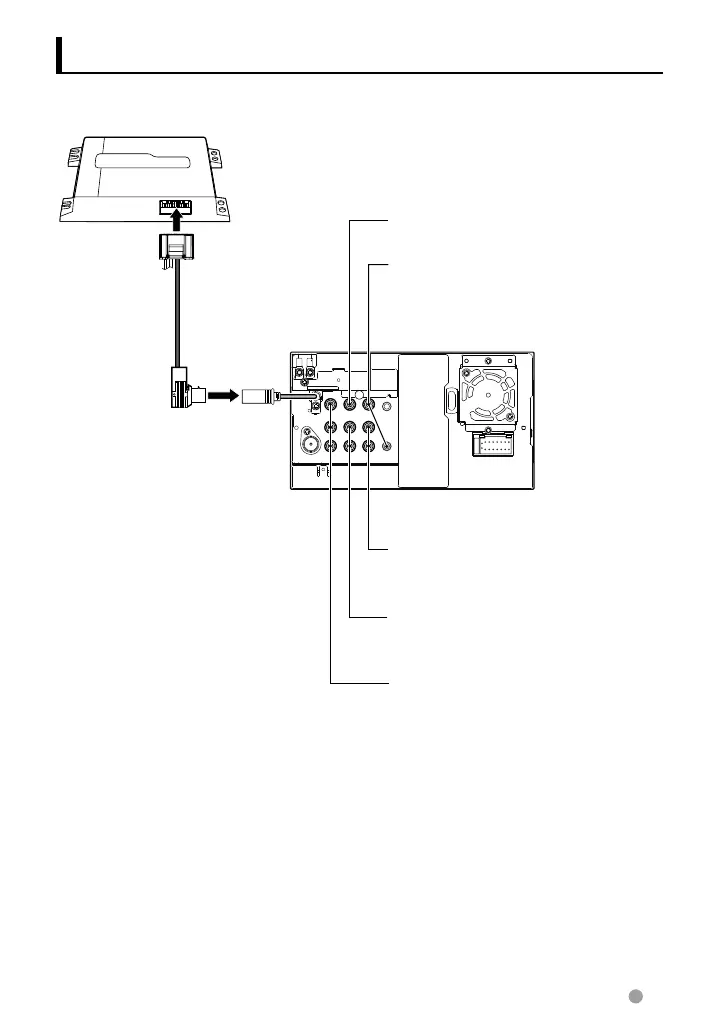
Connecting Other Products
Front Preout
• Audio left output (White)
• Audio right output (Red)
Rear Preout
• Audio left output (White)
• Audio right output (Red)
Rear View Camera Input
• Visual input (Yellow)
Audio/Visual Output
• Visual output (Yellow)
• Audio output (3.5φ mini plug)
Resistance-free stereo type mini plug
Navigation System (Optional Accessory)
C
onnection cable
(
Included in the Navigation System)
N
avigation units that can be connected to this unit.
(
As of December, 2011):
•
KNA-G620T
•
KNA-G630
F
or latest information, access the www.kenwood.com/cs/ce/.
⁄
Audio Visual input 1
• Visual input (Yellow)
• Audio left input (White)
• Audio right input (Red)
EN_LVT2269-001A_EQ.indb 71EN_LVT2269-001A_EQ.indb 71 11/11/28 10:0811/11/28 10:08



 To Next Page