8 DDX6021BT/DDX6051BT/DDX4021BT/DDX4051BT/DDX3021/DDX3051
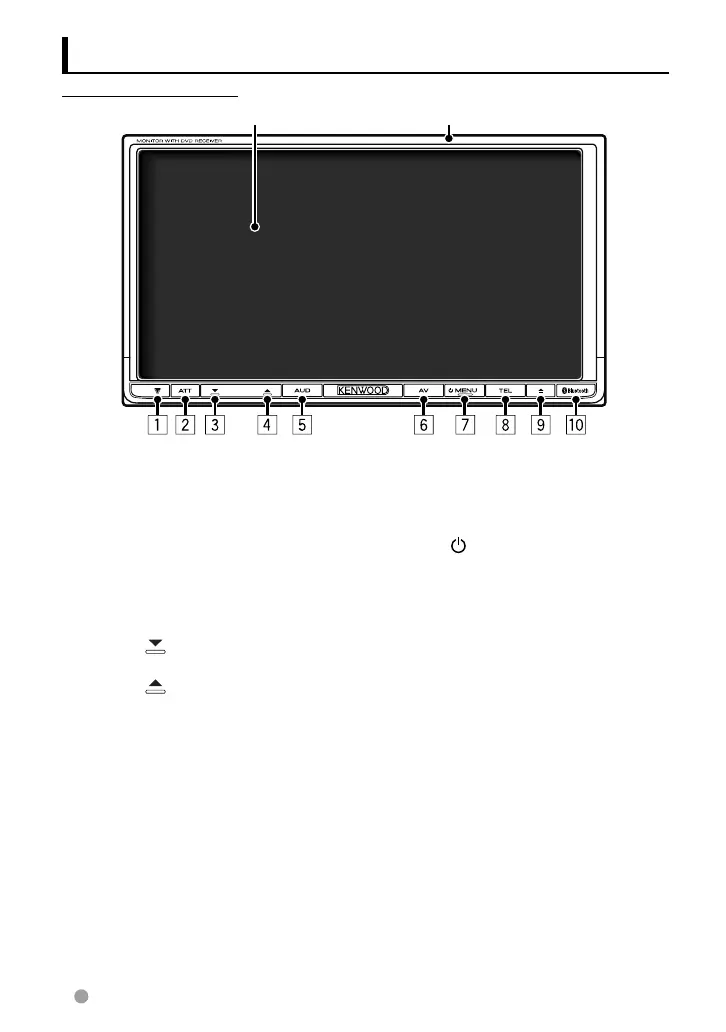
Component names and functions
1 Reset button/Power indicator/Security
indicator
• Resets the unit. (☞ page 3)
• Lights up while the unit is turned on.
• Flashes when the security function is
activated. (☞ page 7)
2 ATT button (Press)
• Attenuates the sound.
V.OFF button (Hold)
• Turns off/on the screen. (☞ page 11)
3 Volume
(down) button (☞ page 11)
• Decreases the volume.
4 Volume (up) button (☞ page 11)
• Increases the volume.
5 AUD button (Press)
• Displays the <Equalizer> screen. (☞
page 33)
R-CAM button (Hold)
• Displays the picture from the rear view
camera.
6 AV button (Press)
• Displays the current source screen.
AV OUT button (Hold)
• Selects the AV source for external
monitor or amplifier.
7 MENU/
button
• Turns off the power. (Hold)
• Turns on the power. (Press)
• Displays the <Top Menu> screen.
(Press) (☞ page 12)
8 TEL button (Press)
• Displays the <Handsfree> screen. (☞
page 46)
FNC button (Hold)
• Displays the source control screen. (☞
page 12)
9 0 (Eject) button
• Ejects the disc (Tilts the monitor panel
fully).
• Opens/Closes the monitor panel.
p Remote sensor
DDX6021BT/DDX6051BT
Screen (Touch panel) Monitor panel
EN_LVT2269-001A_EQ.indb 8EN_LVT2269-001A_EQ.indb 8 11/11/28 10:0811/11/28 10:08



 To Next Page