12 DDX6021BT/DDX6051BT/DDX4021BT/DDX4051BT/DDX3021/DDX3051
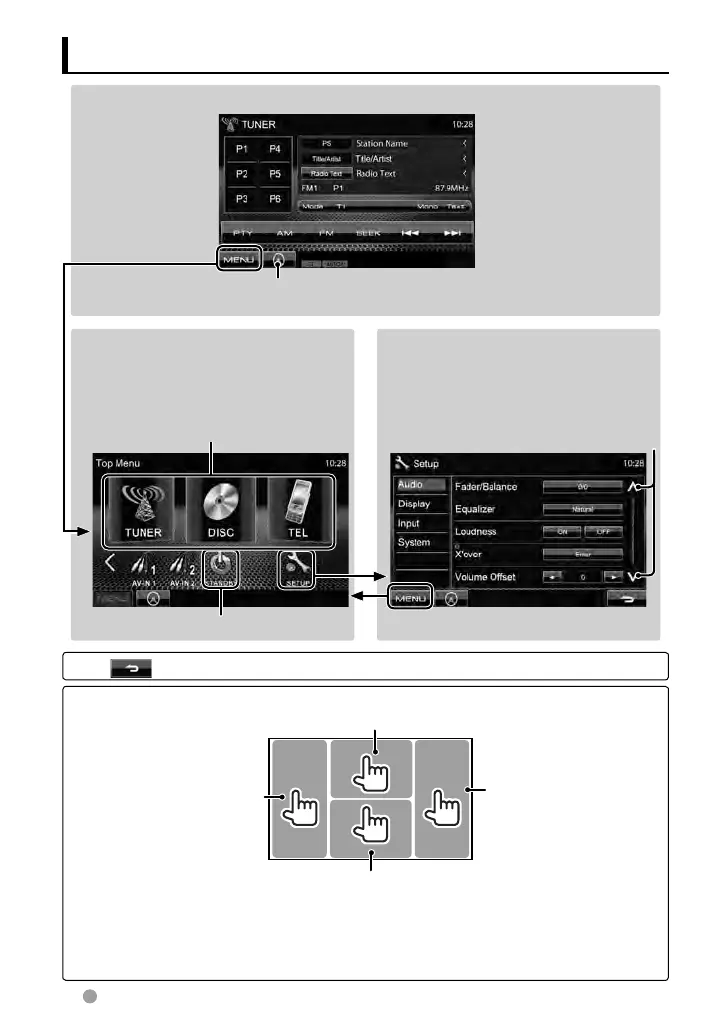
Source control screen
Displays the navigation screen. *
(☞ page 32)
* Appears only when
a navigation unit is
connected.
Press [ ] to return to the previous screen.
Touch screen operation
Displays the source control screen while playing a video.
Goes to the previous
chapter/track.*
Goes to the next chapter/
track.*
Displays the video control menu while playing a video.
• The operation buttons disappear by touching the screen or when no operation is done for
about 5 seconds.
*
Not available for video from an external component and rear view camera.
<Top Menu>
• Changes the AV source.
• Displays the <Setup> screen.
<Setup>
Changes the detailed settings.
Switching screens
Changes the page
☞ page 11
You can select 3 items to be displayed in
this area. (
☞ page 13)
EN_LVT2269-001A_EQ.indb 12EN_LVT2269-001A_EQ.indb 12 11/11/28 10:0811/11/28 10:08



 To Next Page