English 39
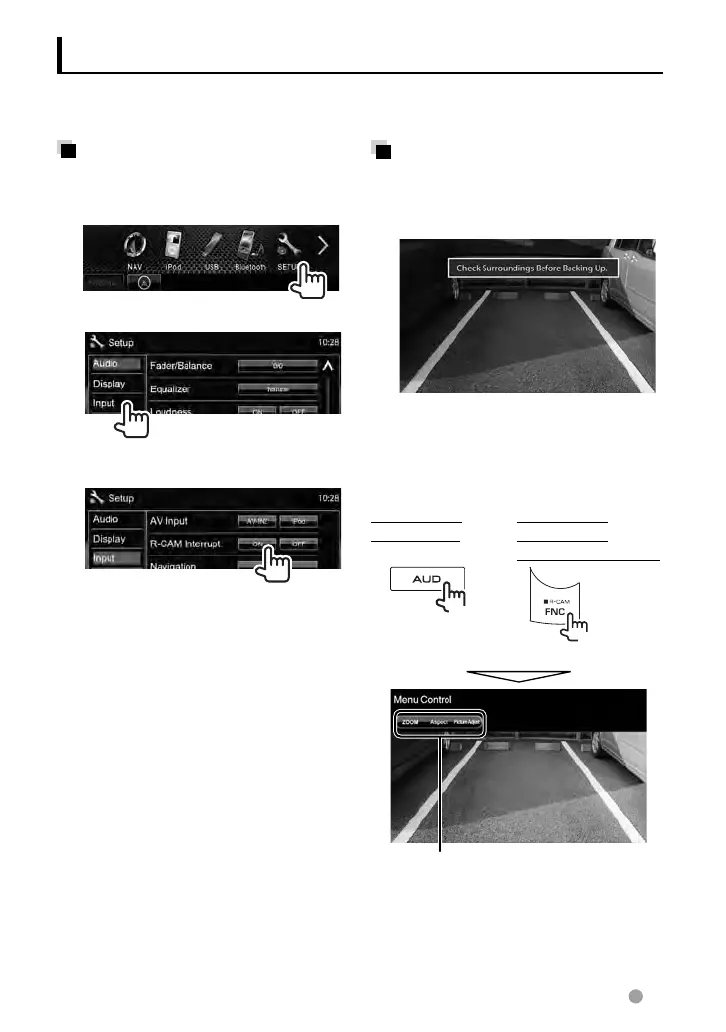
Activating the rear view
camera
1 On <Top Menu>:
2
3
To deactivate, select <OFF>.
Using a rear view camera
• To use a rear view camera, the REVERSE lead connection is required. For connecting a rear
view camera, ☞ page 71 .
Displaying the picture from
the rear view camera
The rear view screen is displayed when you
shift the gear to the reverse (R) position.
• To erase the caution message, touch the
screen.
To display the picture from the rear
view camera manually
DDX6021BT/
DDX6051BT
DDX4021BT/
DDX4051BT/
DDX3021/DDX3051
(Hold)
(Hold)
When displaying the picture from the rear
view camera manually, you can change the
setting of the picture. (
☞ page 37)
To cancel the rear view screen, press and
hold the same button again.
EN_LVT2269-001A_EQ.indb 39EN_LVT2269-001A_EQ.indb 39 11/11/28 10:0811/11/28 10:08



 To Next Page