24 DDX6021BT/DDX6051BT/DDX4021BT/DDX4051BT/DDX3021/DDX3051
• When you turn on this unit, the iPod/
iPhone is charged through the unit.
• The text information may not be displayed
correctly.
iPod/iPhone playback operations
To display the source control screen, ☞ page 13.
• Select “
iPod
” as the source. (☞ page 13)
• The operations explained in this manual are under the condition when the unit is selected
for controlling playback. (☞ below)
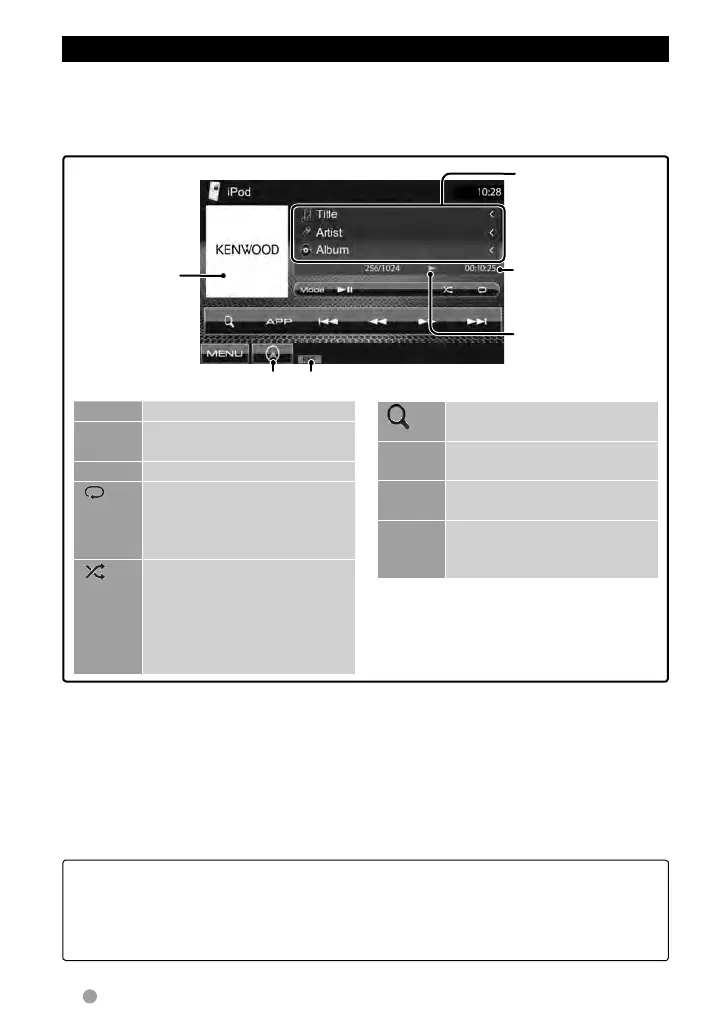
Playback mode
Song/video
information
• Pressing [<] scrolls
the text if not all of
the text is shown.
While playing,
Artwork (the
picture displayed
on the screen
of iPod/iPhone)
is shown if the
song contains the
Artwork.*
1
☞ page 32
Playback status
(3: play / 8: pause )
Playing time
[MENU] Displays <Top Menu> screen.
[Mode] Changes the settings for iPod
playback. (☞ page 23)
[38] Starts/Pauses playback.
[
] Selects Repeat playback
mode. *
2
• REP: Functions the same as
“Repeat One.”
[
]
Selects Random playback
mode. *
2
• RDM: Functions the same as
“Shuffle Songs.”
• A-RDM: Functions the same
as “Shuffle Albums.”
[ ]
Displays the Music/Video menu
on the iPod/iPhone. (☞ page 25)
[4]
[¢]
Selects a track/video.*
3
[1]
[¡]
Reverse/forward search.
[APP] Select iPod to play back using
iPod/iPhone—iPod control
mode.*
4
(☞ page 25)
*
1
For changing the Artwork display setting, ☞
page 23.
*
2
To cancel random or repeat mode, press the
button repeatedly until the indicator disappears.
Not available in iPod control mode. (
☞ page 25)
*
3
You cannot resume playback for video sources.
*
4
When using iPod nano (1st Generation) or iPod
with video, you can control playback only from
the unit.
• For some iPod/iPhone models, the performance may be abnormal or unstable during
operation. In this case, disconnect the iPod/iPhone device, then check its condition.
If the performance is not improved or is slow, reset your iPod/iPhone.
• For the latest compatible list and software version of iPod/iPhone, see:
www.kenwood.com/cs/ce/ipod
EN_LVT2269-001A_EQ.indb 24EN_LVT2269-001A_EQ.indb 24 11/11/28 10:0811/11/28 10:08



 To Next Page