English 73
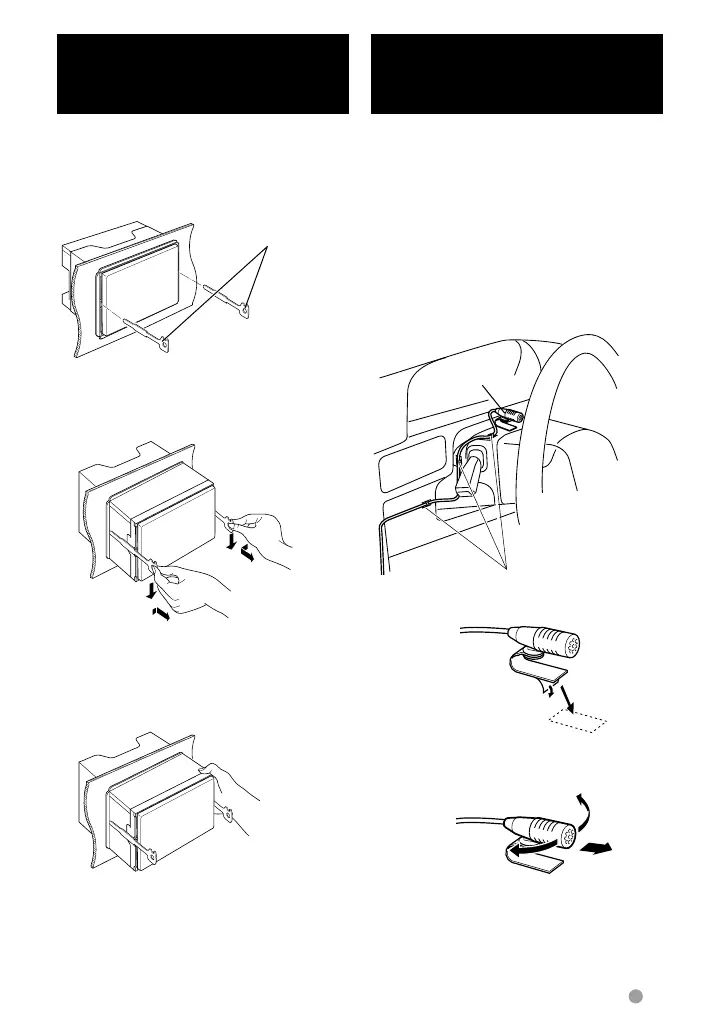
Installing the Microphone Unit
(DDX6021BT/ DDX6051BT/
DDX4021BT/ DDX4051BT only)
1 Check the installation position of the
microphone (accessory 7).
2 Remove oil and other dirt from the
installation surface.
3 Install the microphone.
4 Wire the microphone cable up to the unit
with it secured at several positions using
tape or the like.
⁄
• Install the microphone as far as possible from the
cell-phone.
F
ix a cable with a commercial item of tape.
P
eel the release coated paper of double-face
adhesive tape to fix on the place shown above.
A
djust the direction of the microphone to the driver.
Accessory 7
Removing the Unit
(DDX4021BT/DDX4051BT/
DDX3021/DDX3051 only)
1 Remove the escutcheon by referring to
the removal procedure in the section
<Removing the Escutcheon>.
2 Insert the two removal tools 4 deeply into
the slots on each side, as shown.
A
ccessory
4
3 Lower the removal tool toward the bottom,
and pull out the unit halfway while
pressing towards the inside.
⁄
• Be careful to avoid injury from the catch pins on
the removal tool.
4 Pull the unit all the way out with your
hands, being careful not to drop it.
EN_LVT2269-001A_EQ.indb 73EN_LVT2269-001A_EQ.indb 73 11/11/28 10:0811/11/28 10:08



 To Next Page