English 7
Setting the security function
You can set a security code to protect your
receiver system against theft.
Registering the security code
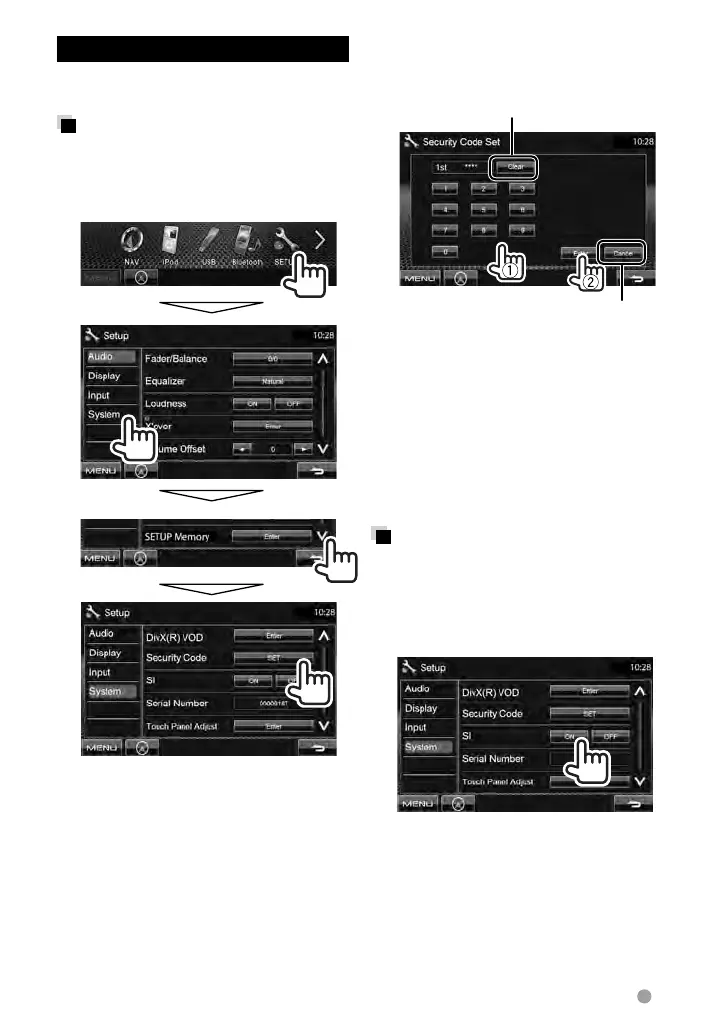
1 Display the security code
setting screen.
On <Top Menu>:
• To clear the registered security code,
perform step
1 and press [CLR] in
<Security Code>.
2 Enter a four-digit number (1),
then confirm the entry (2).
Cancels the setting
Deletes the last entry
3 Repeat step 2 to confirm your
security code.
Now, your security code is registered.
• When the unit is being reset or
disconnected from battery, you are
required to enter the security code. Enter
the correct security code, then press
[Enter].
Activating the security
function
You can activate the security indicator to
protect your receiver system against theft.
On <Setup>:
The security indicator on the monitor
panel flashes when the vehicle ignition
is off.
To cancel, select <OFF>.
EN_LVT2269-001A_EQ.indb 7EN_LVT2269-001A_EQ.indb 7 11/11/28 10:0811/11/28 10:08



 To Next Page