44 DDX6021BT/DDX6051BT/DDX4021BT/DDX4051BT/DDX3021/DDX3051
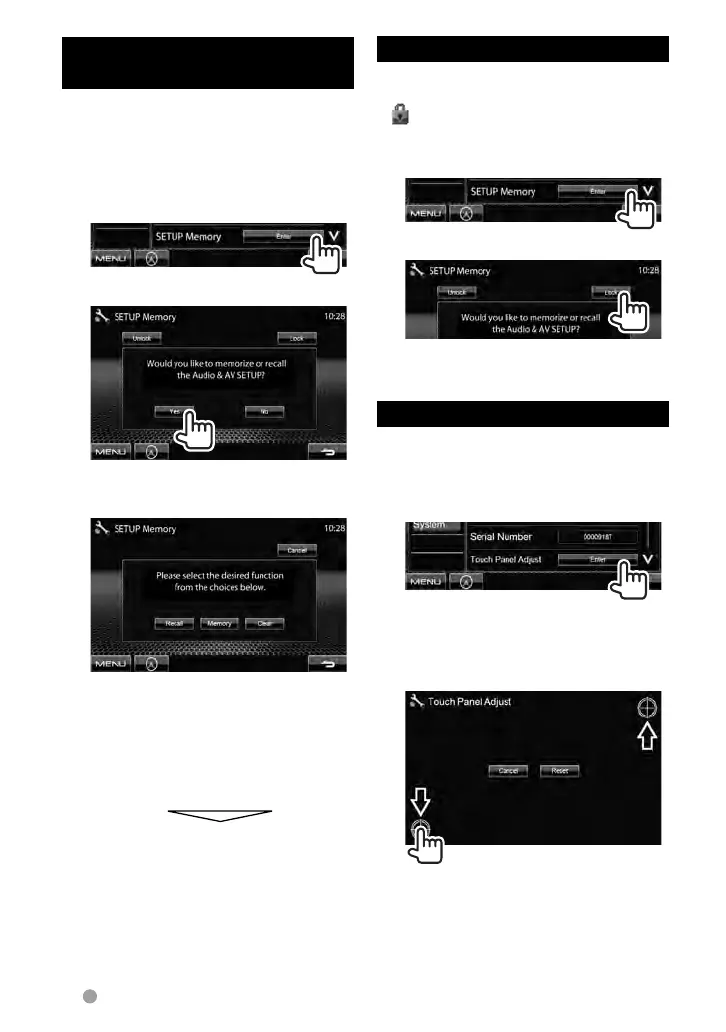
Memorizing/recalling the
settings
You can memorize the settings changed
in the <Setup> menu and recall the
memorized settings anytime.
• The memorized settings are kept even
when the unit is reset.
1 On <Setup>:
2
• To cancel, press [No].
3 Select an operation.
[Recall]: Recalls the memorized settings.
[Memory]: Memorizes the current
settings.
[Clear]: Clears the currently memorized
settings.
• To cancel, press [Cancel].
Confirmation message appears. Press
[Ye s ].
Locking the settings
You can lock the settings to prevent them
from being changed.
•
is shown beside the settings that can
be locked.
1 On <Setup>:
2
To unlock the setting, press [Unlock].
Adjusting the touch position
You can adjust the touch position on the
touch panel if the position touched and the
operation performed do not match.
1 On <Setup>:
2 Touch the center of the marks
at the lower left and at the
upper right as instructed.
• To cancel the current operation, press
[Cancel].
• To reset to the initial setting, press
[Reset].
EN_LVT2269-001A_EQ.indb 44EN_LVT2269-001A_EQ.indb 44 11/11/28 10:0811/11/28 10:08



 To Next Page