50 DDX6021BT/DDX6051BT/DDX4021BT/DDX4051BT/DDX3021/DDX3051
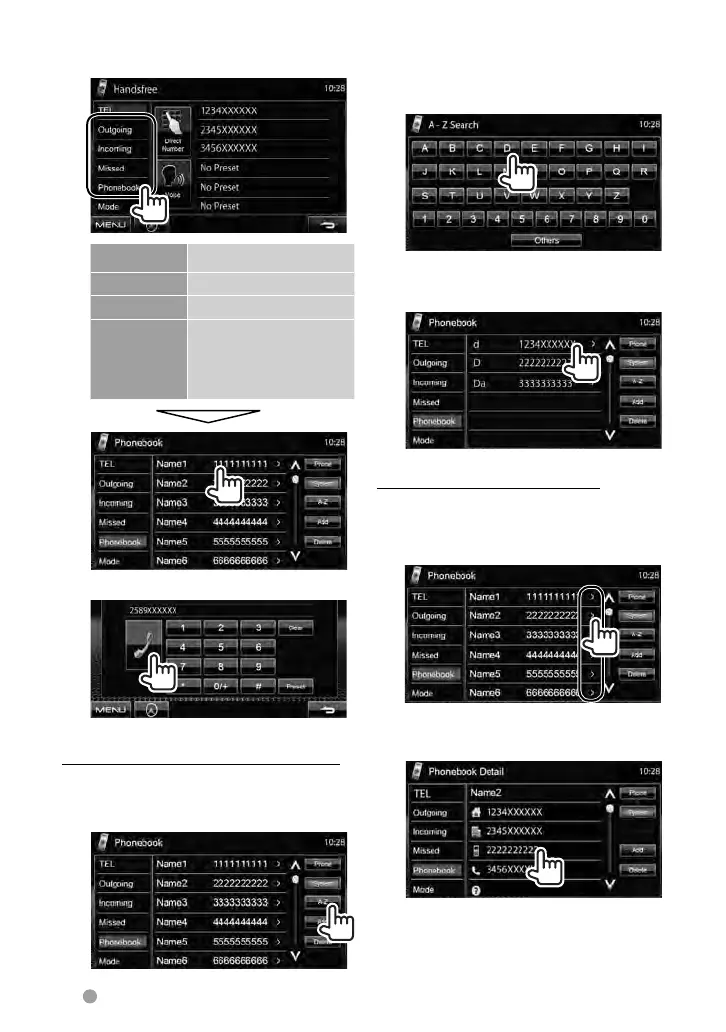
Using the phonebook/call lists
1
Outgoing
From dialled call list.
Incoming From received call list.
Missed From missed call list.
Phonebook From phonebook.
• For copying the
phonebook, ☞ page
51.
2
To use the A-Z search on the phonebook
When <Phonebook> is selected, you can
search by initial.
1
2 Select the initial. If the initial
is not a letter or number, press
[Others].
3 Select a phone number from
the list.
To display the details of an entry
When <Phonebook> is selected...
1 Press the right arrow icon of
an entry.
2 To make a call, select a phone
number.
EN_LVT2269-001A_EQ.indb 50EN_LVT2269-001A_EQ.indb 50 11/11/28 10:0811/11/28 10:08



 To Next Page