PLE-BA-e-0812
33
Ö Confirm settings by pressing the button. Balance jumps back to sub-
menu 4.1.FFun.
Return to weighing mode:
Ö Press the button repeatedly until the "SAVE"? inquiry appears.
Confirm the inquiry by pressing the button to save the changes and to
return to Weighing mode.
-or-
press the button to return to Weighing mode without saving.
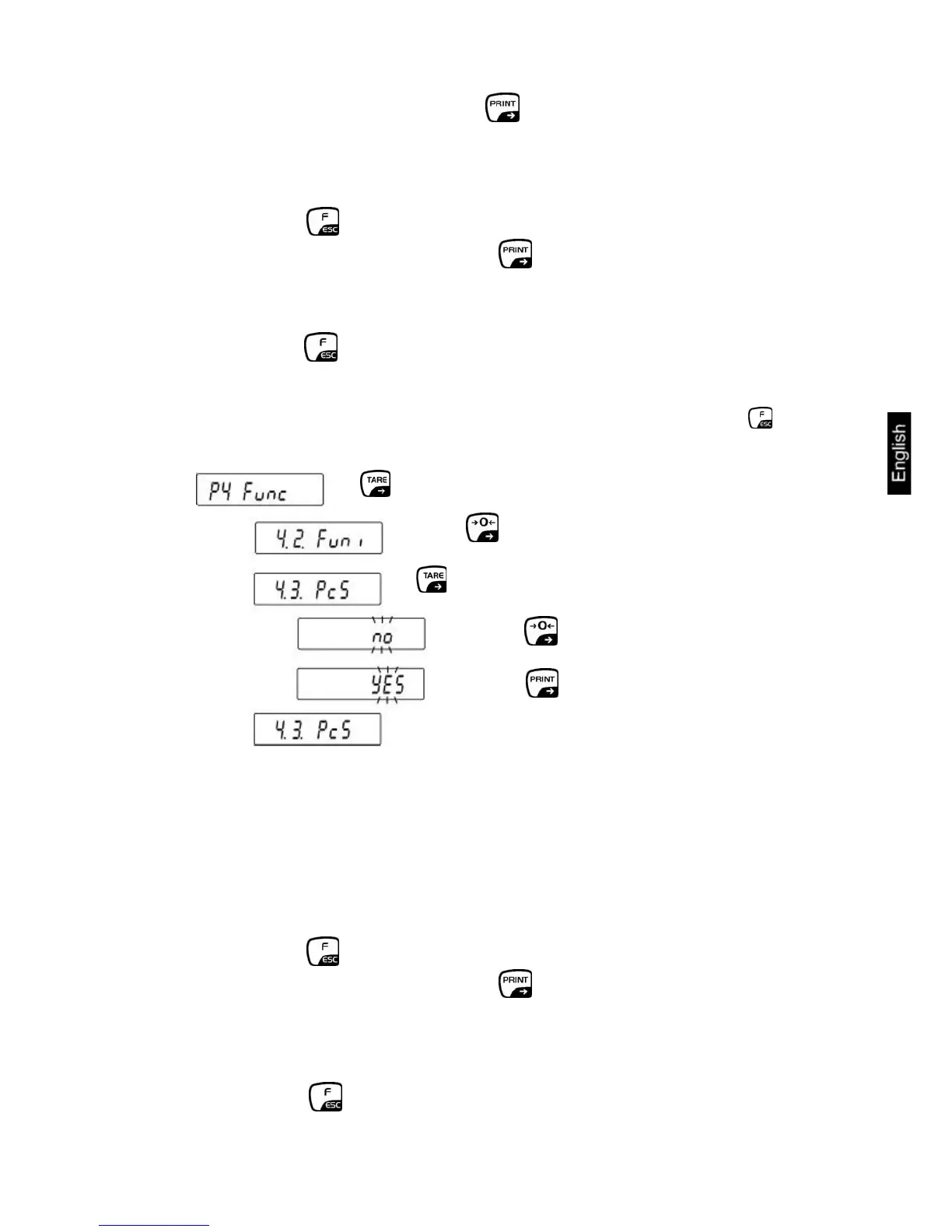
13.1 Settings for Function P4.1 FFun "ALL"
The selection of the menu items, which can then be called up by pressing the
button, is made at this point.
⇒ Choose
⇒ Confirm
⇒ Press repeatedly.
⇒
⇒
no = Function deactivated
YES = Function activated
Please repeat this sequence of operations for any other operating mode available.
Return to weighing mode:
Ö Press the button repeatedly until the "SAVE"? inquiry appears.
Confirm the inquiry by pressing the button to save the changes and to
return to Weighing mode.
-or-
press the button to return to Weighing mode without saving.


 To Next Page