PLE-BA-e-0812
44
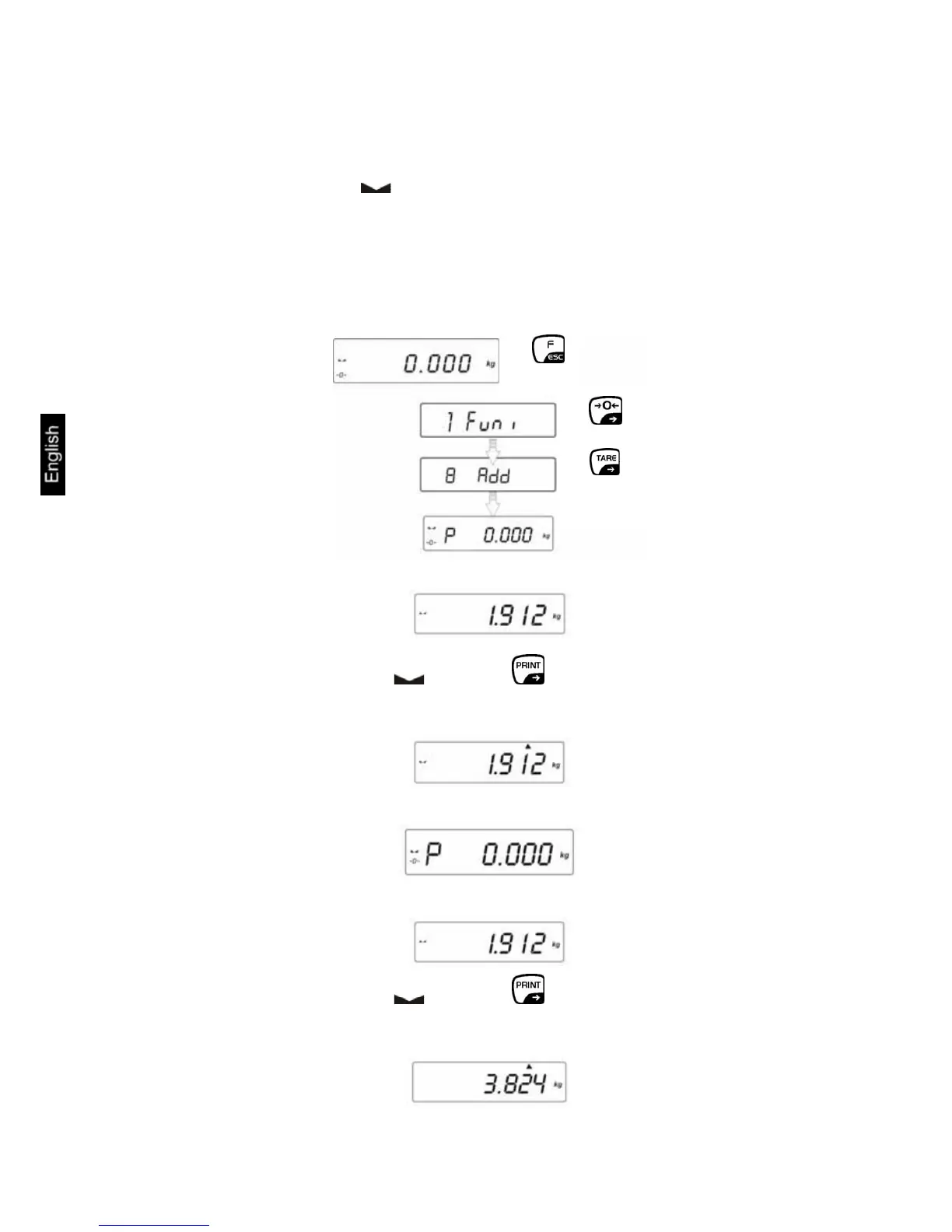
13.7 Totalising of display values (Function P4.9 Add)
Any number or individual weighings are automatically added to a total, e.g. all
individual weighings of a batch.
When the standstill control ( ) is complete the weighing value is automatically
issued to the optional printer. The displayed value is added into the total adding
memory. Afterwards automatic taring will take place. This is repeated newly every
subsequent time a new sample is placed on the balance. When the last single
weighing process is finished, press the [ON/OFF] key to receive the total sum
("TOTAL=").
• Call function
⇒
⇒
⇒
Ö Deposit weight A
Ö After successful stop check ( ) press the button. The display value is
added to the totalising memory (Symbol "▲" pops up top right) and output to the
optional printer.
Ö Remove weight and the balance returns to zero
Ö Put on weight B
Ö After successful stop check ( ) press the button. The total of both
weighing processes appears (Symbol "▲" pops up top right) The result is output
to the optional printer.


 To Next Page