Voice Edit
https://www.ketron.it/images/ketron/Manuali_HTML/SD40/english/53_voice_edit.html[13/05/2020 17:07:12]
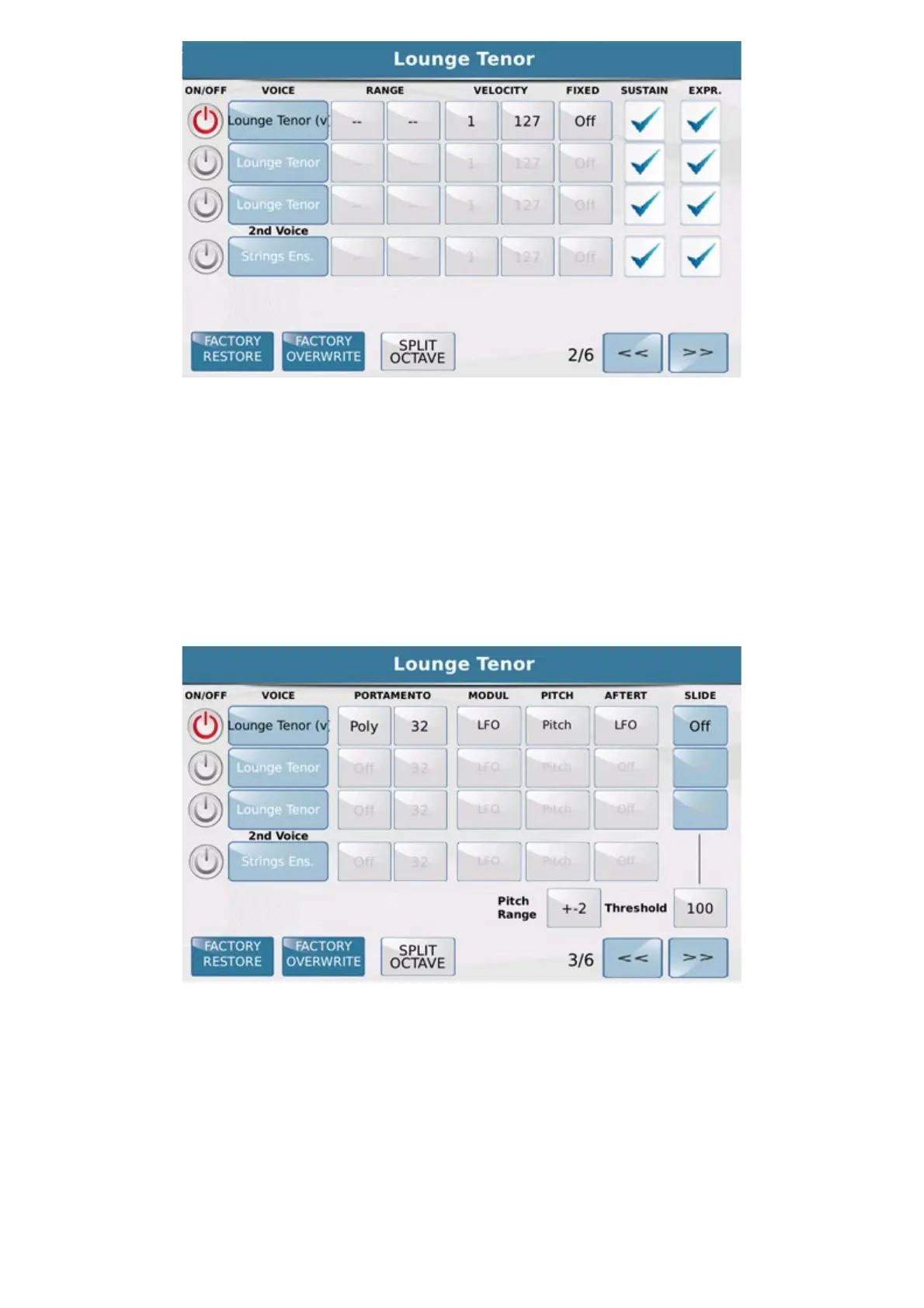
On the second Edit page you may set the RANGE of the sound assigned to each layer by setting the lowest and
highest notes.
Your may set the VELOCITY key range in the same way by entering the minimum and maximum values for
each layer. In this way, the keyboard keys will play different sounds depending on the pressure on the keyboard
keys. If you set a fixed Velocity Key value, this value may be set in the
FIXED box independently for each
layer.
Finally, you may enable the
SUSTAIN and EXPRESSION pedal for the layer.
On the third page you may set for each layer the parameters of the PORTAMENTO effect (Portamento
On/Off and speed), the parameters of MODULATION (you may decide to which functions the Pitch Bend
and Modulation wheel is applied), and the parameters of the PITCH and AFTERTOUCH. The
SLIDE function is also available for the first three layers, where you may set the Threshold value, namely the
efficiency threshold of the slide.



 To Next Page