Voice Edit
https://www.ketron.it/images/ketron/Manuali_HTML/SD40/english/53_voice_edit.html[13/05/2020 17:07:12]
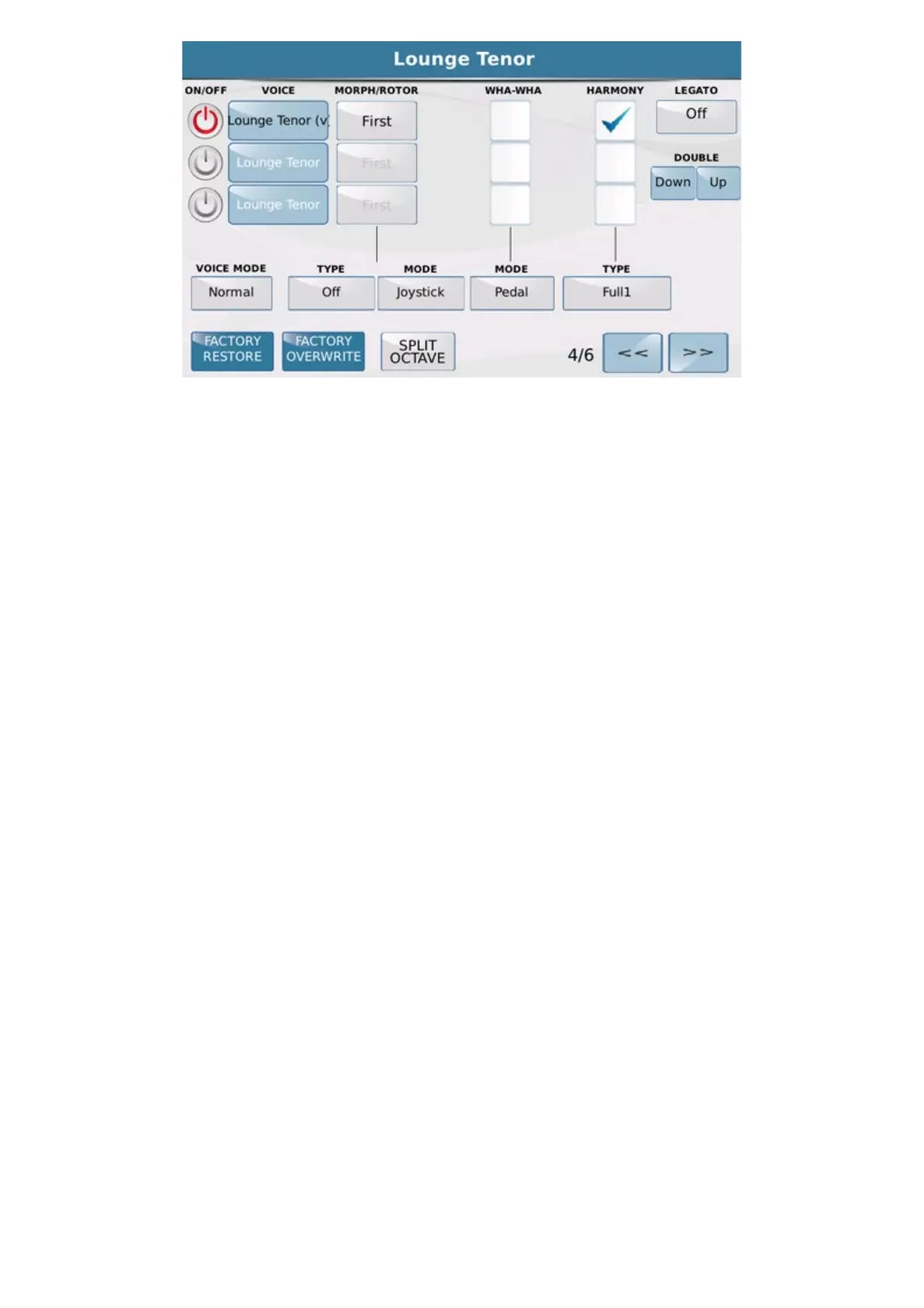
On the fourth page you may assign 4 effects to the first 3 layers. More specifically you will find the following:
-
MORPHING : In the box you may set the Morphing mode between one VOICE and another according to
the parameters ALL,, FIRST and SECOND. If the voice is set as First, the morphing effect will be on the starting
sound, if the voice is set as second this will be the incoming sound, namely the sound that enters completely when
the function that acts on morphing is at the maximum value. If you set the function on ALL,, the Voice is always
enabled.
To set the MORPHING effect between two or three VOICES, select the parameter
Type on Normal, Rotor or
Coupling. In the first case the passage will be from the first to the second sound, in the second case the transition
between two sounds (typical of Organ) is obtained with the Sustain pedal. In the third case (Coupling) the second
sound is added to the first. To introducing the Morphing effect use the Modulation Wheel or the pedal control shown
in the box under
MODE.
The second effect that may be enabled on the voices is the WHA-WHA and may be introduced simply by
ticking the corresponding box. At the bottom of the same column you will find the MODE box where you may
enter the type of control that acts on Wha-Wha.
The third effect is
HARMONY which harmonises the notes you play with your right hand on the Upper
section with the chord you play on the Lower section. The options you may select in the Type field for Harmony are:
Bluegrass Down - Up , Country Down - Up , Full1-2 , Folk1-2 , 2Hands.
Then we find LEGATO effect .The Legato feature works on all the active voices except the Second voice.
There are 6 types of Legato: 3 Mono Legato and 3 Poly Legato.
Each time you touch the new Legato icon, a different Legato type is selected. Choices are: Fast with fast attack,
Medium with medium attack and Slow with a slow attack.
You may set a number of properties common to all 3 Voices in the VOICE MODE field that you will find
at the bottom on the left.
In Normal mode all the Voices are overlapped regardless of the notes you play. In Duet mode, when you play a two
note chord or a chord of 3 or more notes, the First Voice plays the highest treble note, the Second Voice plays the
lowest bass note and all the other notes play all the Voices of the Layer. If you play only one note, only the First
Voice will play. The only difference between Duet 1 and Duet 2 is the acquisition and play speed of the notes. Trio
1, 2 Mode is similar to Duet but for 3 notes. Steel Mode is a specific function of Pitch Bend on the voices. Pitch
Bend affects only the lowest bass note you play and is very useful when you want simulate the playing technique of
some instruments such as the Hawaiian guitar, violin etc.
On feature such TYPE, MODE you can define assignments and operating use of these parameters.



 To Next Page