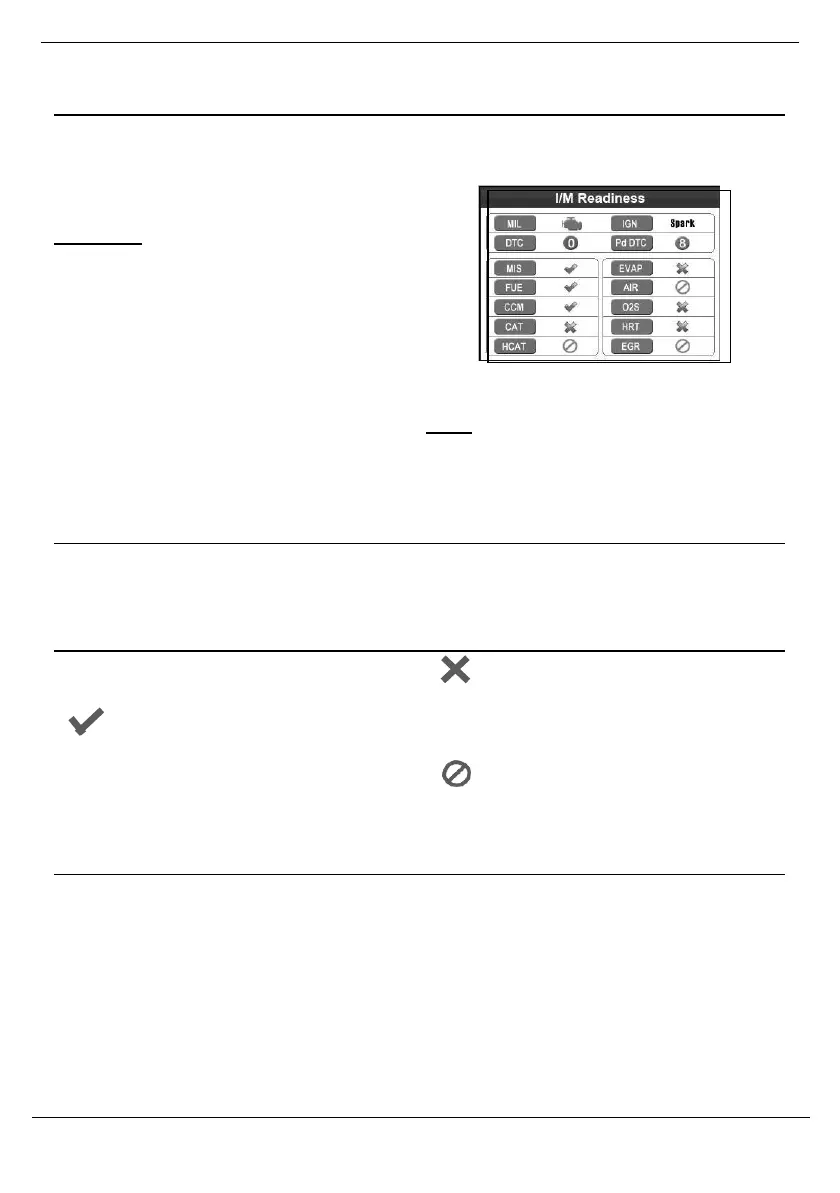
I/M Readiness Quick-Check
Tocheck emissions readiness prior to
having a vehicle inspected for a state
Emissions Test.
To determine which Monitors to configure.
CAUTION: Do not connect or
disconnect the Scan Tool while the
ignition
is on or the engine is running.
1.
Connect the Scan Toolaccording to
“Connect Scan Tool” on page 4.
2.
Turn the vehicle’s ignition ON
with the engine OFF.
3.
Wait until the Scan Tool has
established communication.
4.
Press the I/M button on the keyboard.
Icon Interpretations
MIL - “Check Engine” light status
IGN - Ignition type
Symbol Interpretations
Each Monitor’s readiness is indicated
by one of the following symbols:
The Monitor has completed its
diagnostic routine and is ready.
Keyboard LED Interpretations
1.
Green LED - Ready
Indicates that engine systems
are running normally and no
pending DTCs are present.
2.
Yellow LED - Might be Ready
Indicates there are pending
DTCs or there are Monitors that
have not finishing running.
•
Perform a Drive Cycle,
then repeat the test.
5.
View results and interpret data as
described below.
Figure 64
Note: You may need to complete a Drive
Cycle before performing an I/M Readiness
Test if the battery has been disconnected or
DTCs have been erased recently.
DTC - Number of stored DTCs
PdDTC - Number of pending DTCs
The Monitor has not completed its
diagnostic routine and is not ready.
•
Perform a Drive Cycle,
then repeat the test.
The Monitor is not supported on the
vehicle and may be deselected according
to “Configure Monitors” on page23.
3.
Red LED - Not Ready
Indicates there is a fault condition
in one of the vehicle’s systems
and stored DTCs are present.
•
Have the vehicle serviced.



 To Next Page