5: Using The Cabinet
36
Using the Cabinet Keypad
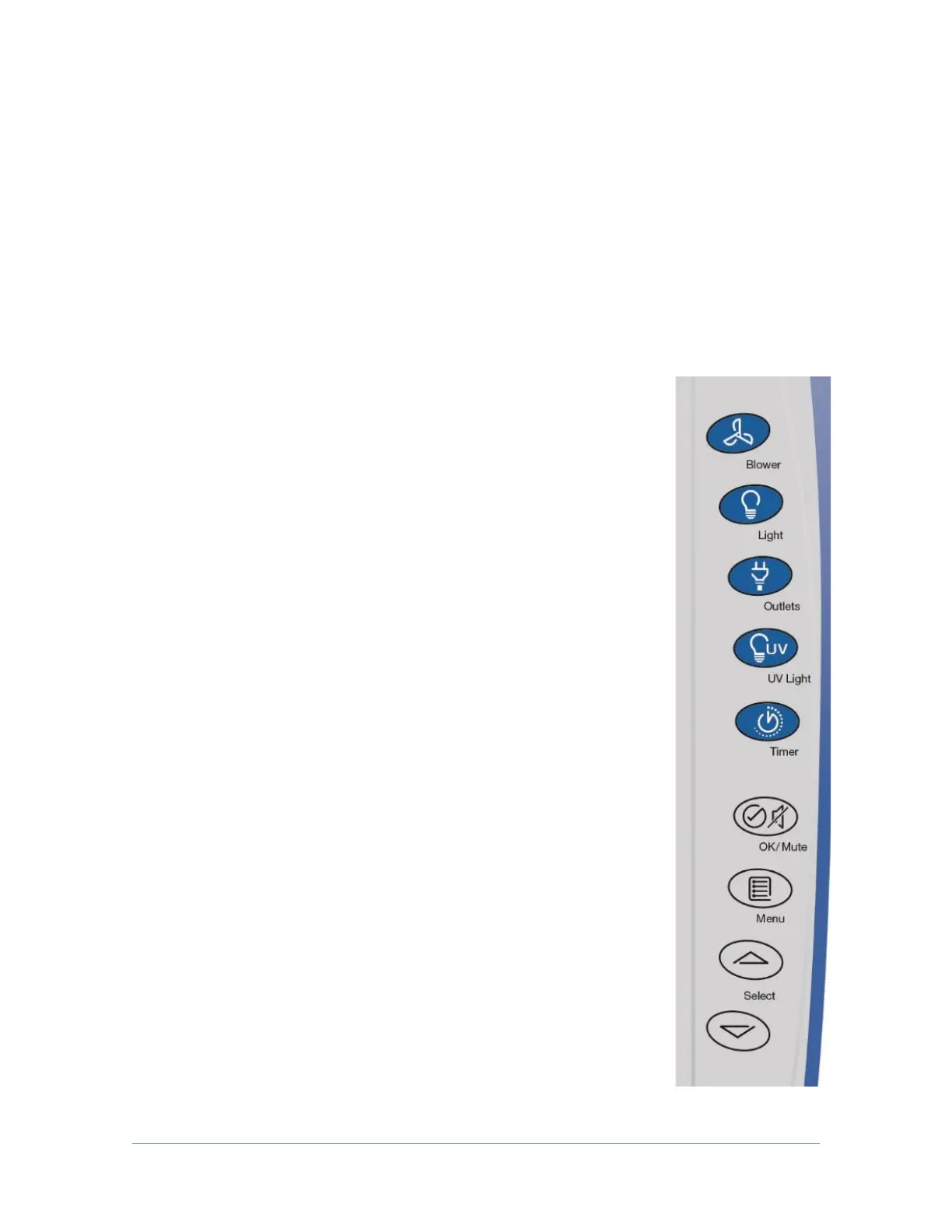
The keypad of the cabinet is shown in Figure 5-6. Take a moment to familiarize
yourself with the buttons, their locations and functions. Also familiarize yourself
with the display located on the right side wall. The display will report system
functions, such as filter capacity, timer displays, alarm or error messages, as well
as icons that illuminate when cabinet functions such as the light and blower are
operational.
[BLOWER] – Starts or stops the cabinet blower. When the
blower is in automatic (SmartStart) mode, opening the sash
from the closed position turns the blower on automatically.
The cabinet can also be configured so that when the sash is
closed, the motor slows to maintain air cleanliness in the work
area (NightSmart). When the sash is reopened, the blower
resumes normal operation. Pressing the blower button at any
time overrides the automatic operation.
[LIGHT] – Turns the LED lamps on or off. Closing the sash
automatically turns the lights off. When the lights are in
automatic (SmartStart) mode, raising the sash turns the lights
on automatically. Pressing the light button at any time
overrides the automatic operation.
[OUTLETS] – Turns on/off electrical outlets in the work area.
[UV LIGHT] – Turns on/off the UV lamp (when installed).
When the UV lamp is in automatic mode, closing the sash
turns the UV light on automatically. When the sash is raised,
the UV light turns off automatically.
[TIMER] – Allows you to select either a repeating interval
timer, or an elapsed timer (stopwatch).
[OK/MUTE] – Mutes all audible alarms for approximately 5
minutes, unless there is a system error alarm. When in any
Menu, this button is used to select an option.
[MENU] – From the Home Screen, this button accesses the
Main Menu. When in any menu screen, pressing this button
returns you to the previous menu level.
[UP] and [DOWN] – Moves between selectable options or change numerical fields
in menu screens.




 To Next Page