6: Maintaining The Cabinet
54
The UV lamp and the work area of the cabinet must be thoroughly
decontaminated before removing the lamp.
1. Start the cabinet’s blower and let it operate for 5 minutes.
2. Raise the sash to its full open position.
3. Thoroughly surface decontaminate the UV lamp and the work area of the
cabinet.
4. Unplug the cabinet or turn off the System Reset Switch, located on the top of
the cabinet.
5. Remove the UV lamp by rotating it 90 degrees and lifting it straight up and out
of its sockets.
6. Install new lamp by reversing the removal procedure.
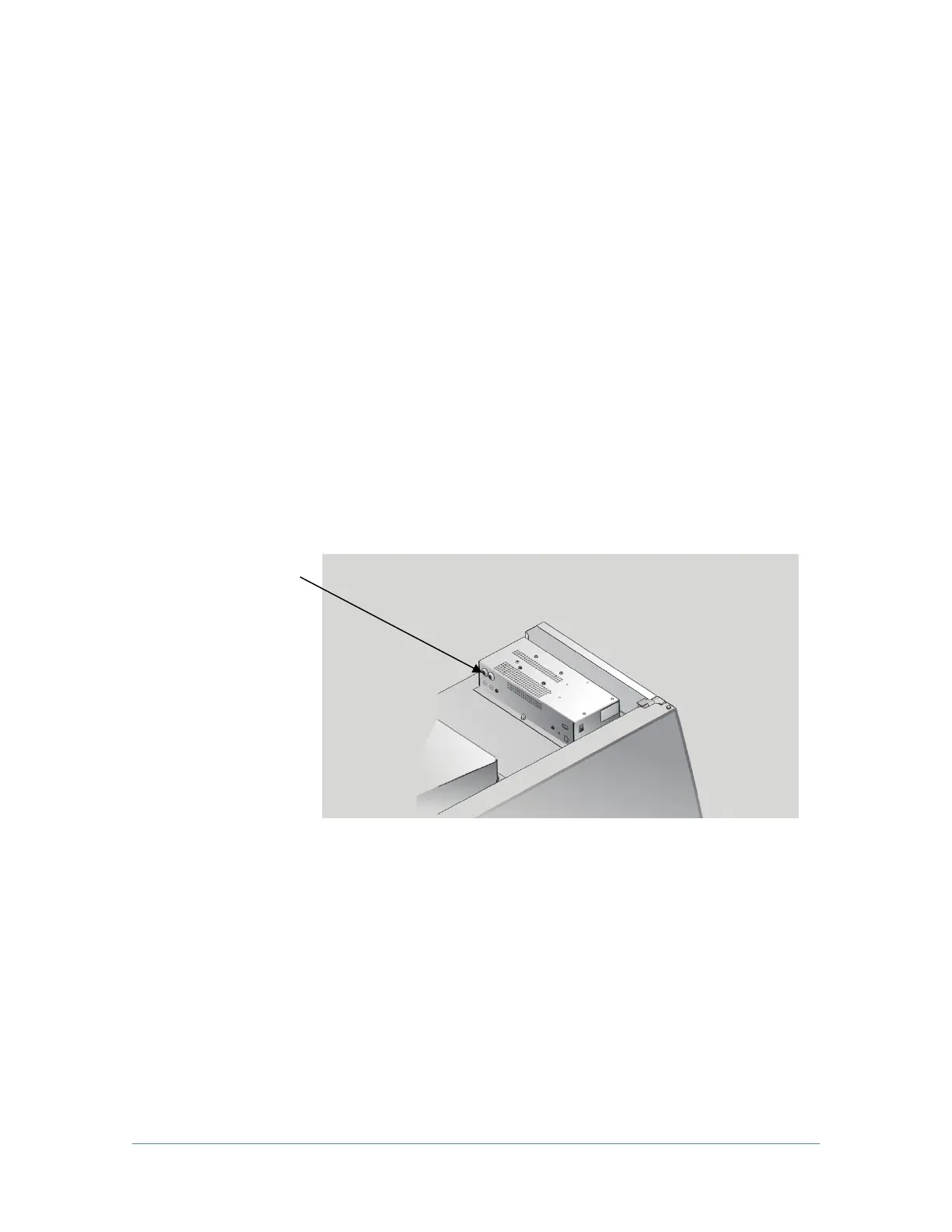
Resetting a Circuit Breaker:
To reset any of the circuit breakers located on the left side of the electronics
module, depress the white button until it sets.
Circuit Breakers-
The front breaker
protects the
electrical outlets, the
rear breaker protects
the motor and lights.
Storage
If the cabinet is to be left unused for more than one month, it should be prepared
for storage.
Note: The cabinet should not be stored in areas of excess humidity or temperature
extremes. If the cabinet is moved during storage, it must be recertified before use.
1. Close the sash completely and seal the bottom edge with plastic sheeting.
2. Seal the exhaust outlet with plastic sheeting.
3. Unplug the cabinet.
4. Ensure that the cabinet will not be moved or disturbed while being stored.




 To Next Page