5: Using The Cabinet
40
Setting Automatic Operation Options
The cabinet allows you to configure it to activate functions automatically when the
sash is opened or closed.
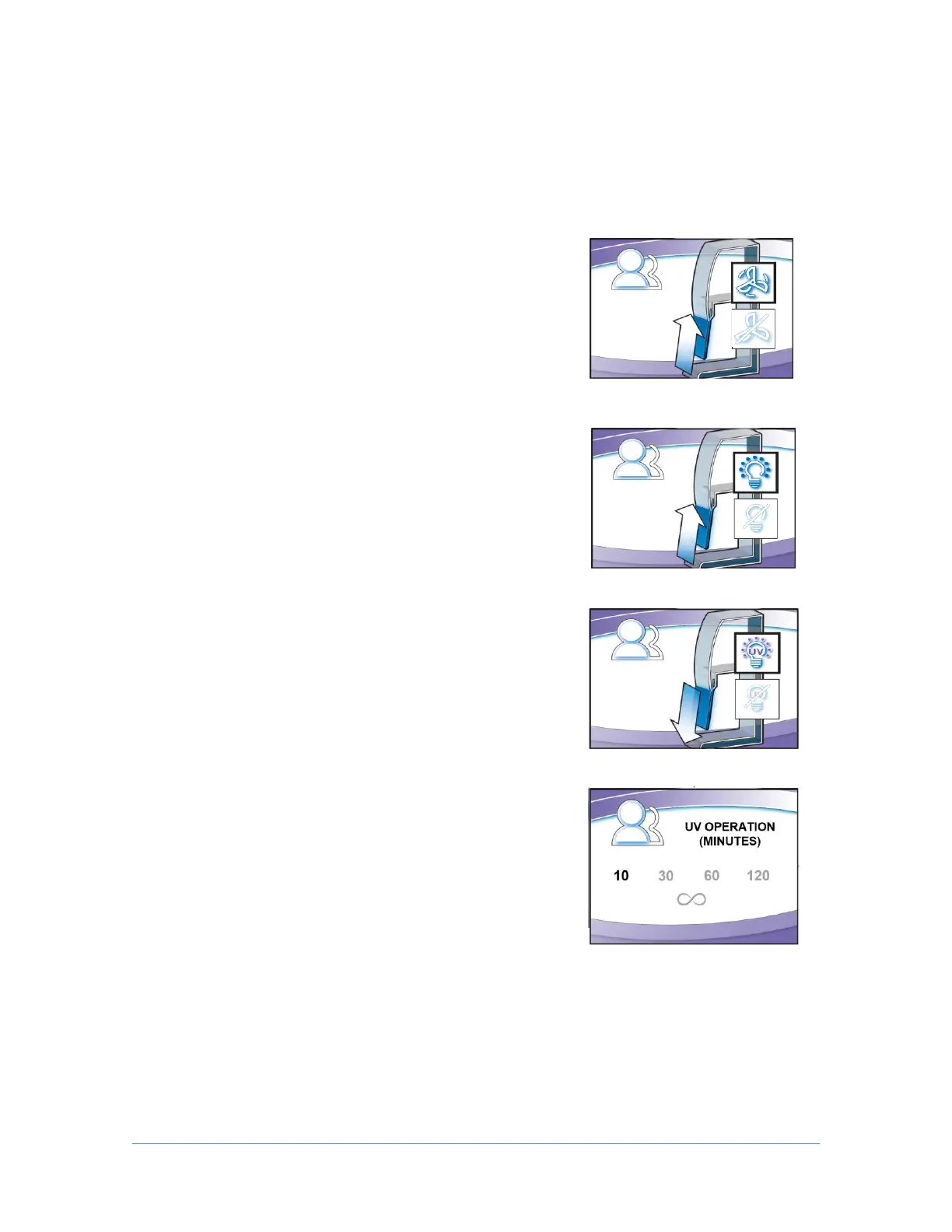
The first screen gives you the option of activating the
blower; if you want the cabinet blower to start every
time you raise the sash, select Blower On, and then
[OK/Mute]. If Blower Off is selected, the blower
must be manually started from the keypad. When
[OK/Mute] is pressed, the next configuration screen
will appear.
If you want the cabinet lights to turn on every time
you raise the sash, select Light On, and then
[OK/Mute]. If Light Off is selected, the lights must
be manually turned on from the keypad. When
[OK/Mute] is pressed, the next configuration screen
will appear if your cabinet is configured for a UV
lamp.
If your Cabinet is configured for a UV light, you will
see Fig. 5-7j and 5-7k. If you want the UV lamp to
turn on every time the sash is closed, select UV Light
On, and press [OK/Mute]. If UV Light Off is selected,
the UV light will not turn on when the sash is closed.
When [OK/Mute] is pressed, the final configuration
screen will appear.
START
LIGHT ON
UV LIGHT ON
Whether the UV Light is initiated from the [UV
Light] button on the keypad, or automatically
initiated upon closing of the sash, this screen
controls the time the UV lamp will remain on.
Select the length of time desired, press
[OK/Mute].




 To Next Page