5: Using The Cabinet
43
Timer Operation
The timer button allows activation of an interval (countdown) or elapsed
(stopwatch) timer. The timers cannot be operated simultaneously.
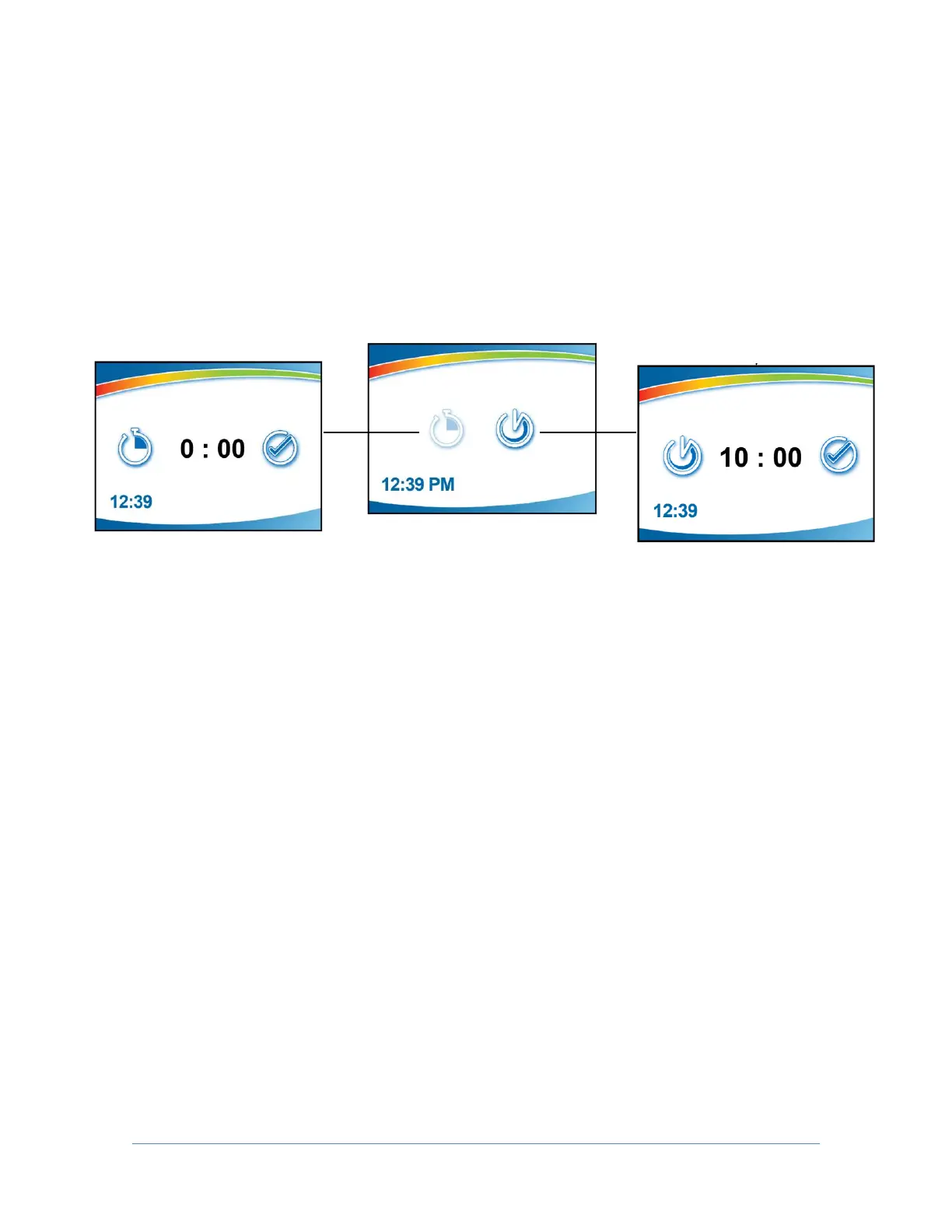
To access the timer menu, press [Timer] anytime during normal operation (from
the Home Screen). The main timer menu is displayed (Fig. 5-8a). Select Interval or
Stopwatch Timer, then [OK/MUTE].
Interval Timer Operation
1. The interval timer defaults to 05:00 (minutes:seconds).
2. Press [UP] or [DOWN] to increase or decrease the timer interval.
3. When the proper interval is selected, press [OK/Mute] to start the timer.
4. When the timer reaches 00:00, an audible alarm will sound, and the timer
will reset itself and repeat the countdown.
5. Press [OK/Mute] to pause the timer. Press [OK/Mute] while paused, and
the timer will reset to the previously selected interval.
6. Press [Menu] to clear the interval timer and return to the main timer menu.
Stopwatch Timer Operation
1. The stopwatch timer defaults to 00:00.
2. Press [OK/Mute] to start the timer.
3. Press [OK/Mute] again to pause the timer. Press [OK/Mute] while paused,
and the timer will reset to 00:00.
4. Press [Menu] to return to the main timer menu.




 To Next Page