5: Using The Cabinet
44
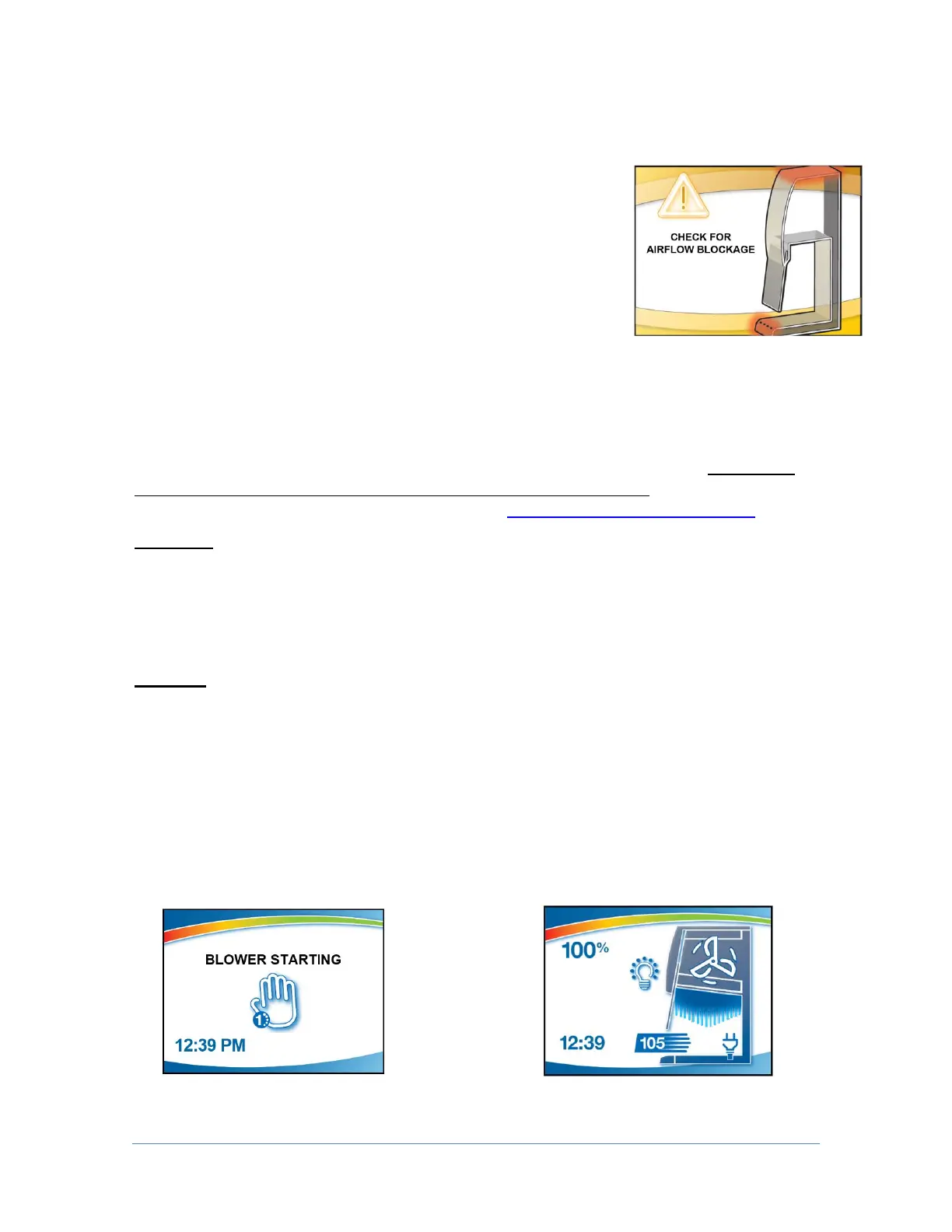
If An Airflow Alert Activates
The most common causes of an Airflow Alert are:
Blockage of the inlet grilles or exhaust outlet
Removal of the work surface or grille during
operation
Resetting the Airflow Alert System
The Airflow Alert automatically resets to normal operation
once the motor speed has stabilized.
Working In the Cabinet
A more thorough review of using a biosafety cabinet can be found in: Biosafety
in Microbiological and Biomedical Laboratories (BMBL), published by the
Centers for Disease Control and Prevention (cdc.gov/biosafety/publications).
Planning
Thoroughly understand procedures and equipment required before
beginning work
Arrange for minimal disruptions, such as room traffic or entry into the room
while the cabinet is in use
Start-up
Turn off UV light (if included on your cabinet)
Slowly raise the sash until the bottom of the sash aligns with the sash
indicator decal located on the left side of the work area (Fig. 5-5)
Turn on the light and cabinet blower if the automatic
features have not been
enabled
Check the air grilles for obstructions
Allow the cabinet to operate until the Home Screen is shown
Warm up Screen Home Screen




 To Next Page